ThreatLocker Threat Intelligence ID’s samples contributing to MSI-based trojans
ThreatLocker Threat Intelligence has identified additional samples in-the-wild that contribute to a family of MSI-based trojans. As a follow up to GoodPersonRAT, these samples share common infrastructure, loader tactics, and final payloads that support attribution to the same operators and broader campaign.
Despite these common factors, each sample has unique differences that give a deeper insight into the campaign and the threat actors responsible.
The campaign’s focus on bypassing China’s censorship through The Great Firewall combines with elements of opportunism to shed light on the software chosen to lure victims.
Threat actors chose popular software banned or under heavy scrutiny by the Chinese government:
- Malicious installers for Google Chrome
- Telegram,
- The previously analyzed LetsVPN sample
Chrome has been banned in China since March of 2010, and Telegram was banned by the Chinese government in July of 2015, which was followed by the recent LetsVPN ban on April 28, 2026. LetsVPN published this statement on their blog, informing users of the disruption to their services:
“… It has been now confirmed that the connection issue cannot be effectively resolved.
… all refund requests will be calculated starting from April 8.
… We deeply regret not being able to provide services to everyone anymore; we truly have the will but are powerless.”

The remaining sample poses as an installer for NetEase Cloud Music, a Chinese based music streaming company. Considering this software can be easily installed safely in China, this sample is much more opportunistic and relies on an unsuspecting user encountering the installer in-the-wild.
Six-step timeline
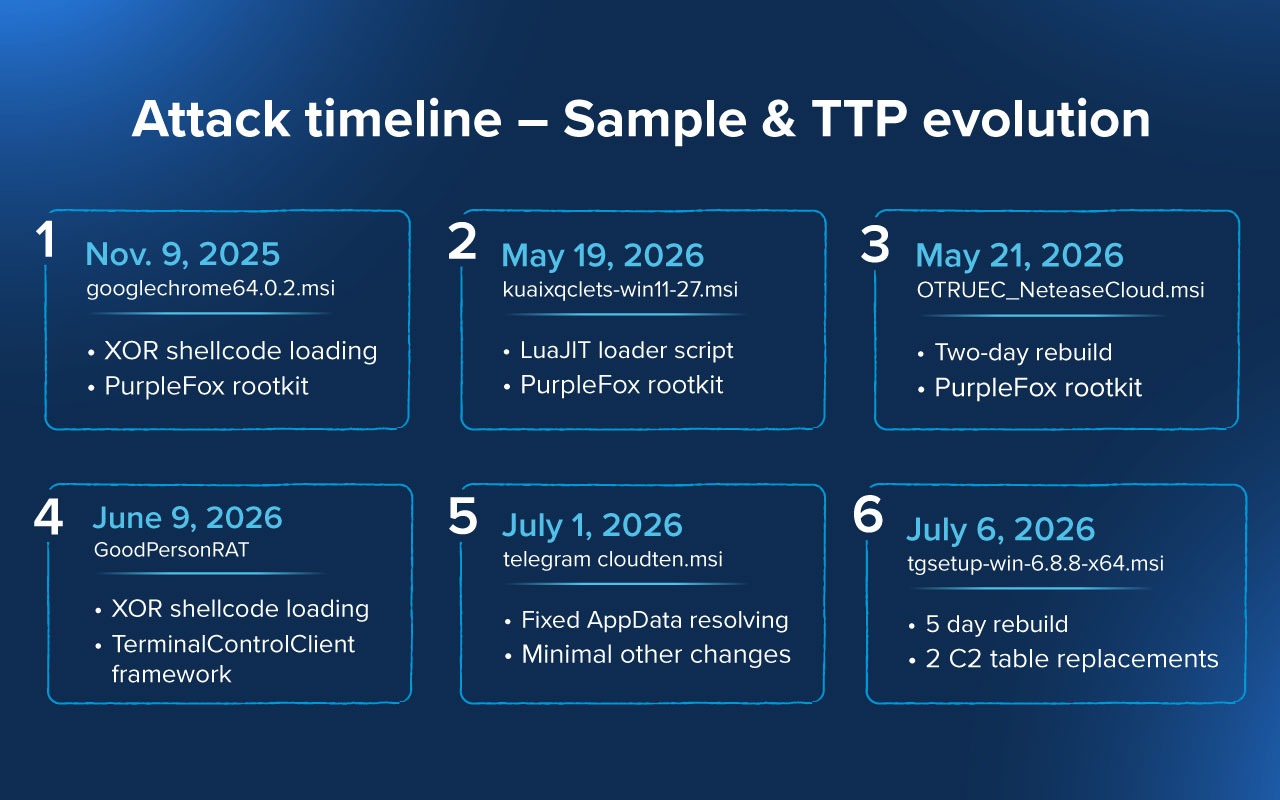
The following six-step timeline spanning from November 2025 to July 2026 tracks the embedded timestamps and changes in TTPs among the collective samples. The loaders and their final payloads have evolved several times over the past two years from public rootkit drivers and plaintext scripts to XORed stages and bespoke C2 frameworks.
googlechrome64.0.2.msi
The first of the selected samples was compiled on November 11, 2025, and is presented to the user as Google Chrome version 109, a version released in February 2025.
The Chrome MSI acts as a decoy that leverages the XOR routine previously detailed in GoodPersonRAT on a carrier file 1109.txt to deliver 1.dll / Shellex. This embedded DLL delivers a PurpleFox rootkit, which registers itself as a service named QAssist.
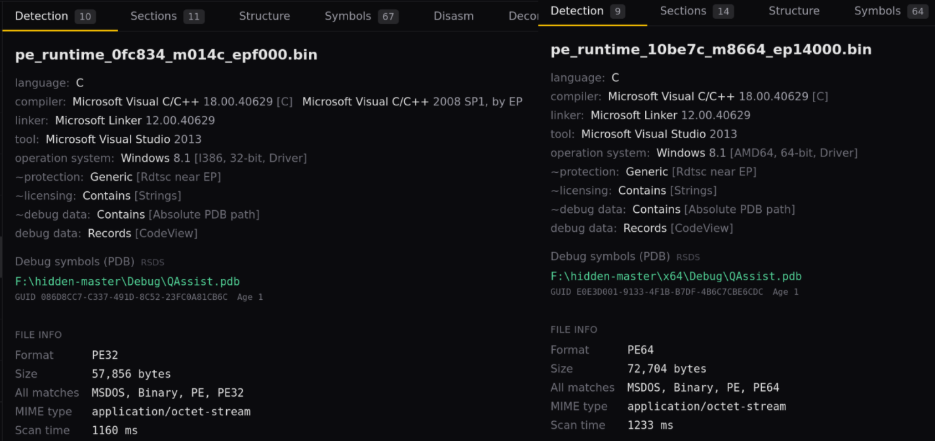
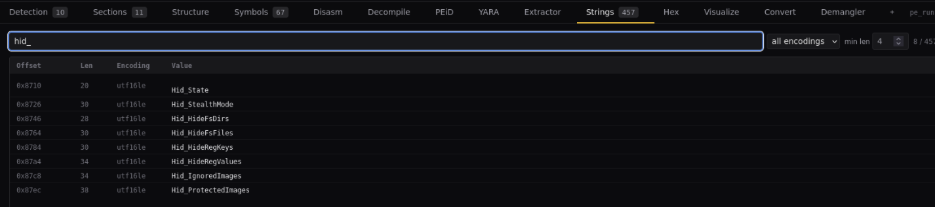
This rootkit can manipulate RDP configurations on the system, support clipboard helper DLL functionality, and use GetMP, a mimikatz compatible binary capable of credential dumping without embedding mimikatz directly into the binary. PurpleFox is quickly recognizable as the extracted payload by a known QAssist PDB path and previously documented strings within the driver such as Hid_StealthMode, Hid_HideFsFiles, and Hid_HideRegValues.
kuaixqclets-win11-27.msi/ OTRUEC_NeteaseCloud.msi
Presented to the user as LetsVPN and NetEase Cloud Music, these binaries contain similar functionality to the malicious Chrome binary but with altered TTPs.
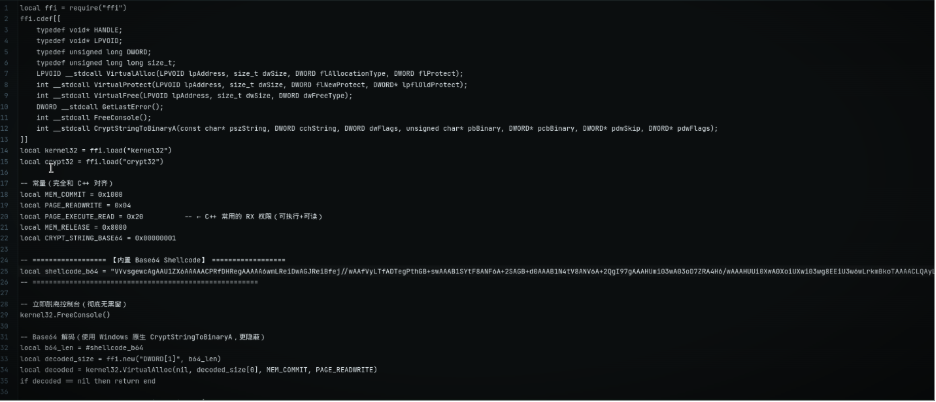
Instead of a .txt carrier file, kuaixqclets-win11-27.msi introduces cache20260519.dat as the encrypted payload file. The notable differences in TTPs from googlechrome64.0.2.msi are a new delivery method (a cleartext LuaJIT loader) and removal of the GetMP binary and RDP modification functionalities.
The PurpleFox rootkit is still being leveraged at this stage, and the operators seem to have reached confidence in these new TTPs, strategy, and delivery.
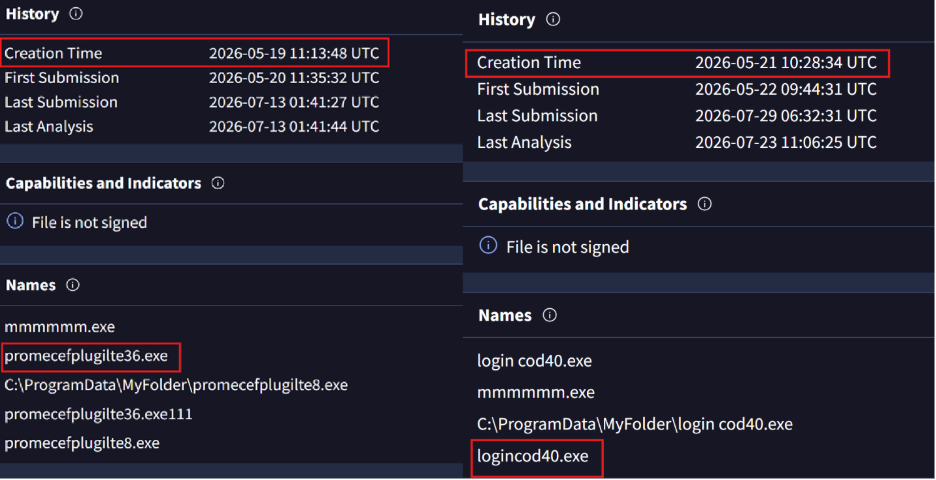
OTRUEC_NeteaseCloud.msi is a rebuild of kuaixqclets-win11-27.msi and replaces the malicious binary used to lure victims. Evidence of the dates between the two resides in the creation times of the embedded loaders promecefplugilte36.exe and logincod40.exe, and date-path PDB.
GoodPersonRAT
GoodPersonRAT (filename Kuailian_win-setup.86.msi) is the first known sample that implements the TerminalControlClient framework, replacing the embedded PurpleFox rootkit drivers with its own custom features and capabilities.
The shellcode loader was compiled with a filename of 20260609.dat, but a ClientVersion variable found in this framework (and future copies below) shows a timestamp of April 27, 2026.
This change in final payload and C2 implementation marks the biggest technique change in the campaign.
telegram cloudten.msi/tgsetup-win-6.8.8-x64.msi
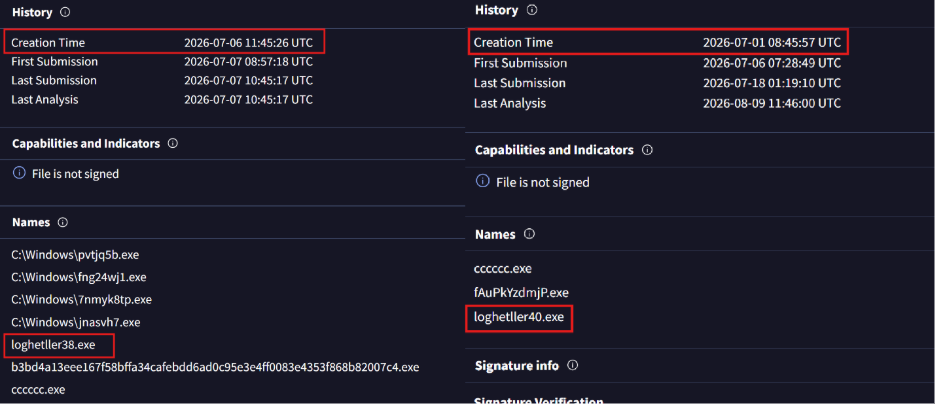
These two samples are the most recent, and have compilation timestamps of July 1, 2026, and July 6, 2026. They both present themselves as Telegram installers and directly target the Telegram tdata folder as the previous installer did.
The primary change made in these two samples is the response to a problem: when GoodPersonRAT executes as SYSTEM (as its persistence methods attempt), the environment variables used to locate browser information, such as %APPDATA%, point to the C:\Windows\System32\Config\SystemProfile\AppData directory, which would likely not contain any user browser profiles.
These samples instead search within the C:\Users directory for viable users and build their own AppData paths from those user profiles.
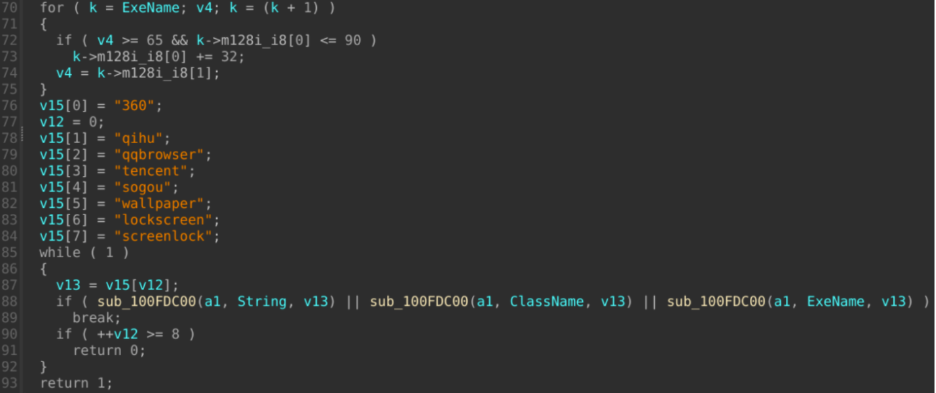
From these paths, browser data is cleared from several providers including QQBrowser, Sogou Explorer, and 2345 Explorer. When a user navigates to any site requiring a login, they would need to re-enter their credentials, which would be captured by active keylogging measures.
These two samples were compiled within five days of each other and are identical outside of two changed entries in the C2 table and their compilation timestamps. These creation dates are derived from their respective loaders, loghetller38.exe and loghettler40.exe.
Consistencies between PurpleFox and TerminalControlClient
Although the samples clearly progress in complexity, several factors remain consistent that allow these samples to be attributed to a single campaign.
The premise used to fool the victim is the same in every case: an unsigned MSI file containing a legitimate installer bundled with a malicious loader and an encrypted payload data file. The legitimate installer is executed while malicious code is run in the background, leaving the user unaware of their own compromise.
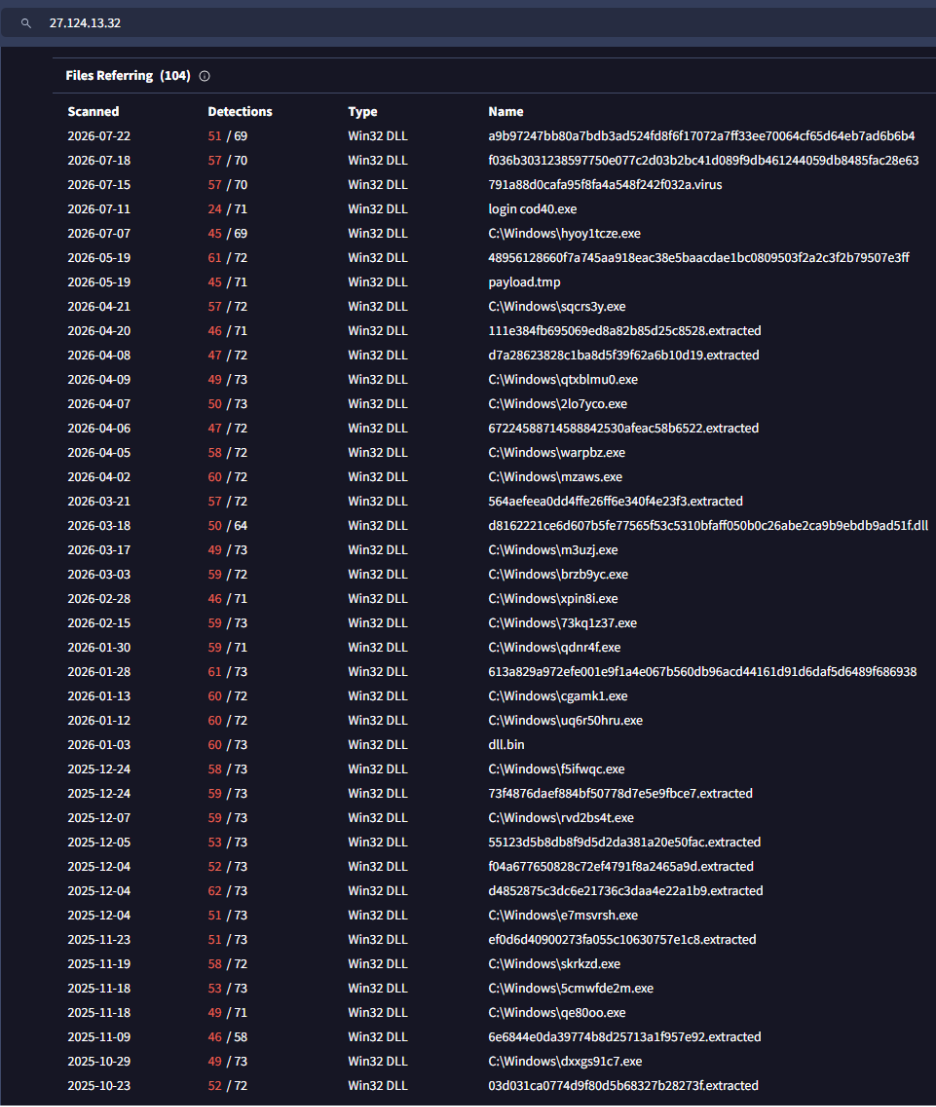
A single IP address is observed in every sample, 27.124.13[.]32. This IP address geolocates to Taipei, Taiwan, and has been associated with several other attacks.
Previous samples and reports related to this IP address show similar samples referred to as mgh0st and HiddenGhost, which refers to the use of the “Hidden” Windows driver by JKornev.
Several core features of the campaign are supported in all versions such as file management, command execution through cmd.exe, SOCKS5 and HTTP proxy tunneling, screen capture and control, keylogging and clipboard exfiltration, browser targeting, AV/EDR discovery, and persistence. These features are either provided through the imported PurpleFox rootkit drivers or the custom TerminalControlClient framework.
How Zero Trust can prevent a successful attack
Despite shared tactics and infrastructure, the operators behind this campaign remain unknown and can only be referred to by their samples and relations to GoodPersonRAT.
This campaign is ongoing, and more related samples will likely be discovered with time to show the continued evolution of operator TTPs.
Considering how each attack can be completed with no indication to the user, awareness is crucial to prevent untrusted installers from being executed and deploying malicious frameworks.
ThreatLocker Zero Trust controls help prevent this attack from being successful in several ways.
- Application Allowlisting deploys a default-deny policy that prevents execution of unknown MSI files
- Ringfencing policies stops approved files from reaching out to attacker servers
- Zero Trust Endpoint Firewall policies denies untrusted domains by default or explicitly block known-bad destinations.
- EDR Real-Time Threat Detection and Managed Detection and Response (MDR) identify and prevent attacks before severely impacting damage takes place.
IOCs
Domains:
baizhu[.]orgcunmap[.]cchuangjinye888[.]comj6fadacai[.]comj6fadacaiaa[.]comj6fadacaiai[.]comj6llaa[.]comj6llaaa[.]comj6lluu[.]comj6lluuu[.]comj6nuremberg[.]comj6uresca[.]comliuli6[.]comnishihaoren1[.]orgnishihaoren1[.]topnishihaoren16[.]orgnishihaoren16[.]topnishihaoren23[.]orgnishihaoren23[.]topnishihaoren24[.]orgnishihaoren24[.]topnishihaoren36[.]orgnishihaoren36[.]topnishihaoren37[.]orgnishihaoren37[.]topnishihaoren38[.]orgnishihaoren38[.]topnishihaoren39[.]orgnishihaoren39[.]topnishihaoren40[.]orgnishihaoren40[.]topnishihaoren5[.]orgnishihaoren5[.]topnishihaoren8[.]orgnishihaoren8[.]topqaqlinken[.]comshunlifadacaisansanjlb[.]comsmbb2[.]icuteddkqoo[.]comteddkwww[.]comwanpan[.]orgwanpan8[.]topxdsansan[.]comxiaoshihou1[.]topxiaoshihou10[.]orgxiaoshihou11[.]topxiaoshihou12[.]topxiaoshihou13[.]orgxiaoshihou13[.]topxiaoshihou13[.]xyzxiaoshihou14[.]topxiaoshihou15[.]orgxiaoshihou16[.]topxiaoshihou17[.]topxiaoshihou18[.]orgxiaoshihou19[.]orgxiaoshihou19[.]topxiaoshihou20[.]topxiaoshihou22[.]orgxiaoshihou23[.]orgxiaoshihou23[.]topxiaoshihou25[.]topxiaoshihou26[.]topxiaoshihou27[.]topxiaoshihou29[.]topxiaoshihou30[.]topxiaoshihou31[.]orgxiaoshihou32[.]topxiaoshihou33[.]orgxiaoshihou34[.]topxiaoshihou35[.]topxiaoshihou36[.]orgxiaoshihou37[.]orgxiaoshihou38[.]orgxiaoshihou39[.]orgxiaoshihou4[.]orgxiaoshihou4[.]xyzxiaoshihou40[.]orgxiaoshihou5[.]topxiaoshihou6[.]topxiaoshihou7[.]orgxiaoshihou8[.]netxiaoshihou9[.]topxmxz[.]netxmymshunfa[.]com
IP Addresses:
108[.]187[.]43[.]116112[.]213[.]101[.]52118[.]107[.]40[.]196118[.]107[.]46[.]81127[.]0[.]0[.]1134[.]122[.]207[.]60137[.]220[.]136[.]161137[.]220[.]140[.]13143[.]92[.]60[.]214154[.]91[.]75[.]192156[.]247[.]41[.]126168[.]76[.]70[.]82172[.]20[.]10[.]2202[.]79[.]173[.]31202[.]95[.]16[.]38206[.]238[.]199[.]214206[.]238[.]43[.]15623[.]133[.]4[.]10823[.]248[.]202[.]21527[.]124[.]13[.]3227[.]124[.]3[.]24727[.]124[.]4[.]5527[.]124[.]40[.]5227[.]124[.]41[.]2927[.]124[.]42[.]11227[.]124[.]44[.]3527[.]124[.]9[.]4738[.]45[.]122[.]17138[.]45[.]124[.]2138[.]45[.]124[.]2238[.]91[.]114[.]21938[.]91[.]115[.]22645[.]194[.]18[.]8147[.]86[.]101[.]9
System Files or Recovered Artifacts:
Chrome:
chrome.msiCDF1E0CB4CA3B8E9F832385A5E1426AA9216313F15E93BE23F5D081FF87DE7CF
promecefplugilte8.exe70C508D559EAFDDA705403D6E26864FC10ADCEC2A5033812616F7F02C1B75BBC
1109.txt71C149EC1F4C29DB0B8327E74EC619A6FD57068C2706618BE14DB43D1BF92259
loghetller40.exe02A0F0E64A4C8C787D311E5D34A47770CAA32C010C78CCCDB61040E5EE2E37E3
Cloudten:
cloudten.msi342DA330430DAD75BF4BAC6B8CBBAE91CEDBB4969D2F193A60E912F1D3E242B9
20260701.dat7342AB3D13F04115ACB6C43307CCD9FBAFF59875744326BC818292BECA4C091E
Netease:
netease.msi0922236039487D6CE96357E2058CAE87980D6A2C473E14124F1533EDB02B0401
logincod40.exe784B04645409E215E657D9A80D2040C3B7561BB507B55B799807A51EDCCD01CC
cache20260521.dat7CA8C958AEFB0D1AA926A6D2198E8695D2CBAB93CCE105D4145646DF92E4247F
Peizhi/kuaixqclets-win11-27.msi:
peizhi/kuaixqclets-win11-27.msi39B29E0C7898CC61DCF062AAB292C73D843F50641F15CFAAFD0C96C2D99631C9
promecefplugilte36.exe8BDC1DEB50291A9419AE85C5813768A8E8F0FED9FBFC5C07D333F3094E4716AF
cache20260519.dat24F46A6AF4787ADC890673A4FCC01243D255463BA22206EC6C979F8B204AD0A5
TGsetup (Telegram):
tgsetup.msiD1851CACC8C90AC5DDAFC4B6CD44183A5D553FC446E922BB37F9EF9E7A6FAAC3
loghetller38.exeB3BD4A13EEE167F58BFFA34CAFEBDD6AD0C95E3E4FF0083E4353F868B82007C4
20260706.datBD6164D2A6D13A8E36C6EAD0CFC4DC74DDADD3DF0FE8BCC37CDCA9DB59DAC81C
Embedded Malicious Components:
QAssist x86 driver15AF9964BCF4938D3B4AB9BB15DC0F297D7CA596A86F8F1D9572F957F5441DDD
QAssist x64 driver1006CAA9F350F4E166704B0F35D10814982F6E238C06001B2508001F0104182B
RpcTsch.dll9CC5B5F204FD89813E7404B9506A064E8548512D0D4C805BA1C02B93A0812BE0
Screen/clipboard helper DLL40EFCFBFDAB6B256CB89608EFE737F059360710B9FD5467A06011E4F12DB4AEC
Runtime Artifacts:
Delivery carrier:
C:\ProgramData\1109.txt20260701.datC:\ProgramData\cache20260521.datC:\ProgramData\cache20260519.dat20260706.dat
Payload directory/files:
C:\ProgramData\Microsoft Drive\Host.sysBITS.sysMark.sysDe.ini
Control files:
C:\ProgramData\Microsoft Drive\stop.iniC:\ProgramData\Microsoft Drive\Destop.ini
Scheduled-task payload:
C:\ProgramData\MyFolder\MyFolder.batC:\ProgramData\MyFolder\
State/output files:
C:\ProgramData\MyFolder\1.ini4.iniprocess_record.txtC:\ProgramData\jerrt.txt
State files:
C:\ProgramData\MyFolder\xd.inixd.ini.tmppeizhi.inipeizhi.ini.tmp
Control path:
C:\ProgramData\Microsoft.NE\FBDFGHH\DFSDHFNG\GSDGTTHJ\DSGSDGFN\stop.iniDestop.ini
Client directories:
C:\ProgramData\TerminalControlClientC:\ProgramData\TerminalControlService
Client state:
install_state.iniClientId.sysMark.sysRemark.sysGroup.sys
Stop/marker files:
C:\ProgramData\Microsoft.NE\FBDFGHH\DFSDHFNG\GSDGTTHJ\DSGSDGFN\monitor.stopC:\ProgramData\Microsoft Drive\De.ini
Collection/output files:
C:\ProgramData\gongzuo.txtC:\ProgramData\meitiangongzuoziliao.zip
Driver objects:
QAssist\Device\QAssist\DosDevices\QAssist
Service names:
MyServiceMyService1
Task module/pipe:
RpcTsch.dll\pipe\atsvc\MyFolder
On-demand module:
CHROMEUSERINFO.dll
Runtime-supplied tool:
GetMP.exeGetMP privilege::debug sekurlsa::logonpasswords exit
RDP-modification artifact:
%SystemRoot%\system32\termsrv_t.dll
Component/service names:
TerminalControlClientV2.dllTerminalControlServiceTerminalControlClientService_Terminal Control Client ServiceTerminalControlClientWatchdog_
Scheduled task:
Terminal Control Client watchdog
Mutex/runtime guard:
Local\TC26_TerminalControlClientV2_RuntimeGuard_EXE_%08lX_%s
Mutexes:
Global\MyFolder_xd_ini_WriteLockGlobal\MyFolder_1_ini_WriteLock
Window/class names:
TC26PrivacyOverlayWindowV105TC26KeyboardDirectInputHiddenWindowKeyboardLoggerSEHKeyboardClipboardLoggerSEH