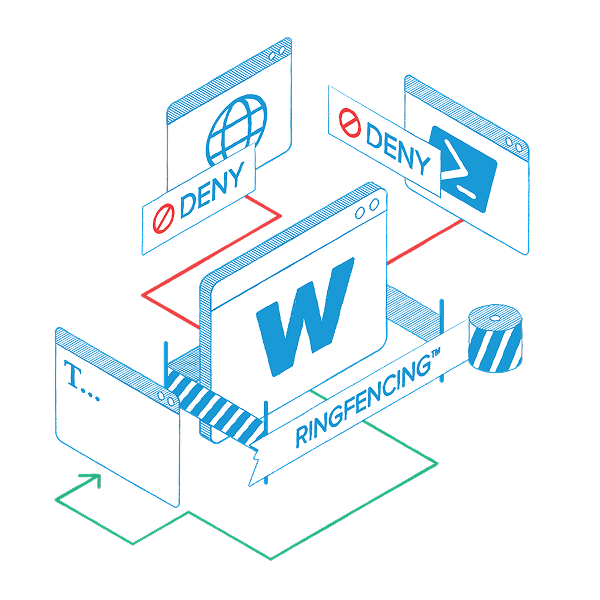
When trusted applications are hijacked, they inherit the user’s full access to files, tools, the network, and the system itself. When compromised, they can steal data, encrypt files, launch PowerShell, and call out to malicious IPs.
That’s exactly how attacks like Follina spread: Word opens a document, launches MSDT, which triggers PowerShell. Suddenly, a trusted app becomes the attacker.
The solution?
Put every application inside clear, enforced boundaries. Contain what it can touch. Contain what it can launch. Contain where it can connect. So, if it’s hijacked, it hits a wall.
The application runs, but the attack doesn’t.
Beyond showing how applications are adopted across environments. ThreatLocker reveals how they behave and interact. See exactly which files, registry entries, and network connections an application typically accesses and automatically generate recommended application containment policies to restrict risky behaviors and contain potential compromises before they spread.
Result: Applications stay in their lane, even if compromised, preventing application hopping and minimizing attack vectors.
Deploy with strong, default protections
Need PowerShell to run, but not reach the internet? Done. Want Word to open documents, but never launch another app? Easy. These powerful out-of-the-box rules let you control hundreds of applications, so they behave exactly the way you want.
Customize with high granularity
Decide which files your applications can access, which programs they can interact with, and whether they can connect to the internet. Restrict scripts, block unauthorized process launches, and prevent apps from sending data outside approved channels.