323MCP servers connect AI agents to internal and external tools, applications, and databases, allowing organizations to automate tasks and streamline workflows. While these connections improve efficiency, they also introduce security risks. By exposing tools and resources to AI agents, MCP servers can expand an organization's attack surface, potentially giving attackers another path to sensitive data and critical systems.
MCP server security must account for more than authentication. Teams need to define which agents can invoke which tools, what data they can reach, and which downstream actions are permitted. The permissions behind the connection determine its potential blast radius.
What is an MCP server, and how does it work?
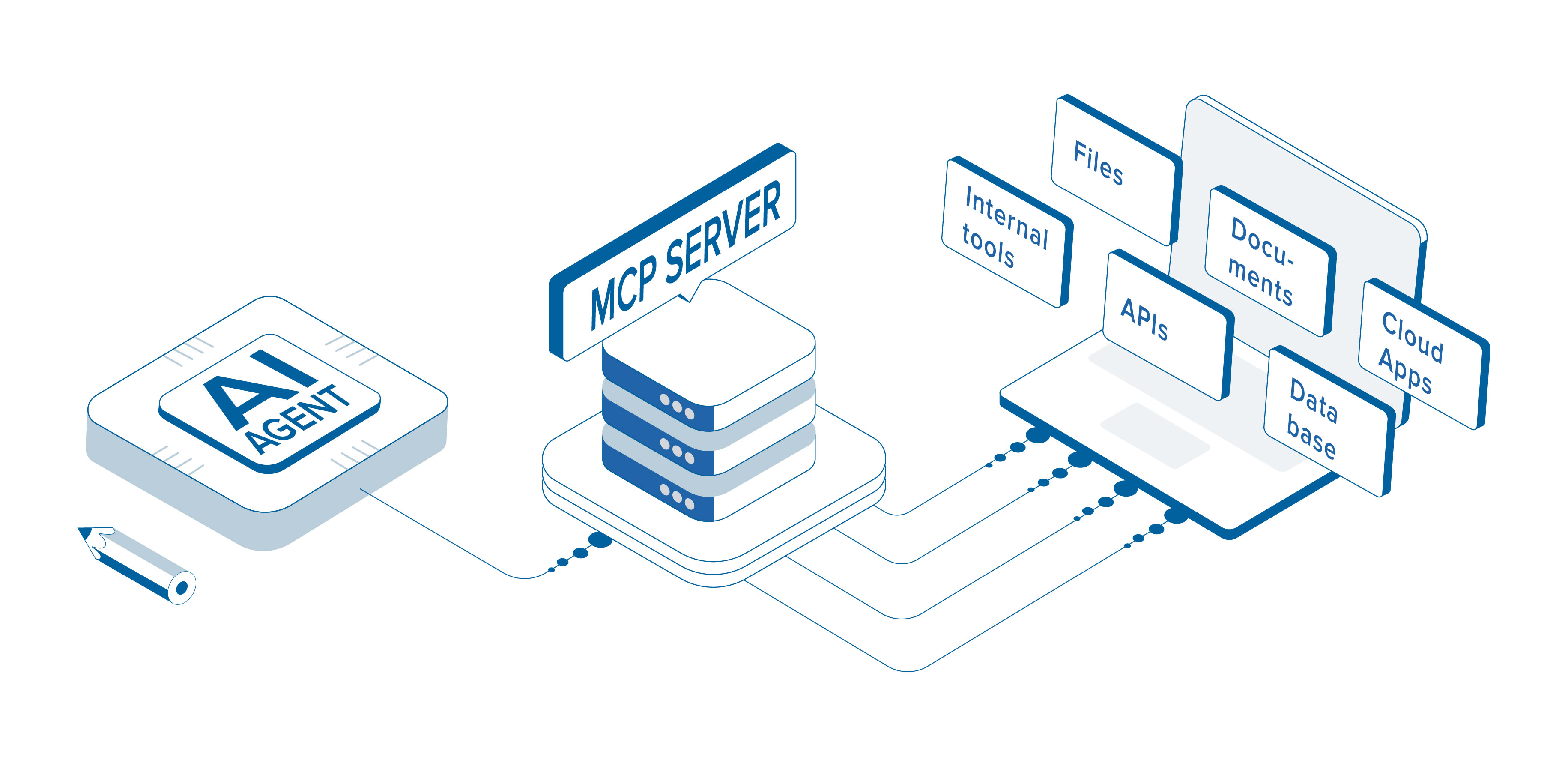
Model Context Protocol (MCP) is an open standard that allows AI agents to interact with tools, applications, and data sources without requiring custom integrations for each connection.
For example, an organization might connect an AI agent to a ticketing system through an MCP server. The server could expose tools that allow the agent to retrieve existing tickets, create new ones, or update existing tickets.
Why MCP servers change the AI security boundary
An MCP server can translate an agent's request into tool or API calls. One prompt may lead to database queries, file access, messages, or configuration changes. Authentication identifies the initiating agent or user; it does not establish whether every resulting action should be permitted.
Authorization should be evaluated at the tool and resource level. Official MCP guidance calls for validating inbound tokens, binding them to intended resources, rejecting token passthrough, and protecting stored tokens. Least privilege and technical enforcement then limit what an authenticated agent can do. GitHub
What Are the Security Risks of MCP Servers?
Compromised AI agents: Attackers who compromise or manipulate an AI agent could abuse their access to connected tools and resources to perform unauthorized actions.
Excessive permissions: Without proper access controls, AI agents may be able to access sensitive resources or execute actions outside their intended scope.
MCP server vulnerabilities: Security flaws in MCP servers or their dependencies could allow attackers to gain unauthorized access, execute malicious commands, or compromise connected systems.
Shared MCP server risks: When multiple AI agents connect to the same MCP server, inadequate authorization controls could allow agents to access tools or resources intended for other agents.
These risks can compound. A compromised agent may use a legitimate MCP connection to perform apparently authorized actions. Treat the agent, server, credentials, exposed tools, and downstream resources as separate trust boundaries.
Real-world MCP server breach: Mittwald
The security risks involved with MCP servers are sometimes out of your control. In November 2026, German hosting provider Mittwald disclosed a security incident involving its MCP server, which connected AI assistants to its hosting management platform.
According to Mittwald, an attacker exploited a vulnerability in the MCP server and gained unauthorized access to 56 customer projects. This was discovered on November 4, and the initial attack began on October 21 when attackers tested vulerability. The confirmed exploitation was happened on October 27. mittwald.de
This incident highlights security risks that may be outside an organization's control and reinforces the importance of implementing security measures to limit access to sensitive resources and reduce the impact of a compromise.
Update on the Mittwald incident
On November 12, Mittwald reported renewed attacks and said its corporate website had been compromised through a vulnerability. It did not attribute that activity to the original MCP flaw, so the two paths should not be treated as confirmed to be the same. Mittwald temporarily disabled administrative interfaces and SSH access.
On November 13, Mittwald said its customer center, mStudio, SSH access, and website had been restored with no remaining unauthorized access. Its MCP server remained unavailable, with no restoration date announced. Systemstatus und Störungshistorie - mittwald
What security teams should learn from the incident
Organizations may not control a vendor-operated MCP server, but they can control the resources placed behind it. Inventory approved servers, tools, credentials, data sources, owners, and agents. Be ready to revoke tokens, disable integrations, and isolate affected systems.
Vendor reviews should cover logging, vulnerability management, credential storage, breach notification, tenant separation, and forensic evidence. Approval of a provider or agent should not confer broad downstream access.
How can organizations secure MCP servers?
Combine preventive controls, scoped permissions, and telemetry. Identify the business task, permit only what it requires, test the workflow, and review access as tools or agent responsibilities change.
Solutions
Utilizing ThreatLocker Zero Trust AI Control (ZTAIC): Enforce restrictions on what AI agents can access, execute, and connect to within the environment.
Enforce least privilege: Ensure AI agents only have access to the tools and resources necessary for their assigned tasks. For example, an agent responsible for creating support tickets shouldn't have access to administrative tools or sensitive employee records.
Restrict network access: Use network segmentation and firewall rules to limit which internal systems MCP servers can communicate with.
Implement just-in-time (JIT) access: Granting temporary elevated privileges only when approved tasks require them.
ThreatLocker Application Control: Prevent unauthorized applications from executing.
Monitor MCP activity: Logging and monitoring tools can help detect suspicious activity in real time, allowing organizations to respond quickly and limit the impact of an attack.
How ThreatLocker supports MCP server security
ThreatLocker Zero Trust AI Control applies restrictions outside the model, controlling what an agent and the processes it invokes can access, launch, connect to, or change. Those boundaries remain in place when the agent calls scripts, browsers, or administrative tools. ThreatLocker Capabilities
Application Allowlisting can block unapproved applications, scripts, and libraries. Privileged Access Management can replace standing rights with application-specific, time-bound elevation. Network policies limit reachable systems. Pair these controls with MCP, identity, application, and network telemetry to investigate unexpected activity. ThreatLocker Capabilities
As organizations continue adopting AI agents, ensuring the right security measures are in place to minimize the impact of compromised agents, vulnerable MCP servers, and malicious integrations is essential.
The objective is not to prevent AI agents from using useful tools. It is to ensure every connection and downstream action remains within an enforceable boundary.
Book a demo to see how Zero Trust controls can keep AI agents within approved boundaries.
Frequently Asked Questions
What is an MCP server?
An MCP server exposes tools, applications, or data sources to compatible AI clients. It receives structured requests, invokes the appropriate service, and returns the result.
Are MCP servers secure?
MCP servers can be deployed securely, but the protocol alone does not make every workflow safe. Security also depends on code, authorization, token handling, permissions, network access, and monitoring.
How can an MCP server be compromised?
Attackers may exploit server vulnerabilities, steal tokens, abuse weak authorization, manipulate an agent, or introduce malicious tools. The impact depends on the resources and actions available through the connection.
Does OAuth make an MCP server secure?
OAuth supports authentication and scoped authorization but does not replace least privilege or action-level controls. Servers must validate token audiences, and organizations must restrict what authenticated agents can do.
What should an organization do if an MCP server is breached?
Disable or isolate the integration, revoke tokens and credentials, and preserve relevant logs. Review accessible tools, data, and actions, then restore access only after the vulnerability and excessive permissions are addressed.