ClickFix and ConsentFix are two social engineering techniques that trick users into believing they are completing a legitimate login process. While ClickFix tricks users into unknowingly executing malicious commands on their devices, ConsentFix attacks exploit the authentication processes to gain OAuth access to cloud accounts without requiring the user to execute commands.
Both techniques disguise a harmful action as routine verification, and understanding the distinction matters because endpoint controls alone cannot address an attack that remains inside the browser and identity layer.
What is a ConsentFix attack?
Security teams warn users not to paste unfamiliar commands into PowerShell or the Windows Run dialog. ConsentFix gives attackers different instructions: Copy a web address.
ConsentFix tricks a user into transferring an OAuth authorization code to an attacker. Push Security documented the technique in December 2025 after observing a campaign targeting Microsoft accounts through the first-party Azure CLI application.
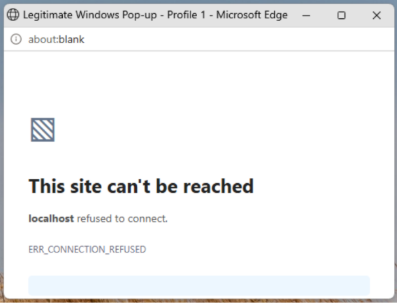
The victim is sent to a real Microsoft sign-in page. After authentication, the browser is redirected to an address containing an authorization code. A local application would normally receive that redirect. Instead, the page fails to load, and the attacker presents the expected failure as another verification problem.
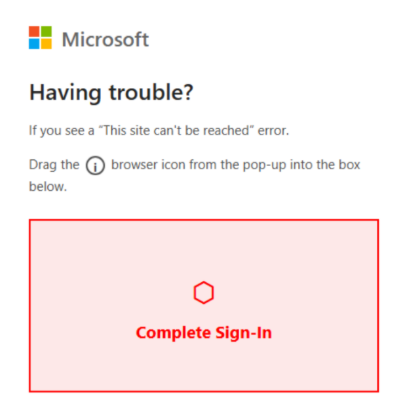
The victim is told to copy and paste, or drag and drop, the failed page’s full URL into the attacker’s site. If the exchange succeeds, the attacker can obtain access and refresh tokens and act within the permissions available to the application and user.
If the victim already has an authenticated Microsoft session, they may not need to enter a password or complete a new multifactor authentication challenge. ConsentFix does not break MFA. It abuses an authorization process the user has already authenticated.
How a ConsentFix attack unfolds
A typical attack follows five stages:
- The user reaches a compromised or attacker-controlled site, often through phishing, malicious advertising, or poisoned search results.
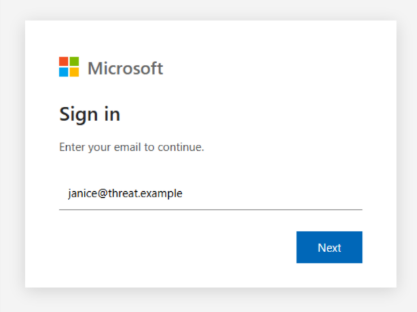
- A fake CAPTCHA or verification prompt directs the user to a legitimate Microsoft authorization page.
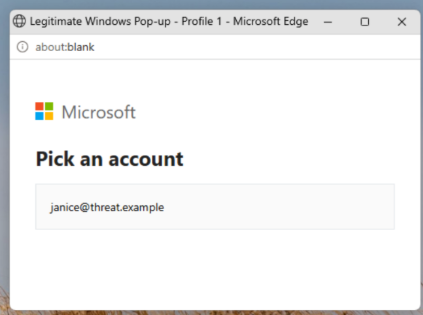
- The OAuth flow redirects the browser to a localhost URL containing a short-lived authorization code.
- The attacker persuades the user to transfer the full URL back to the malicious site.
- The attacker redeems the code and attempts to use the resulting tokens from attacker-controlled infrastructure.
The initial compromise can be browser-native, leaving no suspicious executable or malware file for endpoint security to inspect.
What is ClickFix?
ClickFix also uses a fake problem and user-assisted “fix.” A malicious site may claim that a CAPTCHA failed or a browser needs updating, then instruct the user to run a command through the Windows Run dialog, PowerShell, Terminal, or another trusted tool.
The command can download malware, launch a script, steal credentials, or abuse legitimate operating system utilities. Some chains operate partly in memory, but endpoint execution remains the defining action.
ConsentFix vs. ClickFix: The key differences
The techniques can converge: ClickFix may steal browser tokens, while ConsentFix may enable further intrusion. The distinction describes the initial path, not the attack’s final limit.
How to reduce the risk of ConsentFix and ClickFix techniques
Defenders should match controls to the action an attacker is trying to induce.
For ConsentFix, review which OAuth applications users can access and which permissions they receive. Where appropriate, manage relevant first-party applications as enterprise applications, restrict assignment to approved users, and test changes before enforcement.
Blocking device-code authentication alone should not be treated as a solution. The campaign documented by Push Security used an authorization-code flow. Controls must address the applications, users, devices, and token use involved in the actual path.
Monitor identity and cloud logs for unusual application IDs, unfamiliar infrastructure, and anomalous token use. If compromise is suspected, revoke sessions and refresh tokens, review affected activity and investigate other access paths.
User guidance should be specific. Legitimate verification should not require user to copy or drag links into another website.
For ClickFix, deny-by-default application control can prevent unapproved payloads, scripts, and libraries from running. Application containment can restrict what approved tools such as PowerShell may launch, access, or contact. Web filtering reduces exposure, while detection identifies activity preventive policies do not cover.
How ThreatLocker can help limit the attack paths
ThreatLocker controls can support different stages of these attacks without treating them as identical.
For ClickFix, Application Allowlisting can deny unapproved software, scripts, and libraries by default, while Ringfencing can limit how trusted applications interact with other processes, files, and the internet.
ConsentFix requires greater emphasis on cloud access. ThreatLocker Zero Trust Cloud Access routes designated SaaS access through a secure broker and validates the device, pathway, policy, and request. A token replayed from an unapproved device or attacker-controlled path can therefore be denied, even when the token itself appears valid.
These controls should complement Microsoft Entra configuration, browser and identity telemetry, user education, and incident response. No single control covers every variation. The objective is to prevent a deceptive prompt from becoming an unrestricted action.
Frequently asked questions
Is ConsentFix a type of ClickFix attack?
ConsentFix borrows ClickFix’s fake-verification pattern, but the action differs. ClickFix prompts endpoint command execution while ConsentFix prompts the transfer of an OAuth authorization code.
Does ConsentFix bypass MFA?
ConsentFix does not defeat MFA. It can exploit an authenticated session, so the victim may not see a new password or MFA prompt. Conditional Access and device-based restrictions remain important.
Does ConsentFix install malware?
The initial technique does not require malware. What happens afterward depends on the permissions and resources available through the compromised account.
What should a user do after a suspected ConsentFix attack?
Report it immediately. Revoke sessions and refresh tokens, review OAuth and sign-in logs, examine account activity, and remove unauthorized access. Credential resets may also be appropriate.