NightmareEclipse releases Windows zero-day on Patch Tuesday
Microsoft’s July 2026 Patch Tuesday, which addressed more than 600 CVEs, was quickly followed by the latest exploit from NightmareEclipse, known as LegacyHive.
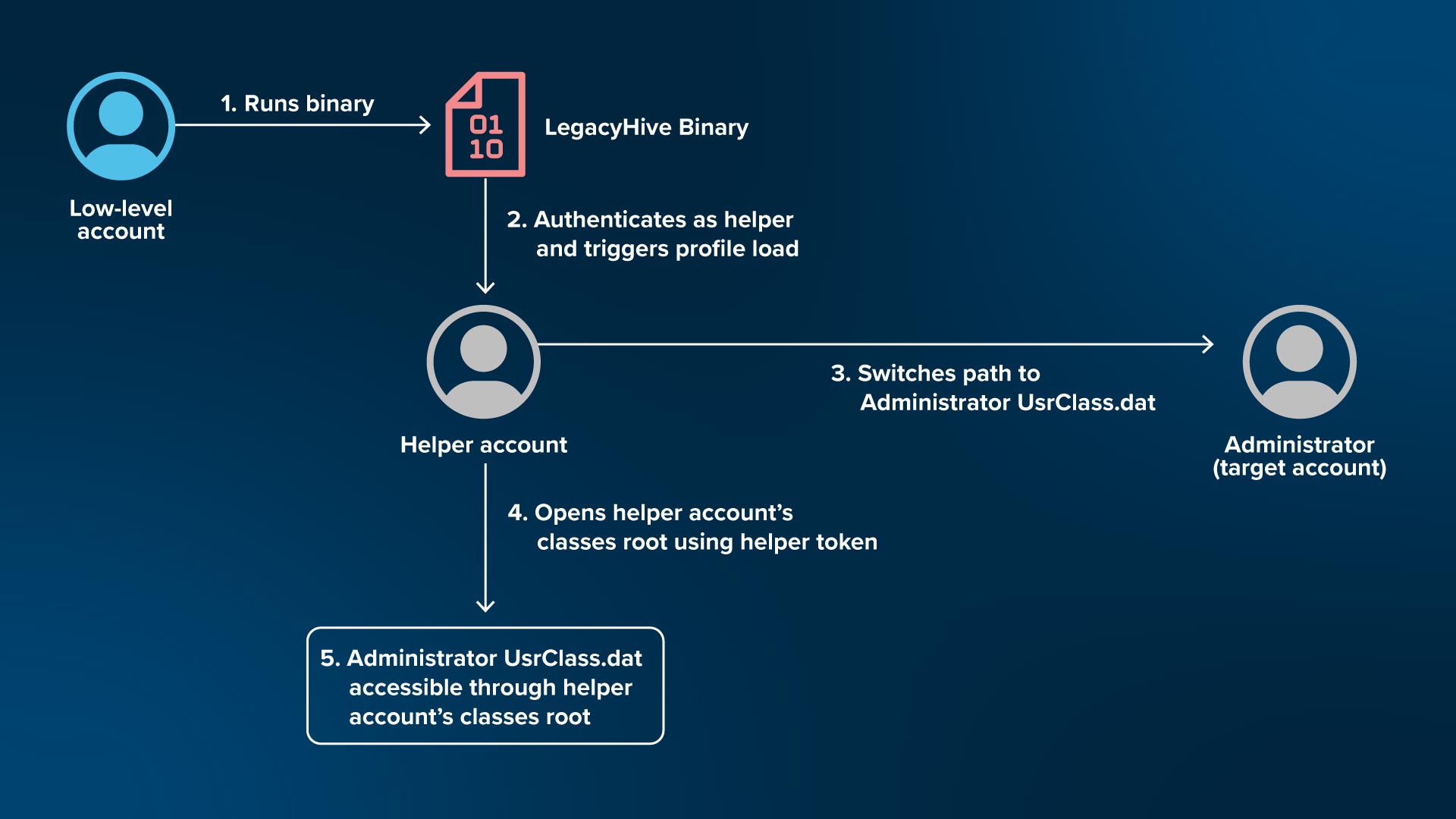
This proof-of-concept (PoC) mounts a target user’s UsrClass.dat hive with read access into another user account, which provides a wide range of application data, Windows Explorer history, and forensic artifacts. Although this hive does not provide password hashes or data that can be directly abused, NightmareEclipse addressed that changes to the posted PoC would allow other hives to be mounted.
The PoC itself exposes the vulnerability that is present in all fully patched desktop and server installations after Patch Tuesday.
One of the CVEs Microsoft patched is RoguePlanet, the privilege escalation flaw exposed by NightmareEclipse in June.
LegacyHive code analysis
The exploit, while it is incomplete in the current state and requires additional steps to compile, starts by taking three arguments <Helper Account><Helper Account Password><Target User>.
A temporary directory named with a randomly generated GUID is generated under C:\ and used for staging. This directory is created with a permissive DACL that grants GENERIC_ALL permissions to Everyone and is used to store the files ntuser.dat and UsrClass.dat. The ntuser.dat file is a temporary modified copy of the secondary helper user’s ntuser.dat file. The UsrClass.dat file is the helper user’s own copy and is used as a controlled decoy hive to trigger an oplock.
Windows APIs NtCreateSymbolicLinkObject and NtCreateDirectoryObjectEx are resolved from ntdll.dll and are used to create Object Manager directory objects \\.\GlobalRoot\BaseNamedObjects\Restricted\{GUID} and \\.\GlobalRoot\BaseNamedObjects\Restricted\Microsoft. The created Microsoft directory contains a Windows symbolic link which points to the temporary GUID staging directory. This means that when a path attempts to resolve to \\.\GlobalRoot\BaseNamedObjects\Restricted\Microsoft\Windows, it will continue path resolution within C:\<GUID>.
The GUID directory object acts as a shadow directory and contains another Windows symbolic link pointing to the target user’s real Windows profile directory, which contains their UsrClass.dat hive. Because Microsoft shadows the GUID directory, if the primary path that points to C:\<GUID> is not found, the shadow directory will be used to resolve instead.
Next, the binary authenticates as the provided secondary user account, and the resulting token is impersonated, switching context to the second user account. The secondary user’s ntuser.dat is read, and the content is loaded into memory to retain an intact copy of the file before any edits.
The Offline Registry Library is used to modify the following registry key HKCU\Software\Microsoft\Windows\CurrentVersion\Explorer\User Shell Folders, specifically Local AppData, to contain the value \\.\GlobalRoot\BaseNamedObjects\Restricted.
The GLOBALROOT device exposes the root of the NT Object Manager through a Win32 path, and when Windows attempts to construct the hive path %LOCALAPPDATA%\Microsoft\Windows\UsrClass.dat, it instead results in the path \\.\GlobalRoot\BaseNamedObjects\Restricted\Microsoft\Windows\UsrClass.dat. Due to the previously created directories, resolving UsrClass.dat would now point to C:\<GUID>\UsrClass.dat.
With the hive modified, it is saved to the GUID staging directory as ntuser.dat, and then used to overwrite the original copy, C:\Users\<secondary account>\ntuser.dat. The secondary user’s legitimate UsrClass.dat file is copied to the GUID staging directory, which is now where the changed ntuser.dat will point to.
Once the secondary user’s staging files and directories are ready, an oplock is placed on the decoy hive C:\<GUID>\UsrClass.dat. This oplock pauses the loading of the expected hive to allow paths to be switched.
Finally, the exploit is triggered through the CreateProcessWithLogonW function. The dwLogonFlag is set to LOGON_WITH_PROFILE which requests that the secondary user’s registry hives are loaded into the established logon context. This would be normal behavior considering the user’s password is provided, but attempting to load UsrClass.dat follows the symbolic links defined above. The modified ntuser.dat points to \\.\GlobalRoot\BaseNamedObjects\Restricted\Microsoft\Windows\, which causes path resolution to resolve to C:\<GUID>\UsrClass.dat.
Accessing C:\<GUID>\UsrClass.dat triggers the previously created oplock which pauses the hive loading process and closes the handle to that path, removing the symbolic link. The remaining shadow path points to the target user’s hive: C:\Users\<target>\AppData\Local\Microsoft\Windows\UsrClass.dat. The oplock is then released to allow the mounting process to continue, which resolves through the wrong path. Since the path resolution succeeds and the filename is found, the target user’s UsrClass.dat file is mounted with no objection.
LegacyHive highlights increase in vulnerabilities of fully patched Windows versions
As addressed in the project README, the final impact of this IOC is not immediately exploitable and does not directly reveal password hashes or allow privileged code execution in itself, but it does highlight the vulnerability clearly: Path resolution through Object Manager can be abused to load administrator hives as a non-privileged user.
Significant modification would be required to turn this PoC into a complete abusable exploit. Considering the researcher’s past warnings about this Patch Tuesday, this project differs from the promises of “shattered bones” but does continue to demonstrate a growing number of vulnerabilities in fully patched versions of Windows.
Mitigations
Mitigation efforts should focus on strong correlation attributes occurring within a short period of time. The PoC deliberately restores the original hive and deletes the temporary artifacts during cleanup. An absence of visible changes on a system after execution doesn’t mean execution never occurred.
Monitor C:\Users\*\ntuser.dat and C:\Users\*\AppData\Local\Microsoft\Windows\UsrClass.dat for suspicious activity, such as:
- A standard-user process writes to another user’s hive.
- A process other than normal Windows profile components replacing
ntuser.dat. UsrClass.datis copied outside the user-profile directory.- Hive files created in
C:\, %TEMP%, %ProgramData%,or other unexpected locations. - A hive being replaced and restored within seconds.
Additional defense in depths strategies should include protecting profile hives by applying narrow scopes for auditing purposes to C:\Users\*\ntuser.dat and C:\Users\*\AppData\Local\Microsoft\Windows\UsrClass.dat
These additional auditing mechanisms serve to monitor:
- Write data
- Delete
- Change in/of permissions
- Change ownership
- File replacement
- Cross-user access
IOCs
Notable Strings
- Software\Microsoft\Windows\CurrentVersion\Explorer\User Shell Folders
- \\\\.\\globalroot\\BaseNamedObjects\\Restricted
- \BaseNamedObjects\Restricted\Microsoft
- “Hive loaded, press any key to unload and exit.”
- “oplock triggered !’
Suspicious/Abnormal Win32 API function calls
- NtCreateDirectoryObjectEx
- NtCreateSymbolicLinkObject
- CreateProcessWithLogonW
- LogonUser
- ImpersonateLoggedOnUser
- RegOpenUserClassesRoot
- OROpenHiveByHandle
- OROpenKey
- ORSetValue
- ORSaveHive
Event IDs
- 4648: Explicit credentials used
- Identify the alternate account and source process
- 4624: Successful logon
- Correlate the new logon session
- 4688: Process creation
- Identify parent, child, user and command line
- 4663: Object access
- Detect profile-hive reads, writes or deletion when SACLs are configured
- 4657: Registry value modified
- May detect live variants, but not necessarily this offline edit
Notable Files
- C:\xxxxxxxx-xxxx-xxxx-xxxx-xxxxxxxxxxxx\
- A folder will be created with the GUID.
ThreatLocker Detect Policy
- TL.EV.1827 - Detection of Malware (Defender: LegacyHive)

ABOUT THE AUTHOR
The ThreatLocker Threat Intelligence Team researches active cyberthreats and emerging exploits to understand how attacks work, the paths they take, and their potential impact. The team provides technical analysis and practical mitigation guidance to help organizations reduce risk and strengthen their defenses.