Nightmare Eclipse drops zero-day that allows BitLocker bypass
GreatXML is another zero-day exploit that Nightmare Eclipse dropped on June 10, 2026, right after Patch Tuesday. This exploit primarily allows attackers with administrator access to a machine to bypass BitLocker without encountering a BitLocker prompt because of how the Windows Recovery Environment interacts with the main system.
GreatXML is the second zero-day released by Nightmare Eclipse, also known as Chaotic Eclipse, following the June Patch Tuesday. Released on June 9, 2026, RoguePlanet abuses Windows Defender functionality to allow SYSTEM level access on Windows 10 and Windows 11 machines. Other recent releases by Nightmare Eclipse include YellowKey, GreenPlasma, and BlueHammer.
Windows Background
BitLocker
The goal of BitLocker is to protect the disk from simple offline attacks. If an attacker removes the drive or boots into a separate operating system, the protected volume should remain inaccessible.
Windows Recovery Environment
Windows Recovery Environment is based on the Windows Preinstallation Environment. This is a minimal Windows runtime used for setup, deployment, recovery, and repair operations. The most common use of this environment is to install or repair the main Windows partition, or to run an offline scan of the machine with Microsoft Defender.
Windows Setup answer files
The Windows Setup answer file is used to customize Windows during installation. It is normally used by administrators and OEMs to automate Windows installation or deployment. Some tasks that answer files can perform include creating a user, setting up partitions and languages, and running commands using RunSynchronous or RunAsynchronous tasks.
The important thing to keep in mind is that RunSynchronous and RunAsynchronous tasks run in a system-level context.
Microsoft Defender Offline scan
Microsoft Defender Offline is designed to run from the Windows Recovery Environment outside the normal Windows OS. Its purpose is to inspect malware that may be hidden in the main operating system.
How GreatXML abuses Windows components
At a high level, GreatXML abuses how these four Windows components interact with each other:
- BitLocker
- Windows Recovery Environment
- Microsoft Defender Offline Scan
- Windows Setup answer-file automation
The result is a recovery-mode execution path that allows an attacker to use a Windows Unattend file to spawn a terminal as System in the WinPE/WinRE context while the protected Windows volume is reachable.
Great XML proof-of-concept
Technical analysis
The overall attack is simple.
Defender's offline scan must scan the main partition for malware. It needs to run in the trusted WinRE, where the main partition is reachable despite BitLocker. Since WinRE is also used during Windows installation, it enables Windows Setup answer file automation.
In short, Defender's offline scan can run Windows automation files.
Replication of the exploit requires attackers with administrator-level privileges to mount the WinRE partition from the main disk. Once the WinRE partition is mounted, the attacker writes the "unattend.xml” file to the root directory and the "ReAgent.xml" file to the Recovery directory.
The last step is to run an offline scan with Microsoft Defender, which causes the machine to reboot. Once Defender's offline scan starts, a CMD terminal will spawn.
Unattend.xml
Nightmare Eclipse's unattend.xml file is a modified version of a script from the https://schneegans.de/windows/unattend-generator/ website.
During ThreatLocker's replication, Nightmare Eclipse's script should have created a local administrator account and read an unattend.xml file from the C drive, but this never happened. It was determined that once the CMD terminal spawns, it stops the rest of the script from running. The following shows how CMD spawns.
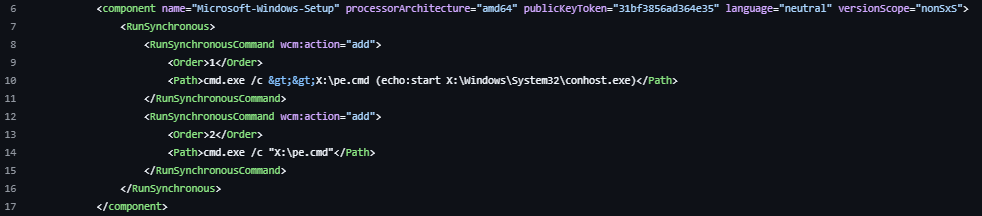
This block uses a RunSynchronous task, which runs the following commands in the order they appear. Order 1 creates a file called "pe.cmd", which starts “conhost.exe" from the X drive (WinRE partition). Order 2 runs the "pe.cmd" file, which provides an interactive system-level shell. Everything after this code block will not run.
How to detect GreatXML
To detect this exploit, organizations can look for the following IOCs:
- Monitor attempts to mount the recovery partition using tools like DiskPart.
- Monitor when "unattend.xml" is created, moved, or written to the root directory of a mounted drive.
- Monitor when "ReAgent.xml" is created, moved, or written to the ":/Recovery/WindowsRE/" directory of a mounted drive.
- Monitor for Event ID 2030 in Microsoft-Windows-Windows Defender/Operational (Defender offline scan was scheduled for the next reboot).
The researcher stated this exploit discovery was accidental and that anyone who has attempted to use Windows Defender Offline Scan could be automatically vulnerable to BitLocker bypass.
ThreatLocker Detect features the following policies in Community
- TL.SC.1780 - Suspicious "unattend.xml" File Creation
- TL.EV.1782 - Scheduled Defender Offline Scan
- TL.EV.1783 - Detection of Malware (Defender: GreatXML)
- TL.PM.1779 - Potential GreatXML Exploit

ABOUT THE AUTHOR
Rayton Li, threat specialist at ThreatLocker, combines hands-on technical expertise with a background in enterprise IT and cybersecurity operations. Before joining ThreatLocker, he worked in IT support at KPMG and as an electrician, developing a practical, systems-level understanding of technology. His work centers on threat analysis, physical red teaming, and incident response, disciplines he approaches with precision, curiosity, and a commitment to helping customers stay secure. At ThreatLocker, Rayton focuses on threat hunting and adversary research, turning technical insight into actionable defense.