Microsoft SharePoint is under attack again.
Multiple deserialization and authentication flaws in on-premises SharePoint Server are under active exploitation, and the immediate guidance is familiar: Patch now and restrict access to trusted devices.
Both steps are correct, but neither tells you what to do if an attacker was already inside before the patch landed.
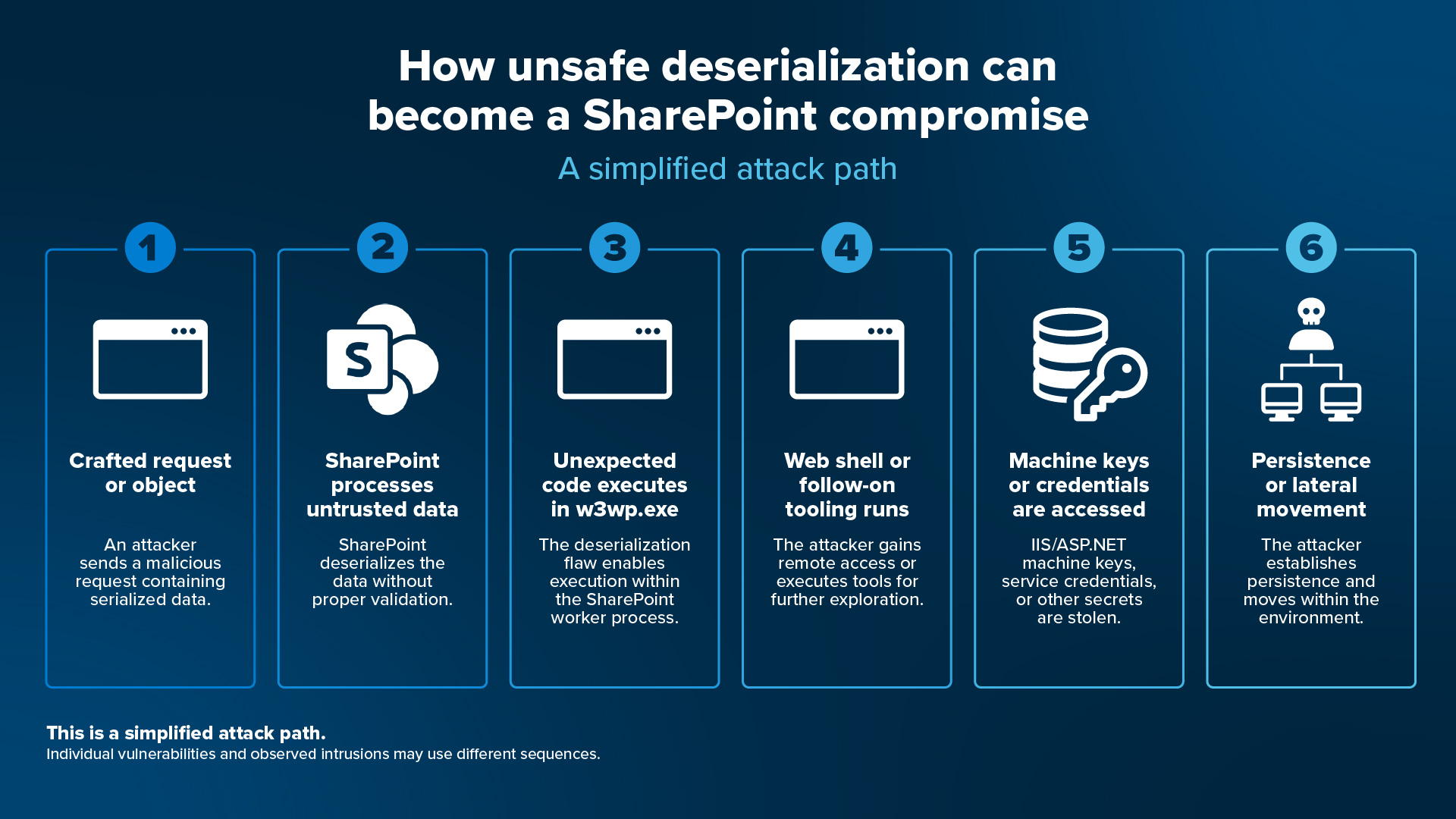
That is the trap in this class of attack. The exploit gets code running in the SharePoint process, but the server may only be the entry point. Attackers can target IIS and ASP.NET machine keys, then use stolen key material to forge authentication and application-state data the server accepts as legitimate. Patching closes the vulnerability, but it does not invalidate keys that were already taken. The door is locked again, but the attacker may still have a key.
For any internet-facing SharePoint farm that remained unpatched during the exploitation window, “Have you patched?” is no longer the only question. A better one is, “Were they already in, and what did they take?” This becomes a hunt-and-contain problem, not merely a patching problem, and it is where much of the published guidance stops.
What follows is the response sequence. Scope your exposure, contain suspected servers without destroying evidence, hunt for what exploitation leaves behind, evict the foothold, and only then patch, rotate keys, harden, and monitor.
SharePoint vulnerabilities exploited: What we know
In mid-July 2026, CISA warned that multiple vulnerabilities in on-premises SharePoint Server were under active exploitation and added several to its Known Exploited Vulnerabilities catalog with federal patch deadlines. Microsoft's fixes landed in stages: an out-of-band update in May, a June fix that was inadvertently left off that month's patch cycle, and the July Patch Tuesday updates.
This is best understood as a cluster of vulnerabilities rather than a single bug. CISA's KEV additions tell the story: April 14, July 1, July 14, July 16. The flaws can play different roles in a compromise:
Entry: CVE-2026-56164, a missing-authentication elevation-of-privilege flaw, and the newest addition to the exploited set.
Code execution: the deserialization RCEs, CVE-2026-45659, plus CVE-2026-58644 and CVE-2026-50522, which turn access into execution.
Supporting: CVE-2026-32201, an input-validation spoofing flaw, the quiet enabler.
What matters more than any single CVE is what an attacker can reach after exploitation. IIS and ASP.NET machine keys can be used to forge authentication and application-state material the server trusts, which is why persistence may outlive the patch.
Microsoft documented this same key-theft-and-persistence pattern during last July's SharePoint attacks, including the need to rotate keys after patching. A year later, the pattern is back.
The resemblance to July 2025's ToolShell campaign is real. Both target internet-facing SharePoint servers, and both can lead to machine-key theft and persistent access. It should not, however, be treated as the same campaign.
Public reporting has not established that the actors identified in 2025 are responsible for this activity. The pattern repeats, but the attribution does not carry over.
Why a "Medium" flaw slipped past your queue
Microsoft assigned CVE-2026-56164 a CVSS score of 5.3, Medium, while NVD scored it 9.8, Critical. That gap matters because patch queues often begin with a severity filter.
A network-reachable, actively exploited flaw carrying a Medium label can be deprioritized. Once a vulnerability appears in CISA’s Known Exploited Vulnerabilities catalog, active exploitation should outweigh the original score.
The public record is clear on the points that matter operationally. Multiple SharePoint vulnerabilities are being actively exploited, security updates are available, and internet-facing servers exposed during the exploitation window may require incident response, rather than patching alone.
What remains less clear is whether every observed compromise used the same sequence, which vulnerability was responsible for each intrusion, and how widely the activity has spread.
If a farm was internet-facing and unpatched during the exploitation window, patching answers only whether the original path is now closed. It does not tell you whether the server was already compromised, what an attacker accessed, or whether persistence remains.
Hunt and contain: The playbook
Much of the current information stops at "patch and restrict access." Equally important is an actual incident-response sequence for a farm that may already be compromised.
Here is the response sequence:
Step 1: Scope your exposure
Inventory on-premises SharePoint farms, versions, and build numbers against the patched builds; identify which were internet-facing and unpatched during the exploitation window. The output is a triage list. Note which servers are "assume breached" versus "patch and monitor."
Step 2: Contain without destroying evidence
Restrict inbound access, unnecessary outbound traffic, and east-west communication from suspect servers, but do not wipe or reimage first. Preserve IIS logs, SharePoint ULS logs, and memory. Isolation is not eradication, and reimaging before you have collected evidence throws away the answer to "what did they take?"
Step 3: Hunt for what exploitation leaves behind
This is the heart of the effort, and the part that guidance often skips. Search for the following artifacts:
- Suspicious POST requests in IIS logs to SharePoint endpoints, especially _layouts paths, with unusual length, encoding, referrers, or user-agents.
- New or modified .aspx files in the LAYOUTS and web root directories (web shells).
- w3wp.exe spawning child processes such as cmd.exe or powershell.exe, which is almost never legitimate.
- Signs of machine-key access or ViewState abuse and reads of web.config.
- Machine-key harvester tools, scripts staged to capture newly generated keys the moment rotation occurs.
- Persistence mechanisms, including new scheduled tasks, services, Registry Run keys, local or domain accounts, and GPO changes.
- Credential access and pivot signals: LSASS access, service-account and farm-account use, and outbound or lateral SMB, RDP, or WinRM from the SharePoint box.
Step 4: Evict the foothold
Remove web shells and other persistence, investigate the identities and adjacent systems the server could reach, and determine whether lateral movement has already occurred. You cannot safely proceed to key rotation until you believe the attacker is out.
Step 5: Patch and complete the update workflow
Install the cumulative updates and note that installing the binary is not necessarily the end of a SharePoint update. The configuration and upgrade step must complete. Patching closes the vulnerability, but it does not invalidate stolen keys.
Step 6: Rotate machine keys
Rotate the ASP.NET machine keys and restart IIS, in that order, so rotation takes effect. This must come after eviction, because rotating keys while an intruder still has a foothold just gives them a fresh key to steal. CISA's own guidance is to hunt and remediate first, rotate second.
Step 7: Harden and monitor
Verify that AMSI is functioning on every SharePoint server. For supported SharePoint Server Subscription Edition builds, enable Full request-body scanning. SharePoint Server 2016 and 2019 support AMSI integration but not the newer request-body scanning modes.
How ThreatLocker reduces what a compromised SharePoint server can do next
Mapped to the stages above, these ThreatLocker capabilities turn the sequence from something you follow into something you enforce.
Each control answers one of those paths:
Application Allowlisting denies the web shells and follow-on tooling that Step 3 hunts for. Code that was never approved does not run, even inside the SharePoint worker process. That includes the follow-on tools and scripts an intruder stages after the shell, not just the shell itself.
Ringfencing limits what approved SharePoint processes may launch, access, or contact. Properly configured policies can prevent w3wp.exe from spawning shells, reaching sensitive files, or communicating with unapproved destinations.
Privileged Access Management keeps a compromised service account from inheriting broad administrative rights. It reduces standing local administrator rights and limits opportunities to abuse administrative credentials.
Zero Trust Network Access restricts which users and devices can reach a server. Limit access to on-premises SharePoint to ThreatLocker-secured and other explicitly approved devices. Endpoint Firewall limits inbound, outbound, and east-west connections, reducing how far an exploited server can move through the environment.
ThreatLocker Threat Intelligence guidance centers that last control, restricting access at the door while the other controls decide what happens once the door is already open.
One compromised application should not become a system-wide incident
A vulnerable application should not have an unrestricted path to execute new payloads, reach credentials, call out, or move through the network.
Zero Trust does not eliminate the vulnerability or replace patching and incident response. Instead, it changes the blast radius.
When access and application behavior are constrained by default, a compromised process has fewer opportunities to launch follow-on tools, reach sensitive systems, or move laterally while defenders investigate and contain the intrusion.
The application may still be compromised, but the goal is to prevent that foothold from becoming a broader incident and give responders a better chance to contain the damage before attackers can expand their reach.

ABOUT THE AUTHOR
The ThreatLocker Special Projects Engineering (SPE) Team is on the front line of cybersecurity, continuously researching, testing, and executing leading-edge work. The team investigates emerging threats and attack vectors, including how zero-day attacks work and how they can be stopped. Their work translates technical research into practical insights for both ThreatLocker product development, and the broader security community. Grounded in a Zero Trust approach, SPE combines rapid execution with a focus on real-world implementation.