Attackers use DigiCert customer support chat to deliver malicious ZIP files
Attackers recently compromised DigiCert’s support channel and delivered a malicious payload disguised as a screenshot. The malware infected two entry points, both of which had malfunctioning security solutions running at the time.
Because DigiCert’s authenticated support analysts can proxy into customer accounts, attackers eventually obtained EV Code Signing certificates. DigiCert revoked 60 total code signing certificates within 24 hours of discovery.
Shortly afterward, Microsoft Defender mistakenly classified legitimate DigiCert root certificates as malware triggering widespread false positives and, in some instances, removing the certificates from Windows systems entirely.
In this article, the ThreatLocker Threat Intelligence team analyzes the breach and consequences.
How the DigiCert compromise happened
The incident occurred on April 2, 2026, and resulted in 60 code signing certificates being revoked.
Attackers attempted to deliver the malicious ZIP files posing as customer screenshots to DigiCert's support team through their customer chat channel.
After multiple delivery attempts, "ENDPOINT1" and "ENDPOINT2" had the malicious ZIP files successfully delivered to them. While "ENDPOINT1" had the files quarantined, "ENDPOINT2" did not due to a faulty EDR deployment. This granted the threat actor the initialization codes for approved and pending EV code signing certificates.
Multiple techniques chained together for this attack chain to occur, with initial access being attributed to the social engineering of customer facing support channels.
The customer support communication channel had insufficient file transfer restrictions. The ZIP file sent to support had a malicious Windows screensaver file within it.
This file enabled the attackers to directly deliver the malicious files to authorized users with privileged access. As mentioned before, a misconfigured EDR tool created a detection gap on one of the endpoints allowing the attackers time to exploit privileged access to DigiCert's internal support portal. Through this portal, the attacker was able to view unmasked initialization codes for pending Code Signing certificate orders.
With the acquired information, the threat actors were able to generate 27 certificates. Of these certificates, 11 were reported by community members, and 16 were identified through the incident investigation.
During the investigation, 33 additional certificates were identified with no explicit confirmation of them being under control of the customer.
As a precautionary measure, all 60 certificates were revoked.
Microsoft Defender triggers false positive alerts
On May 3 at 12:11 p.m. EDT, Microsoft XDR users were notified of issue ID DZ1299600 detailing the false positive alerts that Defender was triggering for specific certificates. The false positive alerts resulted in quarantining files and certificates related to DigiCert with a malware classification string of Trojan:Win32/Cerdigent.A!dha.
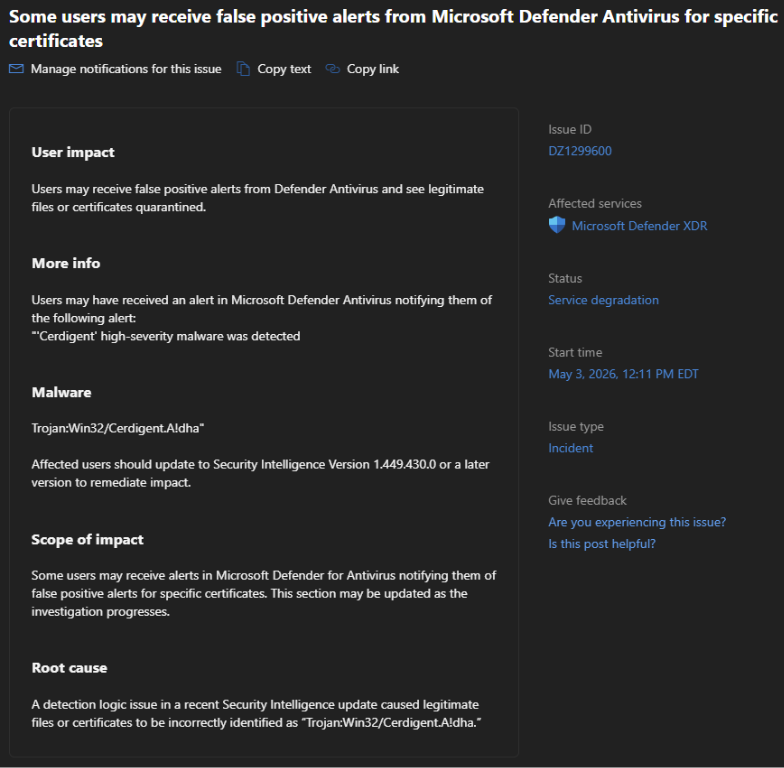
Microsoft’s security intelligence update Version 1.449.377.0, published on April 30, contained security definitions that were incorrectly flagging legitimate DigiCert certificates and files. Microsoft published a new security intelligence update on May 3, 1.449.431.0, and affected users should perform manual updates to prevent further false positives.
The two primary ways to accomplish the XDR defender updates are automatic updates and manual updates. Automatic updates are allowed as long as the endpoint has access to continuous Windows Updates, and manual updates can be performed by navigating to the following path:
Windows Security > Virus and threat protection > Protection updates > Check for Updates
Microsoft responds to false positives
A direct link between these two events was made by Microsoft through a direct quote to Bleeping Computer. This link was not made through a public official disclosure, but it states that false positives on DigiCert root certificates were a direct result from the recent DigiCert incident.
After publishing this article, Microsoft confirmed that the false positives were linked to detections for compromised certificates from a recent DigiCert breach.
"Following reports of compromised certificates Microsoft Defender immediately added detections for malware in our Defender Antivirus Software to help keep customers protected. Earlier today we determined false positive alerts were mistakenly triggered and updated the alert logic," Microsoft told BleepingComputer.
"Microsoft Defender suppressed and cleaned up the alerts for customer environments. Customers should update to Security Intelligence version 1.449.430.0 or later, but do not need to take additional action for these alerts. We have notified affected organizations and recommend administrators look for more details in the service health dashboard (SHD) within the M365 admin center."
In the case of a confirmed incident, Microsoft placed priority on quick and comprehensive protection of their users. Despite these protections, this is a standard case of overcorrection across Windows machines which lasted between when their “Cerdigent” detection was published on April 30, 2026, and when Security Intelligence update 1.449.431.0 was released on May 3, 2026.
Within the three days that this false detection remained, Defender continuously detected and remediated these certificates, heavily impacting SSL verification from HTTPS clients, code-signing validations, and API calls that depended on them.
How to prevent breaches like DigiCert in your environment
According to DigiCert, the attack eventually compromised two systems where the Endpoint Detection and Response (EDR) was either operating below the intended standard, or it wasn’t functioning at all.
EDR evolved from traditional antivirus to combat rapidly advancing malware techniques. While antivirus only looks for known virus signatures or hash digests, EDR combines that with behavior monitoring and shared telemetry to detect abnormal behavior that may indicate a threat.
In a Zero Trust environment, prevention takes precedence over detection.
Application Allowlisting blocks any unknown processes, scripts, and applications from executing, least privilege access is enforced to prevent privilege escalation, and application containment policies prevent apps from accessing data, launching other processes, or connecting to the internet.
A default-deny Zero Trust framework combined with EDR means the abnormal behavior is detected and assessed before it’s able to execute, and the threat is contained.